Bug in scaling vector lines: When I draw a simple vector line and scale using the handles while holding down shift the line expands unpredictably. The same behaviour happens when I try to expand with proportional scaling on.
I see what's happening. When I hit Q and scale a line, it is being scaled like a shape. That's a bit counterintuitive and unlike most apps. If I had to scale the line with the select tool, I have to zoom close in and use the right handles. Or I have to switch to vector select.
Neue Testversion 25.00b8
-
Vivi_Ram
- Mitglied
- Beiträge: 421
- Registriert: Sa 28 Sep 2024 17:04
-
der_fotograf

- Mitglied
- Beiträge: 672
- Registriert: Mo 05 Dez 2016 08:33
- Wohnort: North Germany
Re: Neue Testversion 25.00b8
A canvas is a canvas is a canvas. You can't print anything outside the canvas. A painter also has »only« one canvas. However, you can open a new, empty image or document in another window and place and use your »references« there.Vivi_Ram hat geschrieben: Di 12 Aug 2025 14:26 Writing to request a small enhancement to PL's zoom and pan feature and a shortcut to set line colour:
1. PL's zoom and pan feature. At the moment, it is impossible to pan out of the canvas if the user is fully zoomed in. This can be improved by allowing the user to pan outside the canvas even at deep zoom levels. This is because I routinely place my references outside the canvas and refer to them.
No, and I don't see a reason to add one, because in photos or images you won't see anything in an outline mode.Is there an view in outline mode function in PL?
Nur wenige wissen, wie viel man wissen muss, um zu wissen, wie wenig man weiss.
Only few know how much you have to know to know how little you know.
— Werner Heisenberg [German theoretical physicist]
Only few know how much you have to know to know how little you know.
— Werner Heisenberg [German theoretical physicist]
-
shijan

- Mitglied
- Beiträge: 2033
- Registriert: Mo 23 Dez 2019 15:21
- Wohnort: Ukraine
Re: Neue Testversion 25.00b8
I guess every user (including myself) asked this questionVivi_Ram hat geschrieben: Di 12 Aug 2025 14:26 1. PL's zoom and pan feature. At the moment, it is impossible to pan out of the canvas if the user is fully zoomed in. This can be improved by allowing the user to pan outside the canvas even at deep zoom levels. This is because I routinely place my references outside the canvas and refer to them. Also, in PL by default items outside the canvas are not rendered in full transparency. It would be useful to toggle this behaviour on and off like Affinity where shortcut "\" shows and hides items outside the canvas.

In Ps this setting named "Overscroll". In PhotoLine you can use: Preferences->Display->Document Set the Edge Width for both the Document Mode and Picture Mode to 1000%.
also i like to use: Preferences->Working->Mouse->Scroll image contents with mouse wheel uncheck it to enable zoom with scroll.
I wrote about this earlier here https://www.pl32.com/forum3/viewtopic.p ... 391#p48391 and agree that it is nice to have additional user setting to adjust transparency overlay outside document border when "View->Hide Border Content" disabled.
Currently it is possible only if set set Preferences->Display->Document->Color to Transparent. And optionally adjust Document Background Color in Document Attributes panel. But it is not a perfect solution because border content remain permanently visible.
Du hast keine ausreichende Berechtigung, um die Dateianhänge dieses Beitrags anzusehen.
PhotoLine UI Icons Customization Project: https://www.pl32.com/forum3/viewtopic.php?f=3&t=6302
-
shijan
- Mitglied
- Beiträge: 2033
- Registriert: Mo 23 Dez 2019 15:21
- Wohnort: Ukraine
Re: Neue Testversion 25.00b8
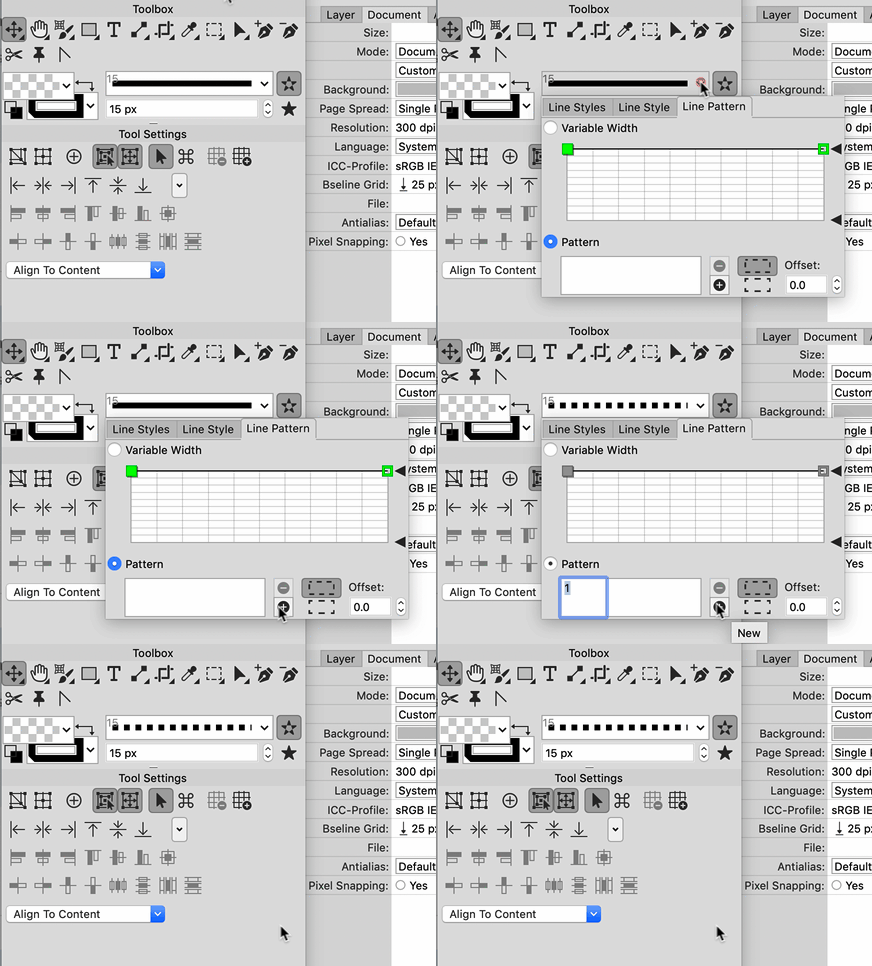
Yes, i can confirm this bug:Vivi_Ram hat geschrieben: Di 12 Aug 2025 14:26 3. Finally, there's a small non-crash bug in the line pattern window where if you set a dash pattern, the window closes immediately, instead of staying open so we can set more values.
PhotoLine UI Icons Customization Project: https://www.pl32.com/forum3/viewtopic.php?f=3&t=6302
-
Vivi_Ram
- Mitglied
- Beiträge: 421
- Registriert: Sa 28 Sep 2024 17:04
Re: Neue Testversion 25.00b8
Distorting vector group applies distortion to each layer separately - as opposed to applying the distortion as a whole. And two, once the distortion is applied, the file immediately causes a crash. Please could have a look at this.
And whilst working on this project I realised that changing colours for groups of vector objects is a laborious process. It can be improved in the following way. If I click a group of objects and click a colour swatch or pick a colour in the colour field, then there can be a prompt window showing all the colours in the group. I can then either select the colours that I want to replace or replace all. This is an excellent way to speed things up. Right now, if I had to change colours which are not document colours, I have to select objects within the group individually.
And whilst working on this project I realised that changing colours for groups of vector objects is a laborious process. It can be improved in the following way. If I click a group of objects and click a colour swatch or pick a colour in the colour field, then there can be a prompt window showing all the colours in the group. I can then either select the colours that I want to replace or replace all. This is an excellent way to speed things up. Right now, if I had to change colours which are not document colours, I have to select objects within the group individually.
Du hast keine ausreichende Berechtigung, um die Dateianhänge dieses Beitrags anzusehen.
-
Herbert123

- Mitglied
- Beiträge: 2455
- Registriert: Sa 12 Mai 2012 21:38
Re: Neue Testversion 25.00b8
I can confirm this. Crashes.Vivi_Ram hat geschrieben: Di 19 Aug 2025 10:18 Distorting vector group applies distortion to each layer separately - as opposed to applying the distortion as a whole. And two, once the distortion is applied, the file immediately causes a crash. Please could have a look at this.
/*---------------------------------------------*/
System: Win10 64bit - i7 [email protected], p6t Deluxe v1, 48gb (6x8gb RipjawsX), Nvidia GTX1080 8GB, Revodrive X2 240gb, e-mu 1820, 2XSamsung SA850 (2560*1440) and 1XHP2408H 1920*1200 portrait
System: Win10 64bit - i7 [email protected], p6t Deluxe v1, 48gb (6x8gb RipjawsX), Nvidia GTX1080 8GB, Revodrive X2 240gb, e-mu 1820, 2XSamsung SA850 (2560*1440) and 1XHP2408H 1920*1200 portrait
-
chessboard

- Mitglied
- Beiträge: 81
- Registriert: So 25 Feb 2018 19:26
- Wohnort: Nordseeküste
Re: Neue Testversion 25.00b8
Of course a painter has more than the one canvas. He has a deskttop or a wall where he can arrange reference objects or images.der_fotograf hat geschrieben: Do 14 Aug 2025 17:52 A canvas is a canvas is a canvas. You can't print anything outside the canvas. A painter also has »only« one canvas. However, you can open a new, empty image or document in another window and place and use your »references« there.
In the digital space, there is the space that forms the canvas, the part of the screen that is printed, and the space next to it, where there is room for parts and references. We no longer live in the last century - we work with computers, and refernce images are also mostly digital today. Therefore, we should use everything that makes our work easier. So there is no reason not to use the area outside the canvas for reference images. Unless you insist that the digital world should mirror the real world 1:1 and adapt to all its limitations.
Photoline has long been much more than just an image editing program. It offers a wide range of tools for vector graphics and layout design. In this area, it is extremely useful, if not essential, to be able to accurately identify the outer contours of design elements. I had also asked for this feature.der_fotograf hat geschrieben: Do 14 Aug 2025 17:52 No, and I don't see a reason to add one, because in photos or images you won't see anything in an outline mode.
It may be that a photographer will never need this feature. But photographers are not the only user group of Photoline.
The display in the viewport must be rendered in any case. Whether this is done with colors and all effects, or purely as layer frames or the outlines of vector shapes, is actually irrelevant. The outlines must be calculated in any case. As a photographer, you don't have to use this type of display if it's not useful to you.
In the end, we should let the developers decide whether they consider this feature useful and want to put in the work to implement it.