That's what I did to workaround it. I clipped a mesh to the shape. However, that does not explain why the shape is being distorted.shijan hat geschrieben: Mi 12 Nov 2025 14:44 I guess you expect too much from Mesh Gradient on so complex vector shapes. It is more logical to draw simple shape specially for mesh gradient and use main vector image as clipping mask for it.
Screen Shot 2025-11-12 at 2.41.58 PM.jpg
Neue Testversion 25.00b11
-
Vivi_Ram
- Mitglied
- Beiträge: 421
- Registriert: Sa 28 Sep 2024 17:04
Re: Neue Testversion 25.00b11
-
Vivi_Ram
- Mitglied
- Beiträge: 421
- Registriert: Sa 28 Sep 2024 17:04
[Crash Report]: Text on path with shapes
I am trying to run text on path, but instead of text, I dropped a vector shape into the text layer and then ran the text on a circle. Until this point it works perfectly. The vector shape is run on the circle. But now select the same text layer and turn it into a dynamic layer, it produces an instant crash.
Steps to reproduce crash:
1. Take a vector object like a square or circle and drop it into text layer.
2. Run the text layer on path.
3. Turn the same text layer into a dynamic text layer in the tool settings. >> Crash.
Also, question: Why are we not able to make vector objects repeat when run on path like we can with text. It would be good to add this as an option. It's a small workaround for the lack of morph along path, by the way.
Steps to reproduce crash:
1. Take a vector object like a square or circle and drop it into text layer.
2. Run the text layer on path.
3. Turn the same text layer into a dynamic text layer in the tool settings. >> Crash.
Also, question: Why are we not able to make vector objects repeat when run on path like we can with text. It would be good to add this as an option. It's a small workaround for the lack of morph along path, by the way.
-
Vivi_Ram
- Mitglied
- Beiträge: 421
- Registriert: Sa 28 Sep 2024 17:04
Bug(?): 3D Body on Text produces strange artefacts
Applying 3D Body on Text produces strange artefacts. When you zoom in and out, the shapes render differently. Outlines when you zoom in close. And solid objects + overlapping text when you zoom out. Is this a bug?
-
Herbert123

- Mitglied
- Beiträge: 2455
- Registriert: Sa 12 Mai 2012 21:38
Re: Neue Testversion 25.00b11
? I have three vector layers each with a line that cross to define a curvy triangle. (Same as your example).Vivi_Ram hat geschrieben: Mi 12 Nov 2025 11:29 Yes, but in PL, it only works if the lines are raster layers. You cannot do a flood fill directly on a vector layer. In the GIF I have added to my previous response, the lines are vector. That's what I mean. And the resulting curve is sharp because there's no anti-aliasing. There are three nodes. One for each corner.
See below: layer.jpg
I then select the background layer (or any image layer), activate the flood fill with All Layers as the source, Overfill and Create Vector Layer checked.
Fills the shape as defined with those three lines.
It's not that much work, but I do agree the fill tool ought to be available when a vector layer is selected. It is counter-intuitive when the user needs to select a bitmap layer or even is forced to create a new bitmap layer before the fill tool becomes available for vector layers.
/*---------------------------------------------*/
System: Win10 64bit - i7 [email protected], p6t Deluxe v1, 48gb (6x8gb RipjawsX), Nvidia GTX1080 8GB, Revodrive X2 240gb, e-mu 1820, 2XSamsung SA850 (2560*1440) and 1XHP2408H 1920*1200 portrait
System: Win10 64bit - i7 [email protected], p6t Deluxe v1, 48gb (6x8gb RipjawsX), Nvidia GTX1080 8GB, Revodrive X2 240gb, e-mu 1820, 2XSamsung SA850 (2560*1440) and 1XHP2408H 1920*1200 portrait
-
Vivi_Ram
- Mitglied
- Beiträge: 421
- Registriert: Sa 28 Sep 2024 17:04
Re: Neue Testversion 25.00b11
Okay, I can see what you mean. But like you say, there's no reason why flood fill shouldn't be available with vector layers active. I agree.
However, even with your solution, we still have the problem of enormous number of nodes. This can be vastly improved.
However, even with your solution, we still have the problem of enormous number of nodes. This can be vastly improved.
Du hast keine ausreichende Berechtigung, um die Dateianhänge dieses Beitrags anzusehen.
-
Vivi_Ram
- Mitglied
- Beiträge: 421
- Registriert: Sa 28 Sep 2024 17:04
Re: Neue Testversion 25.00b11
Here's another workflow challenge I face:
All filters/adjustments applied to vector shapes are clipped just to the initial bounds of the object. In order to avoid this, I have to manually select the mask, unlock the mask position and scale it. This should be automatic. The problem becomes apparent when you expand the bounds of the shape beyond the mask: The filter/adjustment is not applied to whatever is beyond the shape.
In the image above, I've applied a gaussian blur to the shape, and as you can see, the blur is clipped to the initial bounds of the shape. Then, I pulled the node outside the limits of the mask, and the blur does not apply to this portion.
All filters/adjustments applied to vector shapes are clipped just to the initial bounds of the object. In order to avoid this, I have to manually select the mask, unlock the mask position and scale it. This should be automatic. The problem becomes apparent when you expand the bounds of the shape beyond the mask: The filter/adjustment is not applied to whatever is beyond the shape.
In the image above, I've applied a gaussian blur to the shape, and as you can see, the blur is clipped to the initial bounds of the shape. Then, I pulled the node outside the limits of the mask, and the blur does not apply to this portion.
Du hast keine ausreichende Berechtigung, um die Dateianhänge dieses Beitrags anzusehen.
-
shijan

- Mitglied
- Beiträge: 2033
- Registriert: Mo 23 Dez 2019 15:21
- Wohnort: Ukraine
Re: Neue Testversion 25.00b11
Uncheck "Group with Previous layer" when add adjustment layer and it will use document area instead of layer frame. Next you can manually drag adjustment layer inside vector layer or add both to group. Also in already created adjustments you can uncheck locking icons and edit adjustment mask like this. Or use "Layout->Image->Bring to Document Size" and then fill transparent areas with white color.Vivi_Ram hat geschrieben: Fr 14 Nov 2025 11:52 Here's another workflow challenge I face:
All filters/adjustments applied to vector shapes are clipped just to the initial bounds of the object. In order to avoid this, I have to manually select the mask, unlock the mask position and scale it. This should be automatic. The problem becomes apparent when you expand the bounds of the shape beyond the mask: The filter/adjustment is not applied to whatever is beyond the shape.
In the image above, I've applied a gaussian blur to the shape, and as you can see, the blur is clipped to the initial bounds of the shape. Then, I pulled the node outside the limits of the mask, and the blur does not apply to this portion.
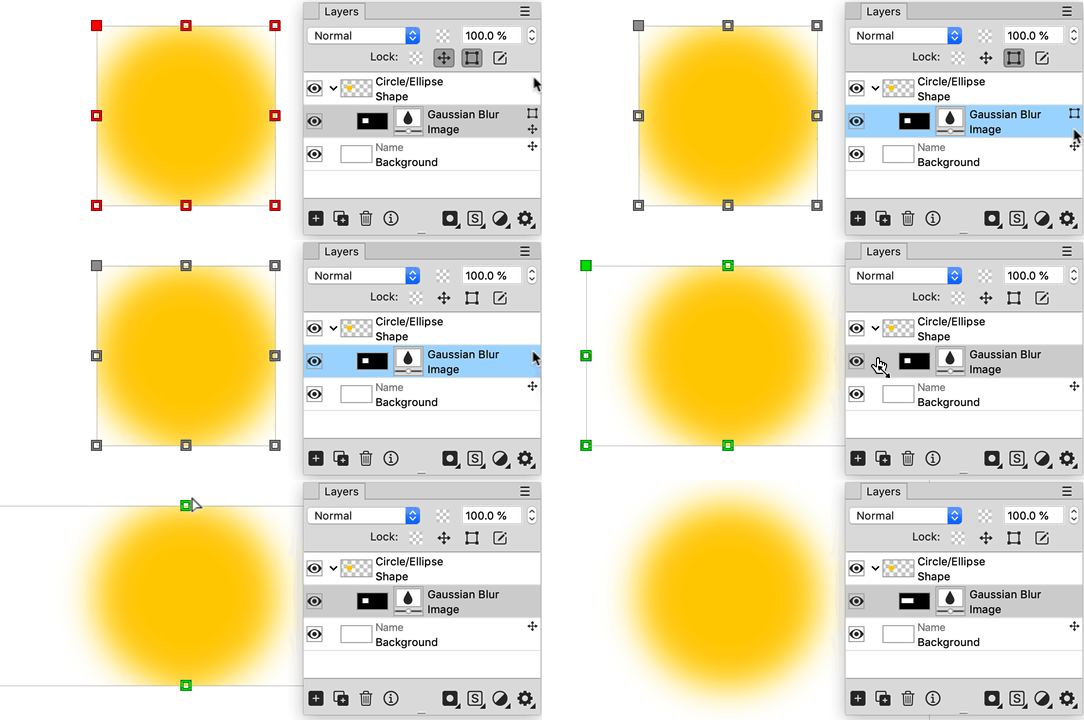
Du hast keine ausreichende Berechtigung, um die Dateianhänge dieses Beitrags anzusehen.
PhotoLine UI Icons Customization Project: https://www.pl32.com/forum3/viewtopic.php?f=3&t=6302
-
Vivi_Ram
- Mitglied
- Beiträge: 421
- Registriert: Sa 28 Sep 2024 17:04
Re: Neue Testversion 25.00b11
Thank you @Shijan: I manually expanded the mask like you show there. The group thing works.
Edit: Applying adjustment to the group throttles the CPU really hard.
The group thing works.Edit: Applying adjustment to the group throttles the CPU really hard.
-
Herbert123
- Mitglied
- Beiträge: 2455
- Registriert: Sa 12 Mai 2012 21:38
Re: Neue Testversion 25.00b11
It can be fixed (partly) by optimizing (simplifying) the curves with Layout-->Vector-->Optimize Vector Layer.Vivi_Ram hat geschrieben: Fr 14 Nov 2025 11:12 layer_4.jpg
Okay, I can see what you mean. But like you say, there's no reason why flood fill shouldn't be available with vector layers active. I agree.
However, even with your solution, we still have the problem of enormous number of nodes. This can be vastly improved.
Of course, it's not going to as good as manually placing points... (well, AI could probably do it)
Du hast keine ausreichende Berechtigung, um die Dateianhänge dieses Beitrags anzusehen.
/*---------------------------------------------*/
System: Win10 64bit - i7 [email protected], p6t Deluxe v1, 48gb (6x8gb RipjawsX), Nvidia GTX1080 8GB, Revodrive X2 240gb, e-mu 1820, 2XSamsung SA850 (2560*1440) and 1XHP2408H 1920*1200 portrait
System: Win10 64bit - i7 [email protected], p6t Deluxe v1, 48gb (6x8gb RipjawsX), Nvidia GTX1080 8GB, Revodrive X2 240gb, e-mu 1820, 2XSamsung SA850 (2560*1440) and 1XHP2408H 1920*1200 portrait
-
Herbert123
- Mitglied
- Beiträge: 2455
- Registriert: Sa 12 Mai 2012 21:38
Re: Neue Testversion 25.00b11
At some point in the compositing process, depending on the resolution of the file as well as the number and type of adjustments and live effects, PhotoLine will slow down. That is only to be expected, and happens with all image and video editing software, even if they are GPU hardware accelerated.Vivi_Ram hat geschrieben: Fr 14 Nov 2025 13:34 Thank you @Shijan: I manually expanded the mask like you show there.
Edit: Applying adjustment to the group throttles the CPU really hard.
This is the reason why smart objects were introduced in Photoshop and why Placeholder layers should be introduced when things start to bog down PhotoLine. Same reasoning behind subcomps in After Effects and nested clips in NLE video editors.
Compared to Photoshop when we work in PhotoLine we have far more freedom of choice: live non-destructive effects are only possible with smart objects in Photoshop, while PhotoLine users aren't locked in this workflow (with placeholder layers). But when the comp begins to slow down, we also have to start converting part of the layer stack to placeholder layers to keep PhotoLine from slowing down too much.
/*---------------------------------------------*/
System: Win10 64bit - i7 [email protected], p6t Deluxe v1, 48gb (6x8gb RipjawsX), Nvidia GTX1080 8GB, Revodrive X2 240gb, e-mu 1820, 2XSamsung SA850 (2560*1440) and 1XHP2408H 1920*1200 portrait
System: Win10 64bit - i7 [email protected], p6t Deluxe v1, 48gb (6x8gb RipjawsX), Nvidia GTX1080 8GB, Revodrive X2 240gb, e-mu 1820, 2XSamsung SA850 (2560*1440) and 1XHP2408H 1920*1200 portrait
-
der_fotograf

- Mitglied
- Beiträge: 672
- Registriert: Mo 05 Dez 2016 08:33
- Wohnort: North Germany
Re: Neue Testversion 25.00b11
@Herbert123: Wow, thank you so much for this hint. Just by coincidence, I was looking for a solution to reduce vector points in a symbol, checked everything, but couldn't find a solution to smooth the delivered *.svg file. So I used a free service online from a company not related to graphics, and the result was great. However, with your hint, I was able to get an even smoother result within PL.Herbert123 hat geschrieben: Sa 15 Nov 2025 00:11 It can be fixed (partly) by optimizing (simplifying) the curves with Layout-->Vector-->Optimize Vector Layer.
Of course, it's not going to as good as manually placing points... (well, AI could probably do it)
These tiny tips and hints are so valuable…
Nur wenige wissen, wie viel man wissen muss, um zu wissen, wie wenig man weiss.
Only few know how much you have to know to know how little you know.
— Werner Heisenberg [German theoretical physicist]
Only few know how much you have to know to know how little you know.
— Werner Heisenberg [German theoretical physicist]
-
Vivi_Ram
- Mitglied
- Beiträge: 421
- Registriert: Sa 28 Sep 2024 17:04
Re: Neue Testversion 25.00b11
Thank you! @Herbert123: This is essentially what I did too. What I meant by improvement is at the level of code. The flood fill tool used on vectors should not produce so many nodes. I guess its something to do with edge detection. Not sure.Herbert123 hat geschrieben: Sa 15 Nov 2025 00:11It can be fixed (partly) by optimizing (simplifying) the curves with Layout-->Vector-->Optimize Vector Layer.Vivi_Ram hat geschrieben: Fr 14 Nov 2025 11:12 layer_4.jpg
Okay, I can see what you mean. But like you say, there's no reason why flood fill shouldn't be available with vector layers active. I agree.
However, even with your solution, we still have the problem of enormous number of nodes. This can be vastly improved.
2025-11-14 14_08_22-#1.jpg
Of course, it's not going to as good as manually placing points... (well, AI could probably do it)
-
Martin Huber
- Entwickler

- Beiträge: 4300
- Registriert: Di 19 Nov 2002 15:49
Re: Neue Testversion 25.00b11
The shape isn't distorted, but simplified, because otherwise you would get even more points.Vivi_Ram hat geschrieben: Mi 12 Nov 2025 15:12 That's what I did to workaround it. I clipped a mesh to the shape. However, that does not explain why the shape is being distorted.
With a complex shape like yours you should either use a clipping path (like shijan suggested) or split the shape in several basic ones.
-
Vivi_Ram
- Mitglied
- Beiträge: 421
- Registriert: Sa 28 Sep 2024 17:04
Re: Neue Testversion 25.00b11
Right... Okay. Thank you. So it's a feature, not a bug.
What do you think of the excessive number of nodes in the flood fill tool? Do you see any room for improvement there?
What do you think of the excessive number of nodes in the flood fill tool? Do you see any room for improvement there?