I love Photoline so far - it offers some features I have not seen anywhere before. I do a lot of screen-based design in it, from web, to app, to 2d game designs. In the past I used Fireworks in combination with Photoshop, and I was able to give the boot to those apps.
You may have heard about the demise of Macromedia Fireworks in Adobe's hands. Adobe stopped development, and Fireworks is now dead in its tracks. Currently nothing on the market can replace or act as a full alternative for Fireworks. There is a good article about Firework's advantages over other software for screen design here: http://fireworks.smashingmagazine.com/2 ... fireworks/
Photoline actually checks quite a lot of the boxes compared, yet is missing some essential functionality to make this type of work easier.
Photoline comes close, though, IF it had a couple of things added to it. And I think Photoline may then be able to break open a new segment of users. This is a plea to the developers to implement at least a couple of these, so this type of work will become easier in Photoline.
This list is based on almost 17 years of experience.
1) symbol library. Photoline currently does have a clipart/shape lists, but when the user drags these on the canvas, they do not act as true live instances - in Fireworks/Freehand/Flash the user can change the contents of a library item, and all the instances automatically update on all pages.
Photoline already does have virtual layers, so extending the clipart list to behave like true symbols might not be that much work. This would also be a great feature for print design, btw. That is why both Illustrator and InDesign offer a symbol library too. The user should be able to change the contents of a library symbol (for example, opening it as a seperate document window).
2) Search and Replace function for object colours and text styles/fonts. Incredibly powerful, and allows the user to search for certain style properties in the entire document, and replace (restyle) them with ease. This affects text styles, line styles, colours for strokes and fills, and effects styles. Freehand and Fireworks allowed for this, and it can save a tremendous amount of time.
3) Master page(s) in the pages pane. Photoline is the only design app with page support I know of that does not offer master pages. Though virtual layers can be a reasonable workaround, it would be tremendously helpful for almost any type of multi-page design work.
4) Nine-slice scaling tool for both image and vector objects.
5) Copy and paste attributes. Copy the attributes of one object to other selected objects with a simple keyboard shortcut. This would copy colour fill/stroke, text, layer effects, stroke properties from one object to other objects. <ctrl><c>, and <ctrl><shift><v> copies and pastes the attributes. Again saving a lot of time in the process.
[copy/paste layer attributes does more or less the same, but excludes text layer properties]
6) Spot colours. Not only (essential) for print jobs, but also incredibly handy for screen design work. Make a change to the spot colour, and all objects making use of that colour change along with it.
7) style list: a list of styles that includes not only a layer's layer effects, but also the vector layer's line properties, colours, and so on. This would again be "live", in that when the user changes the style, all the layers/objects that make use of this particular style will update in the document.
Currently Photoline does have a layer style list, but it does not include vector layer properties, and it is not "live". Similar request as in (1) and (6).
7) A proper knife tool for vector objects. Freehand's knife tool was excellent, and very easy to use. Fireworks' knife tool is also very simple. In Photoline it is a very laborious process.
8 ) in-view web optimization tools. It would be awesome to have some sort of screen proof while working on stuff. Fireworks has a preview pane for screen work, and we can set optimization settings on specific objects/layers. Also see (9). I imagine setting export properties for individual or multiple selected layers, and then turning on a "proof web" view that we can work in to see the changes instantly. This is quite essential for screen work. I am unsure how much work this would take to implement.
9) Cut'n slice or Photoshop generator options for layers: the layer name controls how the layer is exported. Photoline already has an option to export individually selected layers to separate files, and it would be relatively easy to add layer controls to control HOW each layer is exported and how it is optimized. Cut and Slice goes one step further, and allows for specific output control. For example, it also allows the user to export assets at different resolutions with several devices in mind.
Please see
http://www.cutandslice.me/
http://helpx.adobe.com/photoshop/using/ ... ayers.html
I believe the layer names already influence some actions, so it would not be that much work to add (I hope).
Slicing is no longer required, nowadays. (8) would solve the slicing as well. Truly essential for web and screen work.
10) an overall "align to pixel" option that we can turn off and on, not only for each vector layer individually. In addition, a simple keyboard shortcut to move objects to exact pixels, It takes some time now to set the layer position to exact pixel values for both the x and y position.
11) Regarding the Web Export dialogue:
a) true 8bit png with full transparency export option. Export a 2 up to 1024 colour png with full transparency. The 2 up to 256 colours should be a true 8bit png with full transparency.
b) an option to export selected layers only. This would save SO much time: select one or more layers/groups and only those would be exported.
c) the Reduce Colors settings should be part of the overall interface, and update the view in realtime. It is very cumbersome to be forced to open the reduce colors modal dialog, and change a setting, then preview, then open it again - very tiresome. Every other web export window I know of integrates these settings in the window itself!
12) controllable amount of anti-aliasing for vector and text objects. (sharp, smooth, etc)
[already implemented!] 13)better downsize sampling (Catmull Rom, MitchellNetravali, etc) (OMG! ALREADY IMPLEMENTED IN THE LATEST BETA!!! MANY THANKS!)
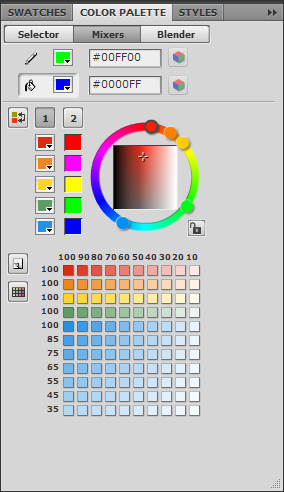
14) expanded colour palette pane that combines Harmony, and includes tints from 0% up to 100% in steps of 10. Harmony is modal now, and sort-of hidden away. Bit like this, perhaps: http://www.idux.com/wp-content/uploads/ ... mixers.png
15) quick browser preview option. This can be simply a integrated export to a png, and open in the default browser option. I do not expect full html/css export here at all. Other apps should take care of that.
16) user extendable script option - currently Photoline is "closed" to the user, i.e. we cannot develop our own custom functionality even if we wanted to.
Nice to have:
1) a properties panel that changes parameters according to the context. This would simplify the interface quite a bit. It could be an optional dialogue, rather than replace the older approach. Click on a page: page properties shown. Click on a layer in the layer pane: layer properties are shown, together with the object's properties inside (like the star or text). And so on. Also the name, position and dimensions of the object/layer.
It would also make Photoline easier to use in general, since the user no longer is required to hunt down the exact pane/place in the GUI to find the parameters/settings for the selected item.
2) editable shapes like the star can only be adjusted in the properties. It would be nice if the user could change them visually by dragging special control points in the document - that way the user is not required to 1) select the specific tool that was used to create it, and two adjust the parameters in the tool settings. Again, a context sensitive properties panel would already make things easier and quicker to control.
3) more vector tools to adjust shapes, and so on. Freeform and reshape area tools like Fireworks, VectorScribe like tools? http://www.astutegraphics.com/software/vectorscribe/
4) hanging interpunction for text.
Yes, a lot of requests, with some quick ones, and some more complicated ones I think. if the first 13 would be implemented in some way I feel it would make Photoline a true alternative for many screen/web/mobile designers. And improve it in a number of essential areas as well for everyone else.
Comments are very welcome.
Photoline as a web and screen design tool
-
Herbert123

- Mitglied
- Beiträge: 2452
- Registriert: Sa 12 Mai 2012 21:38
Photoline as a web and screen design tool
Zuletzt geändert von Herbert123 am Di 21 Jan 2014 10:13, insgesamt 2-mal geändert.
/*---------------------------------------------*/
System: Win10 64bit - i7 920@3.6Ghz, p6t Deluxe v1, 48gb (6x8gb RipjawsX), Nvidia GTX1080 8GB, Revodrive X2 240gb, e-mu 1820, 2XSamsung SA850 (2560*1440) and 1XHP2408H 1920*1200 portrait
System: Win10 64bit - i7 920@3.6Ghz, p6t Deluxe v1, 48gb (6x8gb RipjawsX), Nvidia GTX1080 8GB, Revodrive X2 240gb, e-mu 1820, 2XSamsung SA850 (2560*1440) and 1XHP2408H 1920*1200 portrait
-
photoken

- Mitglied
- Beiträge: 2162
- Registriert: Sa 28 Sep 2013 01:25
Re: Photoline as a web and screen design tool
I'm not intending to rain on your parade, just wanted to say that for me it's the image editing features of PL that are important. Plenty of requests in the "Feature Requests" thread that I'd like to see first (feathering control for the Patch Tool, and a real History panel with non-linear undo being the two biggies for me).Herbert123 hat geschrieben: I feel it would make Photoline a true alternative for many screen/web/mobile designers.
Ken
Yes, I think it can be eeeeeasily done....
Just take everything out on Highway 61.
Yes, I think it can be eeeeeasily done....
Just take everything out on Highway 61.
-
bkh
- Beta Tester
- Beiträge: 3687
- Registriert: Do 26 Nov 2009 22:59
Re: Photoline as a web and screen design tool
PL has "extended line styles" which include vector properties and distortions. The corresponding menu entries are called "Copy/Paste Layer Attributes" (manual, section 7.5.50). Assign keyboard shortcuts if you like. (Maybe "Paste Layer Style"/"Paste Layer Attribute" should also be made to work if a whole layer has been copied – this would make the separate "Copy Style" commands obsolete.)Herbert123 hat geschrieben:5) Copy and paste attributes. Copy the attributes of one object to other selected objects with a simple keyboard shortcut. This would copy colour fill/stroke, text, layer effects, stroke properties from one object to other objects. <ctrl><c>, and <ctrl><shift><v> copies and pastes the attributes. Again saving a lot of time in the process.
7) style list: a list of styles that includes not only a layer's layer effects, but also the vector layer's line properties, colours, and so on.
I agree that it would be nice to have layer styles (both simple and extended) which are proper styles (so that layers change with the style, like text styles in PL) – currently they are just presets. Most of the time, I have been able to work around this by assigning styles to groups rather than individual layers, but then I don't use PL's layout functions that much.
Cheers
Burkhard.
-
Herbert123
- Mitglied
- Beiträge: 2452
- Registriert: Sa 12 Mai 2012 21:38
Re: Photoline as a web and screen design tool
I was merely getting these requests out there, and hoping for the best. Some of these requests have been made before; for example, spot colour and channel support, master pages.
If only the web export would be simplified along the lines of a more optimized web export dialogue, an option to export selected layers only in the web export dialogue, as well as having an option to control the export through simple layer labels (9) I'd be very happy.
Extending the clipart list with symbol library behaviour would also benefit everyone. Again, I do not think that would be so difficult to implement.
Design for screens/web/mobile is getting more and more important, and I just wanted to highlight a number of missing features that would make life much easier for those type of users, and keep Photoline in the race as a screen design tool. Media publishing is becoming focused on digital platforms, so that's what I had in mind with most of these requests.
Of course, it is up to the brothers to decide what they think should be implemented first. At the very least some very useful options can now be added to the list of potential future updates. And I am already over the moon with the inclusion of the new downsampling algorithms in the scale dialogues.
If only the web export would be simplified along the lines of a more optimized web export dialogue, an option to export selected layers only in the web export dialogue, as well as having an option to control the export through simple layer labels (9) I'd be very happy.
Extending the clipart list with symbol library behaviour would also benefit everyone. Again, I do not think that would be so difficult to implement.
Design for screens/web/mobile is getting more and more important, and I just wanted to highlight a number of missing features that would make life much easier for those type of users, and keep Photoline in the race as a screen design tool. Media publishing is becoming focused on digital platforms, so that's what I had in mind with most of these requests.
Of course, it is up to the brothers to decide what they think should be implemented first. At the very least some very useful options can now be added to the list of potential future updates. And I am already over the moon with the inclusion of the new downsampling algorithms in the scale dialogues.
/*---------------------------------------------*/
System: Win10 64bit - i7 920@3.6Ghz, p6t Deluxe v1, 48gb (6x8gb RipjawsX), Nvidia GTX1080 8GB, Revodrive X2 240gb, e-mu 1820, 2XSamsung SA850 (2560*1440) and 1XHP2408H 1920*1200 portrait
System: Win10 64bit - i7 920@3.6Ghz, p6t Deluxe v1, 48gb (6x8gb RipjawsX), Nvidia GTX1080 8GB, Revodrive X2 240gb, e-mu 1820, 2XSamsung SA850 (2560*1440) and 1XHP2408H 1920*1200 portrait
-
Herbert123
- Mitglied
- Beiträge: 2452
- Registriert: Sa 12 Mai 2012 21:38
Re: Photoline as a web and screen design tool
Ah, thanks, I did overlook the copy/paste layer attributes. It does not copy text layer attributes, though. Also, would it not be easier to just have one general copy command, and several paste options as to what the user wants to paste exactly? It would simplify the menu entries, and consolidate all paste commands in the edit menu.bkh hat geschrieben:PL has "extended line styles" which include vector properties and distortions. The corresponding menu entries are called "Copy/Paste Layer Attributes" (manual, section 7.5.50). Assign keyboard shortcuts if you like. (Maybe "Paste Layer Style"/"Paste Layer Attribute" should also be made to work if a whole layer has been copied – this would make the separate "Copy Style" commands obsolete.)Herbert123 hat geschrieben:5) Copy and paste attributes. Copy the attributes of one object to other selected objects with a simple keyboard shortcut. This would copy colour fill/stroke, text, layer effects, stroke properties from one object to other objects. <ctrl><c>, and <ctrl><shift><v> copies and pastes the attributes. Again saving a lot of time in the process.
7) style list: a list of styles that includes not only a layer's layer effects, but also the vector layer's line properties, colours, and so on.
I agree that it would be nice to have layer styles (both simple and extended) which are proper styles (so that layers change with the style, like text styles in PL) – currently they are just presets. Most of the time, I have been able to work around this by assigning styles to groups rather than individual layers, but then I don't use PL's layout functions that much.
Cheers
Burkhard.
/*---------------------------------------------*/
System: Win10 64bit - i7 920@3.6Ghz, p6t Deluxe v1, 48gb (6x8gb RipjawsX), Nvidia GTX1080 8GB, Revodrive X2 240gb, e-mu 1820, 2XSamsung SA850 (2560*1440) and 1XHP2408H 1920*1200 portrait
System: Win10 64bit - i7 920@3.6Ghz, p6t Deluxe v1, 48gb (6x8gb RipjawsX), Nvidia GTX1080 8GB, Revodrive X2 240gb, e-mu 1820, 2XSamsung SA850 (2560*1440) and 1XHP2408H 1920*1200 portrait
-
bkh
- Beta Tester
- Beiträge: 3687
- Registriert: Do 26 Nov 2009 22:59
Re: Photoline as a web and screen design tool
It works on all layers. If you mean text attributes: these are accessible via text styles (paragraph and character styles) – and they are real styles, in the sense that if you update them, all formatted text changes. There are also separate copy/paste commands for character and ruler formats. As far as text styles are concerned, PL offers all I need.Herbert123 hat geschrieben: Ah, thanks, I did overlook the copy/paste layer attributes. It does not copy text layer attributes, though.
Yes, that's what I tried to suggest …Herbert123 hat geschrieben: Also, would it not be easier to just have one general copy command, and several paste options as to what the user wants to paste exactly? It would simplify the menu entries, and consolidate all paste commands in the edit menu.
Cheers
Burkhard.