Neue Testversion 25.00b3

Hier diskutieren die Betatester von PhotoLine untereinander und mit den Entwicklern
Benutzeravatar
Gerhard Huber
Entwickler
Entwickler
Beiträge: 4278
Registriert: Mo 18 Nov 2002 15:30
Wohnort: Bad Gögging

Neue Testversion 25.00b3

Beitrag von Gerhard Huber »

Hallo,

es gibt wieder eine neue Testversion 25.00b3.

Windows:
https://www.pl32.com/beta/pl2500b3.zip

macOS:
https://www.pl32.com/beta/plx2500b3.zip

Neues:
  • Verlaufsaktion: Bei der Aktion kann nun der "In aktive Ebene"-Status geändert werden
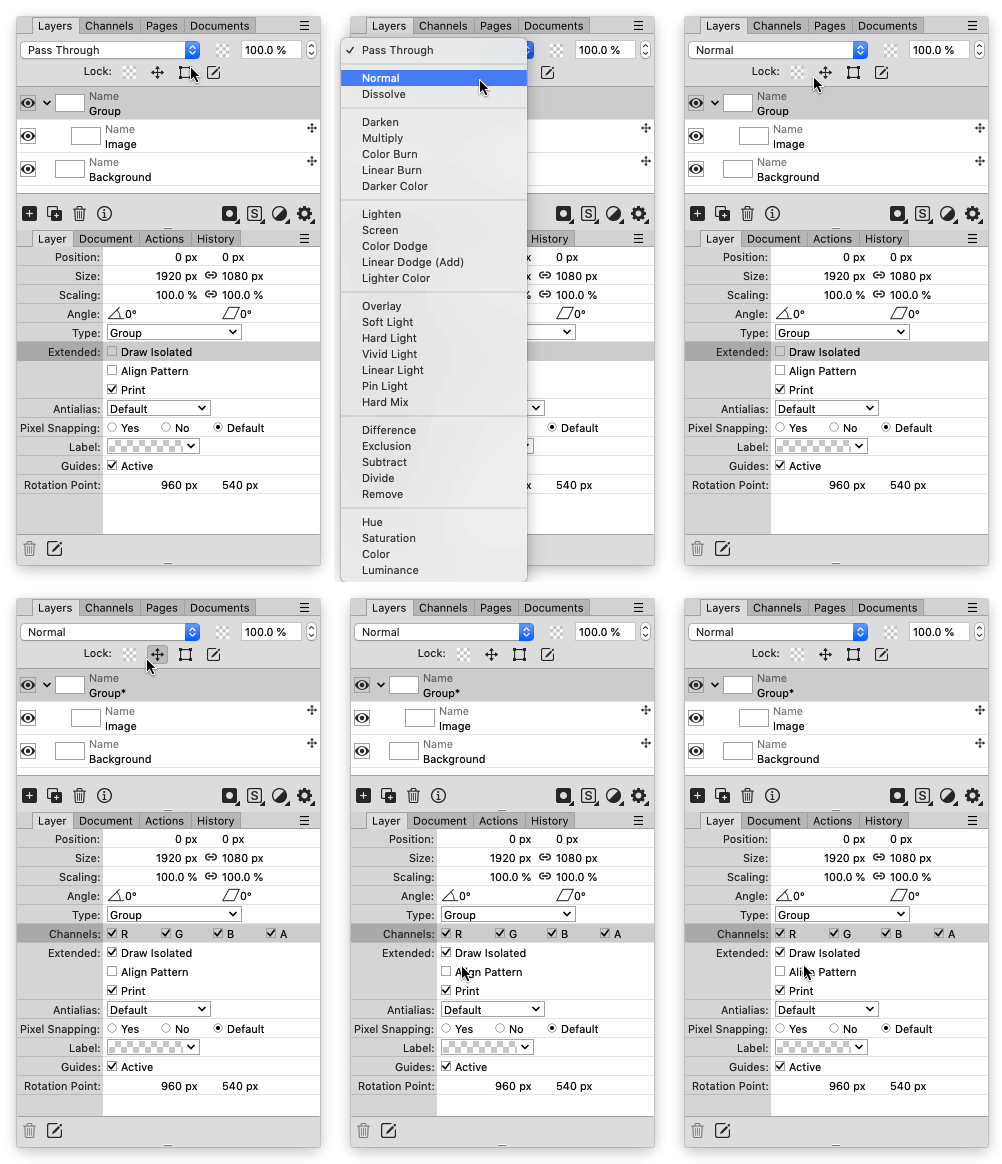
  • Ebenenliste: Gruppen mit "Hindurchwirken", automatisches Setzen auf "Gekapselt Zeichnen" wenn anderer Mischmodus
  • Ebenenattribute: "Normale" Ebenen mit sichtbaren Kindern können nun gekapselt gezeichnet werden.
  • XCF: Unterstützung von Palettenbildern
  • Drag&Drop, Windows, Links: Werden Links (z.B. aus VisualStudio Code) auf PhotoLine gezogen, werden diese jetzt richtig gelesen
  • Diverse Fehlerbehebungen und kleinere Verbesserungen
Benutzeravatar
shijan
Mitglied
Beiträge: 2033
Registriert: Mo 23 Dez 2019 15:21
Wohnort: Ukraine

Re: Neue Testversion 25.00b3

Beitrag von shijan »

Some other problems fixed in 25.00b3 added to Large List of Bugfixes 2019-2025:
  • in Windows version there is no checkbox near Thumbnail background options in the Layers List menu.
  • Request/Idea: Draw Isolated mode for Adjustment Layers.
  • Request/Idea: Pass trough blend mode for groups with Clipping Layers.
So Normal/Pass Trough modes enables/disables Draw Isolated checkbox. So we can toggle this from both ways. Nice! Also Layers with Adjustment Layers inside now also could be switched to Draw Isolated mode.
Bild
Zuletzt geändert von shijan am Mo 03 Mär 2025 14:13, insgesamt 1-mal geändert.
PhotoLine UI Icons Customization Project: https://www.pl32.com/forum3/viewtopic.php?f=3&t=6302
Vivi_Ram
Mitglied
Beiträge: 421
Registriert: Sa 28 Sep 2024 17:04

Re: Neue Testversion 25.00b3

Beitrag von Vivi_Ram »

Great!!! Quick work. Thanks!!
Benutzeravatar
shijan
Mitglied
Beiträge: 2033
Registriert: Mo 23 Dez 2019 15:21
Wohnort: Ukraine

Re: Neue Testversion 25.00b3

Beitrag von shijan »

The problem - Normal/Pass Trough applied to group still don't change the behave of Clipping Layer. Same as before, Clipping Layer only affect layers inside the group.
PhotoLine UI Icons Customization Project: https://www.pl32.com/forum3/viewtopic.php?f=3&t=6302
Benutzeravatar
Herbert123
Mitglied
Beiträge: 2455
Registriert: Sa 12 Mai 2012 21:38

Re: Neue Testversion 25.00b3

Beitrag von Herbert123 »

THANK YOU for fixing that grouping/anti-aliasing switch bug!!!

:D
/*---------------------------------------------*/
System: Win10 64bit - i7 [email protected], p6t Deluxe v1, 48gb (6x8gb RipjawsX), Nvidia GTX1080 8GB, Revodrive X2 240gb, e-mu 1820, 2XSamsung SA850 (2560*1440) and 1XHP2408H 1920*1200 portrait
Benutzeravatar
Herbert123
Mitglied
Beiträge: 2455
Registriert: Sa 12 Mai 2012 21:38

Re: Neue Testversion 25.00b3

Beitrag von Herbert123 »

Also, the copying bug is resolved as well.
/*---------------------------------------------*/
System: Win10 64bit - i7 [email protected], p6t Deluxe v1, 48gb (6x8gb RipjawsX), Nvidia GTX1080 8GB, Revodrive X2 240gb, e-mu 1820, 2XSamsung SA850 (2560*1440) and 1XHP2408H 1920*1200 portrait
Vivi_Ram
Mitglied
Beiträge: 421
Registriert: Sa 28 Sep 2024 17:04

Re: Neue Testversion 25.00b3

Beitrag von Vivi_Ram »

I already pitched the idea of pinning, unpinning and reveal-on-hover for panels. It would be nice to have even during normal operation (although your feelings might differ on this - and I respect that! :D ). But there's also another much simpler solution: "Ignore Hide Panels"... It is functionally the same as pinning and unpinning. Could we please get it? It means that even when all panels are hidden, you can make exceptions for some of them.
Ignore Hide Panel.jpg
Notice also, that Painstorm Studio allows you to individually scale each panel. This would mean that you can set the scale for each panel by scrolling in and out as you can already do for layers. Except, in this case, it does not increase the size of the dialogue box. Instead the sliders shorten (if there are sliders), and fonts become larger (while their tracking reduces). It is a nice to have. Not a must have. But I really would like to have an "Ignore hide panels" option for all the panels in here.
Ignore Hide Panel in PL.jpg
Du hast keine ausreichende Berechtigung, um die Dateianhänge dieses Beitrags anzusehen.
Martin Huber
Entwickler
Entwickler
Beiträge: 4300
Registriert: Di 19 Nov 2002 15:49

Re: Neue Testversion 25.00b3

Beitrag von Martin Huber »

shijan hat geschrieben: Di 18 Feb 2025 19:34 So Normal/Pass Trough modes enables/disables Draw Isolated checkbox.
This is just a Ps-compatible way of turning on "Draw Isolated".
shijan hat geschrieben: Di 18 Feb 2025 19:34 So we can toggle this from both ways. Nice! Also Layers with Adjustment Layers inside now also could be switched to Draw Isolated mode.
Ordinary layers (not groups) with adjustment layers have always been implicitely isolated. I will change the Layer Attributes to show that.
Vivi_Ram
Mitglied
Beiträge: 421
Registriert: Sa 28 Sep 2024 17:04

Re: Neue Testversion 25.00b3

Beitrag von Vivi_Ram »

I've asked the same question separately in another part of the forum, but wanted to drop it here as its more likely to be seen.

I'd like to ask a quick question. When I'm switching between the colour spaces within curves, RGB Vs HSV Vs Lab, the curve remains, but adjustment itself is altered for the chosen colour space.

What I'd like to be able to do: Make changes to Lightness in Lab, come back to a straight curved RGB, and make my changes independently. Is this possible? Really what I'm asking for is to stack curves adjustments without the need to create an extra curve adjustments.

I can make a video later to demo what I'm asking for if you need.
Benutzeravatar
shijan
Mitglied
Beiträge: 2033
Registriert: Mo 23 Dez 2019 15:21
Wohnort: Ukraine

Re: Neue Testversion 25.00b3

Beitrag von shijan »

Martin Huber hat geschrieben: Do 20 Feb 2025 16:55
shijan hat geschrieben: Di 18 Feb 2025 19:34 So we can toggle this from both ways. Nice! Also Layers with Adjustment Layers inside now also could be switched to Draw Isolated mode.
Ordinary layers (not groups) with adjustment layers have always been implicitely isolated. I will change the Layer Attributes to show that.
Currently this setting seems don't change anything for layers with adjustment layers inside. Not sure how exactly it should behave if Draw Isolated disabled. Use layer as pass-trough group, apply adjustment to main layer and to all bottom layers as well?
PhotoLine UI Icons Customization Project: https://www.pl32.com/forum3/viewtopic.php?f=3&t=6302
Benutzeravatar
Herbert123
Mitglied
Beiträge: 2455
Registriert: Sa 12 Mai 2012 21:38

Re: Neue Testversion 25.00b3

Beitrag von Herbert123 »

Is HEIC export broken? I am trying to save a HEIC file, but it results in a 0 bytes file. (Windows)
/*---------------------------------------------*/
System: Win10 64bit - i7 [email protected], p6t Deluxe v1, 48gb (6x8gb RipjawsX), Nvidia GTX1080 8GB, Revodrive X2 240gb, e-mu 1820, 2XSamsung SA850 (2560*1440) and 1XHP2408H 1920*1200 portrait
Benutzeravatar
Gerhard Huber
Entwickler
Entwickler
Beiträge: 4278
Registriert: Mo 18 Nov 2002 15:30
Wohnort: Bad Gögging

Re: Neue Testversion 25.00b3

Beitrag von Gerhard Huber »

Herbert123 hat geschrieben: So 09 Mär 2025 03:26 Is HEIC export broken? I am trying to save a HEIC file, but it results in a 0 bytes file. (Windows)
No problem here. Anything special with your test file?
Benutzeravatar
shijan
Mitglied
Beiträge: 2033
Registriert: Mo 23 Dez 2019 15:21
Wohnort: Ukraine

Re: Neue Testversion 25.00b3

Beitrag von shijan »

In Windows 10 in Save As/Export dialog i don't see HEIC format at all
Screen Shot 2025-03-09 at 3.13.00 PM.jpg
Du hast keine ausreichende Berechtigung, um die Dateianhänge dieses Beitrags anzusehen.
PhotoLine UI Icons Customization Project: https://www.pl32.com/forum3/viewtopic.php?f=3&t=6302
Benutzeravatar
Gerhard Huber
Entwickler
Entwickler
Beiträge: 4278
Registriert: Mo 18 Nov 2002 15:30
Wohnort: Bad Gögging

Re: Neue Testversion 25.00b3

Beitrag von Gerhard Huber »

PhotoLine uses the Windows-Heic interface.
In Windows 11 this is installed anyway.
In Windows 10 I found no computer without the interface here, but first versions of Windows 10 had no preinstalled HEIC driver.
Benutzeravatar
shijan
Mitglied
Beiträge: 2033
Registriert: Mo 23 Dez 2019 15:21
Wohnort: Ukraine

Re: Neue Testversion 25.00b3

Beitrag von shijan »

Ok, that explains a lot. I use old version of Win 10 on virtual machine. Also it is customized and many features are removed to decrease system size, so i guess HEIC just not there.
PhotoLine UI Icons Customization Project: https://www.pl32.com/forum3/viewtopic.php?f=3&t=6302