Neue Testversion 25.00b6

Hier diskutieren die Betatester von PhotoLine untereinander und mit den Entwicklern
Vivi_Ram
Mitglied
Beiträge: 421
Registriert: Sa 28 Sep 2024 17:04

Re: Neue Testversion 25.00b6

Beitrag von Vivi_Ram »

shijan hat geschrieben: Di 03 Jun 2025 14:33 Vivi_Ram, you literally can add any icon (adjustment, layout preset, action) to any toolbar in PhotoLine. And you can also use multiple toolbars. Why make things too complicated?
So, help me understand this. Still trying to figure it out. Do I add this through the Layout options under Options? How do I do this across panels? Also, is it possible to create multiple custom toolbars? :) Thanks for your response.
Vivi_Ram
Mitglied
Beiträge: 421
Registriert: Sa 28 Sep 2024 17:04

Re: Neue Testversion 25.00b6

Beitrag von Vivi_Ram »

@Shijan: Edit: Never mind, I figured it out.

I just want to be able to create multiple custom toolbars like in other apps. That would be very useful to have. @Martin @Gerhard: Would it possible to let this happen?

Because it means I can easily create two distinct toolbars: One for managing adjustments and one for managing lists and panels. :)
Benutzeravatar
shijan
Mitglied
Beiträge: 2033
Registriert: Mo 23 Dez 2019 15:21
Wohnort: Ukraine

Re: Neue Testversion 25.00b6

Beitrag von shijan »

There is a toggle on top where you can switch between multiple toolbars, then you can edit each toolbar and even rename title.
Then you can open those toolbars in "View->Toolbars"

Also there is a very useful customizable "Context Menu" that you can open from any place by clicking on middle mouse scroll button.
Screen Shot 2025-06-03 at 4.55.13 PM.jpg
Screen Shot 2025-06-03 at 4.56.27 PM.jpg
Du hast keine ausreichende Berechtigung, um die Dateianhänge dieses Beitrags anzusehen.
PhotoLine UI Icons Customization Project: https://www.pl32.com/forum3/viewtopic.php?f=3&t=6302
Vivi_Ram
Mitglied
Beiträge: 421
Registriert: Sa 28 Sep 2024 17:04

Re: Neue Testversion 25.00b6

Beitrag von Vivi_Ram »

I already figured this out, and it's quite useful. Thank you! What I mean is adding a second or third custom bar, instead of just one. Because you essentially only get 7 toolbars. There's no need to limit this. And hopefully, removing this limit should not require extensive work at the code level. :)

Also, now that I notice, how do you have more than 7 items in your dropdown? Am I missing something @Shijan? I see that colour field is not editable. Which does make sense.

I think it would tremendously useful to have more than one custom bar. Please do consider developers.
Benutzeravatar
shijan
Mitglied
Beiträge: 2033
Registriert: Mo 23 Dez 2019 15:21
Wohnort: Ukraine

Re: Neue Testversion 25.00b6

Beitrag von shijan »

Yes, Toolbox, Color and Contrast/Brightness are not editable. Image Tools may contain only 4 icons (i requested increase it to 6 or 8 icons). I am personally have no idea why 6 custom toolbars could be not enough :)
PhotoLine UI Icons Customization Project: https://www.pl32.com/forum3/viewtopic.php?f=3&t=6302
Vivi_Ram
Mitglied
Beiträge: 421
Registriert: Sa 28 Sep 2024 17:04

Re: Neue Testversion 25.00b6

Beitrag von Vivi_Ram »

Essentially, to separate out if possible the layout by workflow like Hoogo mentioned.

I haven't checked this: I will later today and edit this comment. I want to edit the individual toolbars for DTP, Photo editing and vector workflow, then save them as layouts. If this works, then excellent. If not, I prefer having more custom toolbars.
Benutzeravatar
shijan
Mitglied
Beiträge: 2033
Registriert: Mo 23 Dez 2019 15:21
Wohnort: Ukraine

Re: Neue Testversion 25.00b6

Beitrag von shijan »

Well, yes. By this logic more toolbars could be useful.
PhotoLine UI Icons Customization Project: https://www.pl32.com/forum3/viewtopic.php?f=3&t=6302
Vivi_Ram
Mitglied
Beiträge: 421
Registriert: Sa 28 Sep 2024 17:04

Re: Neue Testversion 25.00b6

Beitrag von Vivi_Ram »

Okay, tested this out. It does not work.

I created three panel layouts: DTP, VECTOR and PHOTO EDITING

I changed the toolbars for each of them, and saved them. But when I load them, they don't change. All three layouts show the same set of tools.

What am I missing?
Benutzeravatar
shijan
Mitglied
Beiträge: 2033
Registriert: Mo 23 Dez 2019 15:21
Wohnort: Ukraine

Re: Neue Testversion 25.00b6

Beitrag von shijan »

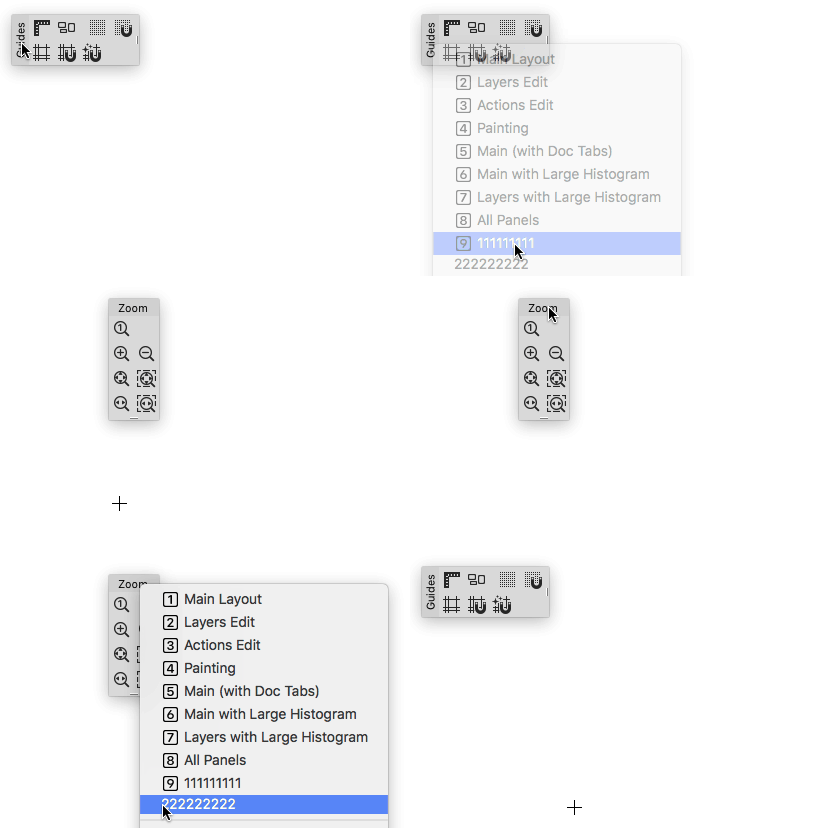
You need to enable different toolbars in different layouts before saving layouts:

- Open toolbar 1
- Save as "layout 1"

- Close toolbar 1 and open toolbar 2
- save as "layout 2"

Icons itself in toolbars don't change when you save different layouts. Only different toolbars, lists and panels shown/hidden when you switch between different layouts.
PhotoLine UI Icons Customization Project: https://www.pl32.com/forum3/viewtopic.php?f=3&t=6302
Vivi_Ram
Mitglied
Beiträge: 421
Registriert: Sa 28 Sep 2024 17:04

Re: Neue Testversion 25.00b6

Beitrag von Vivi_Ram »

That's what I did.

I named Layout 1 as DTP. Then changed the panels, saved the layout.
Then created a second layout called Vector. Changed the panels, saved the layout.

Now, when I switch to DTP layout, the icons don't change. They just show the icons of the Vector layout.
Benutzeravatar
shijan
Mitglied
Beiträge: 2033
Registriert: Mo 23 Dez 2019 15:21
Wohnort: Ukraine

Re: Neue Testversion 25.00b6

Beitrag von shijan »

Bild
PhotoLine UI Icons Customization Project: https://www.pl32.com/forum3/viewtopic.php?f=3&t=6302
Benutzeravatar
Hoogo
Beta Tester
Beiträge: 4169
Registriert: So 03 Jul 2005 13:35
Wohnort: Deutschland

Re: Neue Testversion 25.00b6

Beitrag von Hoogo »

Vivi_Ram hat geschrieben: Di 03 Jun 2025 19:39...I named Layout 1 as DTP. Then changed the panels...
What exactly is "changed the panels"?

- You have chosen one of the given toolbars for DTP, adjusted all buttons for DTP, placed it on screen and saved the layout with the name "DTP".
- Then you have chosen another of the given toolbars for VECTOR, adjusted all buttons for VECTOR, replaced the DTP toolbar on screen and saved the layout with the name "Vector"?

Save layout does not care for the buttons of a toolbar, only for positions and visibility of the toolbars. Changing buttons in 1 toolbar will not work, but enabling different toolbars should do it.
----------------
Herr Doktor, ich bin mir ganz sicher, ich habe Atom! /Doctor, doctor, I'm sure, I've got atoms!
Vivi_Ram
Mitglied
Beiträge: 421
Registriert: Sa 28 Sep 2024 17:04

Re: Neue Testversion 25.00b6

Beitrag von Vivi_Ram »

This works. But that's not what I am looking for. I am looking for Layout Level changes to the list itself. Here is what I mean.

I created Vector Layout, and within that layout, I create a custom list of toolbars such as "Curve" "Boolean Ops" "Node". I saved it.
Next, I create a DTP Layout, and within that layout, I create a custom list of toolbars such as "Text flow" "Text tools". I saved it.
Next, I create a Photo editing layout, and within that layout, I create a custom list of toolbars such as "Masking" "Adjustments" "Filter FX". I saved it.

Now, I have three layouts, each with it's own set of custom toolbars, with its own arrangement of icons, and placement of toolbars. When I switch between them, nothing happens. Everything remains the same. Whatever is the current arrangement is what you get. What am I looking for is something like Affinity's Persona. The entire layout and toolbars and menu items changing.

I don't think that's possible in PL at the moment. Ideas! :idea:
Benutzeravatar
shijan
Mitglied
Beiträge: 2033
Registriert: Mo 23 Dez 2019 15:21
Wohnort: Ukraine

Re: Neue Testversion 25.00b6

Beitrag von shijan »

Yes, exactly. Save layout does not care for the buttons of a toolbar.
Just make visible different toolbars for different layouts.
PhotoLine UI Icons Customization Project: https://www.pl32.com/forum3/viewtopic.php?f=3&t=6302
Vivi_Ram
Mitglied
Beiträge: 421
Registriert: Sa 28 Sep 2024 17:04

Re: Neue Testversion 25.00b6

Beitrag von Vivi_Ram »

Got it. It would be great to have it. Thanks for confirming.

The missing link is between the Layout and customised button arrangement within toolbars. There is already the link between layouts and toolbar placement on the screen. That link would be very helpful to separate out the tools very quickly.

A great example of this sort of arrangement is in Viva Designer, which has tool settings for various levels of expertise. Beginner, Intermediate and Expert. You choose one layout, you get a specific arrangement of tools on your screen. You can configure this further to your benefit.
Zuletzt geändert von Vivi_Ram am Di 03 Jun 2025 20:05, insgesamt 1-mal geändert.