Herbert123
From my understanding of color management, your setup is not correct. You shouldn't have a working color space ICC profile as your screen profile. You should enter the ICC profile that was generated when you calibrated and profiled your monitor. I could be wrong on this but that's my understanding. Could someone else confirm which ICC profile, working space or monitor, to enter into the screen option? Thanks
Is Color Management always on in Photoline?
-
pixel8tor
- Mitglied
- Beiträge: 72
- Registriert: Di 24 Jul 2018 17:15
-
shijan

- Mitglied
- Beiträge: 2095
- Registriert: Mo 23 Dez 2019 15:21
- Wohnort: Ukraine
Re: Is Color Management always on in Photoline?
Yes, "Screen" should use display ICC profile.
Also in Windows instead of creating manual custom calibration you can extract and use factory ICC profile directly from monitor EDID data using DisplayCAL application https://displaycal.net/ (File-> Create profile from Extended display identification data).
It is also really strange that none of us can't reproduce this problem. Could it be due your display ICC profile itself? Some time ago i noticed a bug in PhotoLine color management when some ICC v4 profiles with some specific gammas don't work when applied in Proof Mode. This problem was only when used Little CMS and AppleCMS. So maybe your problem is somehow linked to this as well.
Try to check if your system display profile is v2 or v4. ALso just for test try to set to display some simple default sRGB profile and see if it will change things.
Also in Windows instead of creating manual custom calibration you can extract and use factory ICC profile directly from monitor EDID data using DisplayCAL application https://displaycal.net/ (File-> Create profile from Extended display identification data).
It is also really strange that none of us can't reproduce this problem. Could it be due your display ICC profile itself? Some time ago i noticed a bug in PhotoLine color management when some ICC v4 profiles with some specific gammas don't work when applied in Proof Mode. This problem was only when used Little CMS and AppleCMS. So maybe your problem is somehow linked to this as well.
Try to check if your system display profile is v2 or v4. ALso just for test try to set to display some simple default sRGB profile and see if it will change things.
PhotoLine UI Icons Customization Project: https://www.pl32.com/forum3/viewtopic.php?f=3&t=6302
-
pixel8tor
- Mitglied
- Beiträge: 72
- Registriert: Di 24 Jul 2018 17:15
Re: Is Color Management always on in Photoline?
Shijan
Thanks for the confirmation about the screen option needing to be set to a monitor ICC profile.
Also I've never used the extract profile from the EDID in DisplayCal, didn't even know it was there. How do you know what the OSD settings were when the embedded ICC profile was created. As I understand it, a monitor ICC profile is only valid if all the OSD settings are the same as when it was created.
Yeah, I agree it is strange, but that's what my system is doing. And like I mentioned earlier I've tried all different permutations and combinations. And the monitor profile was created with DisplayCal so I'm pretty sure that's not the issue. Plus I have several other color managed apps and none of them show this behavior. So, as for as I know, *something* changed in version 23.40b3. Every release before that operated as expected.
Thanks for the confirmation about the screen option needing to be set to a monitor ICC profile.
Also I've never used the extract profile from the EDID in DisplayCal, didn't even know it was there. How do you know what the OSD settings were when the embedded ICC profile was created. As I understand it, a monitor ICC profile is only valid if all the OSD settings are the same as when it was created.
Yeah, I agree it is strange, but that's what my system is doing. And like I mentioned earlier I've tried all different permutations and combinations. And the monitor profile was created with DisplayCal so I'm pretty sure that's not the issue. Plus I have several other color managed apps and none of them show this behavior. So, as for as I know, *something* changed in version 23.40b3. Every release before that operated as expected.
-
shijan
- Mitglied
- Beiträge: 2095
- Registriert: Mo 23 Dez 2019 15:21
- Wohnort: Ukraine
Re: Is Color Management always on in Photoline?
ICC profile extracted from EDID data don't depends of monitor OSD settings. It is just color matrix that represents native color space and native gamma of the display panel.
"As I understand it, a monitor ICC profile is only valid if all the OSD settings are the same as when it was created"
Yes and No. Color temperature, backlight brightness and all other color adjustments are independent from monitor ICC profile. Especially when used simple matrix ICC profile. In most cases modern panels are more-less accurate and may only require manual RGB color temperature backlight setting based on realtime colorimeter measurements.
Sure in perfect world it is better to set desired color temperature and brightness, calibrate monitor and don't touch it anymore. But in reality it don't works because monitor brightness and color temperature always somehow relative to room lighting conditions. Smartphones and many displays even use dynamic adaptation.
But if for some unknown reason you create and use more complex LUT-based monitor ICC profile, it probably will require exact unchanged settings. I say probably, because i never created LUT-based profile for display (because there not so many displays that support LUT-based ICC profiles on hardware level, and operating systems don't support LUT-based monitor ICC profiles as well), but similar LUT-based input profiles for scanners are very sensitive to changes in white balance and exposition.
"As I understand it, a monitor ICC profile is only valid if all the OSD settings are the same as when it was created"
Yes and No. Color temperature, backlight brightness and all other color adjustments are independent from monitor ICC profile. Especially when used simple matrix ICC profile. In most cases modern panels are more-less accurate and may only require manual RGB color temperature backlight setting based on realtime colorimeter measurements.
Sure in perfect world it is better to set desired color temperature and brightness, calibrate monitor and don't touch it anymore. But in reality it don't works because monitor brightness and color temperature always somehow relative to room lighting conditions. Smartphones and many displays even use dynamic adaptation.
But if for some unknown reason you create and use more complex LUT-based monitor ICC profile, it probably will require exact unchanged settings. I say probably, because i never created LUT-based profile for display (because there not so many displays that support LUT-based ICC profiles on hardware level, and operating systems don't support LUT-based monitor ICC profiles as well), but similar LUT-based input profiles for scanners are very sensitive to changes in white balance and exposition.
PhotoLine UI Icons Customization Project: https://www.pl32.com/forum3/viewtopic.php?f=3&t=6302
-
Herbert123

- Mitglied
- Beiträge: 2459
- Registriert: Sa 12 Mai 2012 21:38
Re: Is Color Management always on in Photoline?
Correct, it's an incorrect setup. I just got a new screen, and I am about to buy a new screen calibrator to profile it. I haven't done any colour critical work lately, so it's not an issue. Mostly game and screen work where it is of no concern, so I just turn colour management off. But I do have to profile my monitor...pixel8tor hat geschrieben: Fr 12 Sep 2025 22:58 Herbert123
From my understanding of color management, your setup is not correct. You shouldn't have a working color space ICC profile as your screen profile. You should enter the ICC profile that was generated when you calibrated and profiled your monitor. I could be wrong on this but that's my understanding. Could someone else confirm which ICC profile, working space or monitor, to enter into the screen option? Thanks

Other than that, the end result of this test is not invalidated by the wrong screen profile: colour management is merely mapping to and fro a wrong profile, and it is still 'working'.
ICC colour management is more-or-less a hack, but it is what we have to work with, unfortunately.
/*---------------------------------------------*/
System: Win10 64bit - i7 [email protected], p6t Deluxe v1, 48gb (6x8gb RipjawsX), Nvidia GTX1080 8GB, Revodrive X2 240gb, e-mu 1820, 2XSamsung SA850 (2560*1440) and 1XHP2408H 1920*1200 portrait
System: Win10 64bit - i7 [email protected], p6t Deluxe v1, 48gb (6x8gb RipjawsX), Nvidia GTX1080 8GB, Revodrive X2 240gb, e-mu 1820, 2XSamsung SA850 (2560*1440) and 1XHP2408H 1920*1200 portrait
-
Martin Huber
- Entwickler

- Beiträge: 4303
- Registriert: Di 19 Nov 2002 15:49
Re: Is Color Management always on in Photoline?
I still can't reproduce the problem. My Screen profile ist set to system, and it works as expected.pixel8tor hat geschrieben: Fr 12 Sep 2025 03:57 Here's another bit of information. When PL is installed the color management options are set to a default configuration. For Edit->Options...->Color Management->Devices->Screen it is set to "System". If I set the "Screen" device to my named monitor ICC profile, rather than "System", color management can be toggled on and off as expected. But if it is set to "System", then the main window can't be toggled off.
What do you mean by "then the main window can't be toggled off"?
-
pixel8tor
- Mitglied
- Beiträge: 72
- Registriert: Di 24 Jul 2018 17:15
Re: Is Color Management always on in Photoline?
I mean the main IMAGE window! Are you following the thread? That's what I've been talking about all along!
Whether you can reproduce the problem isn't really the issue, I can 100% of the time. I've given you some ideas where the issue is. But rather than examine the code to see what changed in version 23.40b3, you complain you can't reproduce the problem. Well *something* changed with 23.49b3 that causes this problem for me! Are you getting tired of PL? Seems like you really aren't interested in tracking down this bug. It's pretty easy to do a DIFF compare between two versions. You are using version control, right? If this were my code base there's no doubt I could track down the issue quickly. Sort of like my other issue of the too tall listbox, rather than examine the code you'd rather deflect and say you don't see it.
Whether you can reproduce the problem isn't really the issue, I can 100% of the time. I've given you some ideas where the issue is. But rather than examine the code to see what changed in version 23.40b3, you complain you can't reproduce the problem. Well *something* changed with 23.49b3 that causes this problem for me! Are you getting tired of PL? Seems like you really aren't interested in tracking down this bug. It's pretty easy to do a DIFF compare between two versions. You are using version control, right? If this were my code base there's no doubt I could track down the issue quickly. Sort of like my other issue of the too tall listbox, rather than examine the code you'd rather deflect and say you don't see it.
-
bkh
- Beta Tester
- Beiträge: 3687
- Registriert: Do 26 Nov 2009 22:59
Re: Is Color Management always on in Photoline?
Please, read the answers. Martin already wrote that he checked the changes and found nothing relevant.pixel8tor hat geschrieben: Mo 15 Sep 2025 22:56 Whether you can reproduce the problem isn't really the issue, I can 100% of the time. I've given you some ideas where the issue is. But rather than examine the code to see what changed in version 23.40b3, you complain you can't reproduce the problem.
That's a bit unfair. Tracking down something that must a subtle side effect which only affects very few systems without being able to reproduce the problem is a really difficult task. I bet the developers did their best.If this were my code base there's no doubt I could track down the issue quickly.
Again, I'd advise to read the developers' answer. There is no clipping, just scrollbars. I can't see what's wrong with this.pixel8tor hat geschrieben: Mo 15 Sep 2025 22:56 Sort of like my other issue of the too tall listbox, rather than examine the code you'd rather deflect and say you don't see it.
While I can somehow understand your impatience, please keep in mind that everybody here is trying their best to help you.
-
Herbert123
- Mitglied
- Beiträge: 2459
- Registriert: Sa 12 Mai 2012 21:38
Re: Is Color Management always on in Photoline?
More testing performed. First, I change the screen profile to the standard System screen profile.
And turn off colour management in PhotoLine.
Low and behold, I run into the same behaviour as @pixel8tor:
.

That behaviour seems to be odd. Why is the map not colour managed, and the image view seems to be sRGB profile managed even when colour management is turned off?
The sRGB embedded version seems to display 'correctly' non-colour managed.
.
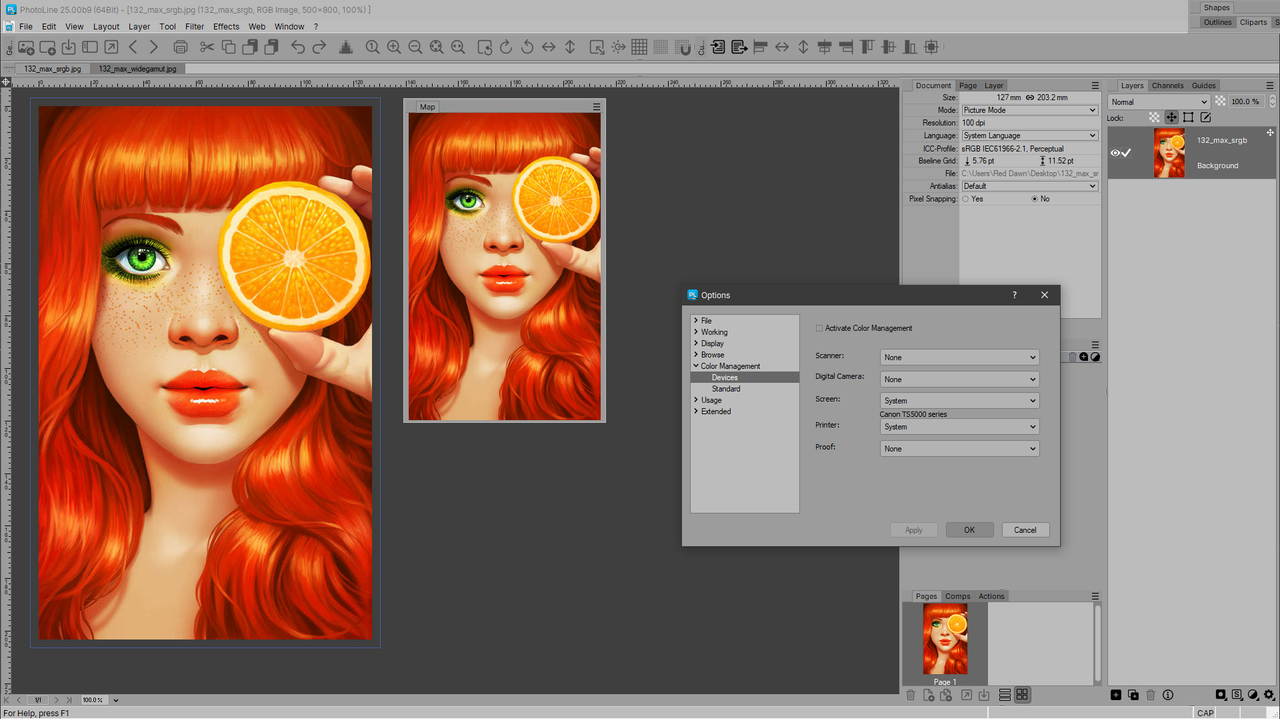
But on second thought it probably just means that the sRGB profile merely matches the seemingly in-use sRGB screen profile even when colour management is turned off in PhotoLine when the System profile is used.
When I force the screen profile in PhotoLine to use the standard srgb colour profile (like before) the result is as expected with deactivated CM and the wide gamut profile embedded image version:
.

So I decided to investigate further.
Because I still have not gotten around to properly profile this monitor, I decided to just install the manufacturer's monitor profile (which assumes that I am running the monitor in standard DCI-P3 mode). But I decide to continue to run the monitor in sRGB mode, because the result of this mismatch between sRGB and SCI-P3 should be a less saturated image even with colour management on. I do this to ensure I cannot confuse the system profile that is in use by PhotoLine with the actual monitor profile.
Now it works as it should:
.
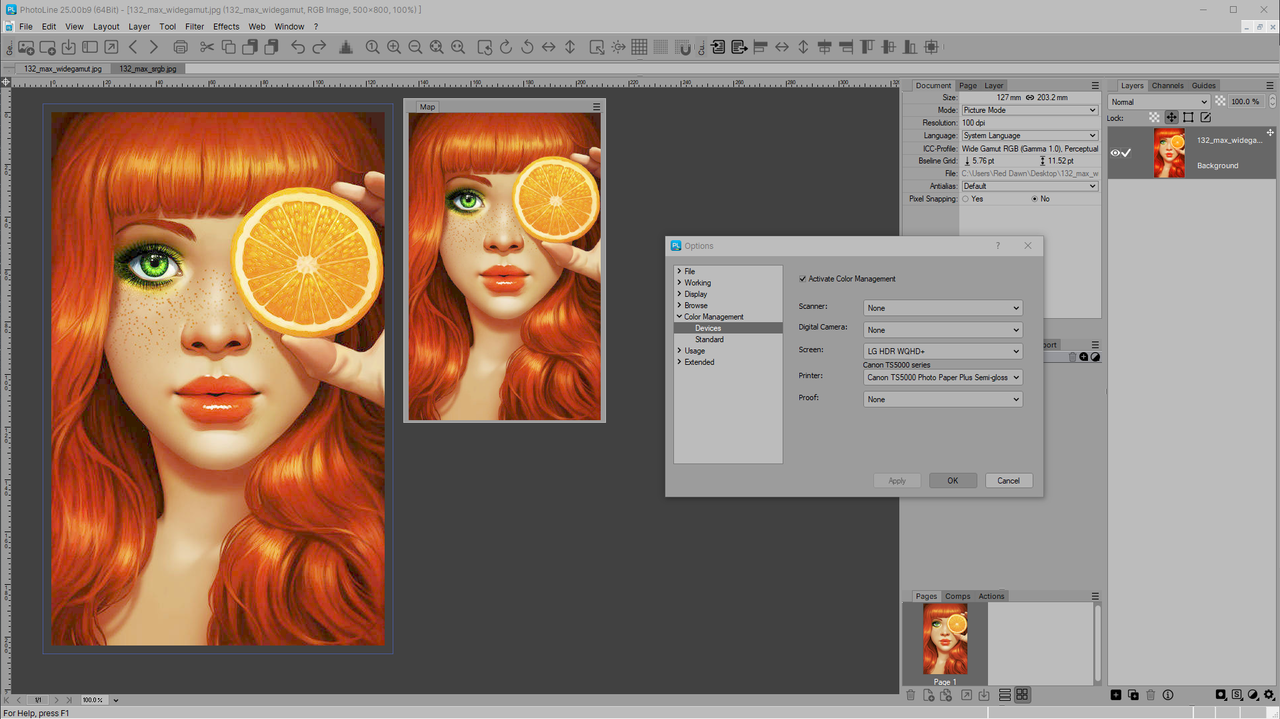
Note that the saturation is slightly, but visibly, lowered when I use the LG profile. Which is to be expected since its DCI-P3 98% gamut is wider than sRGB.
With CM turned off and using this profile I get:
.
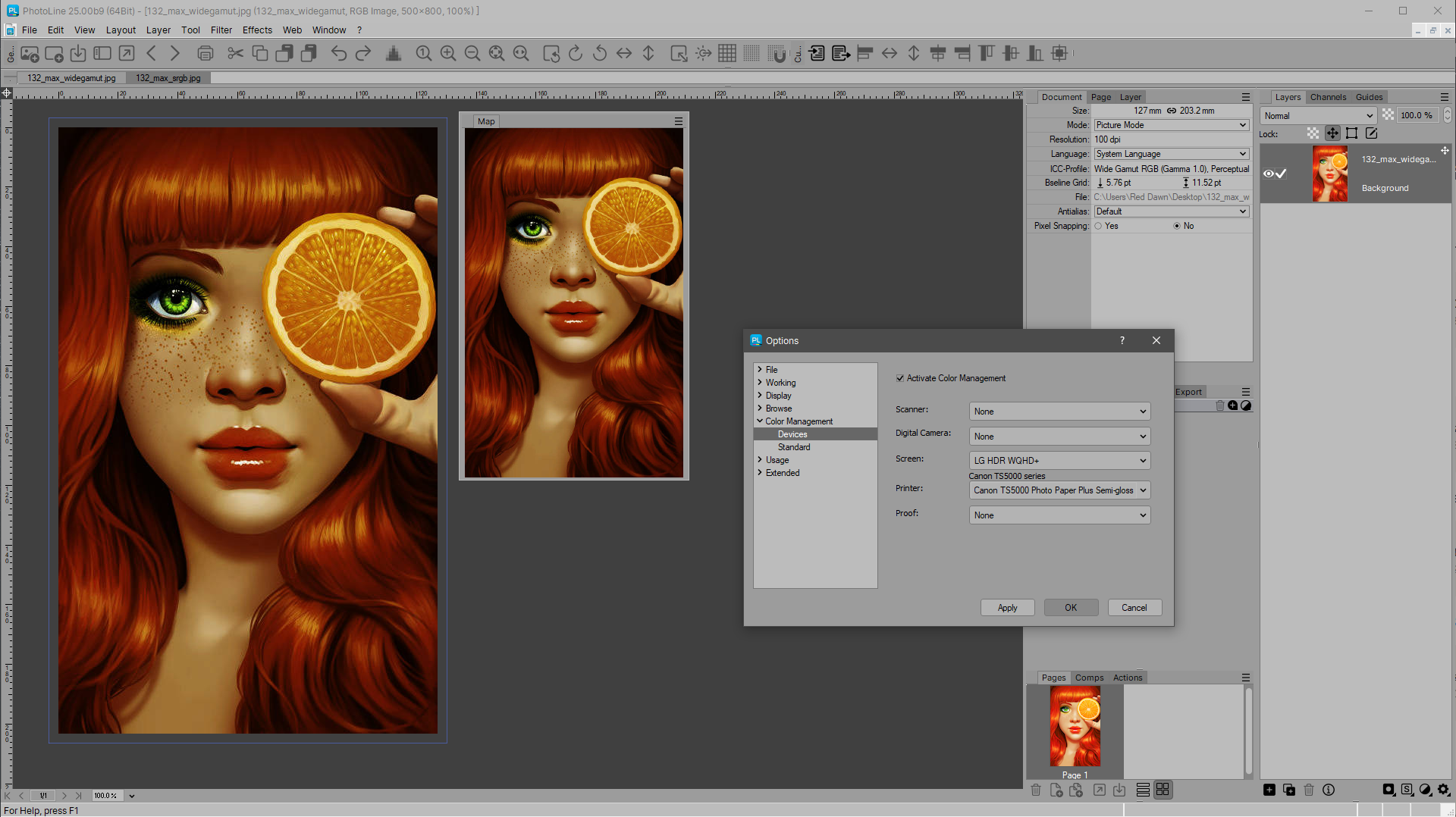
Next I change the system settings for my screen's colour profile to allow all apps system-wide to use the LG profile, and tell PhotoLine to use the System colour profile:
.
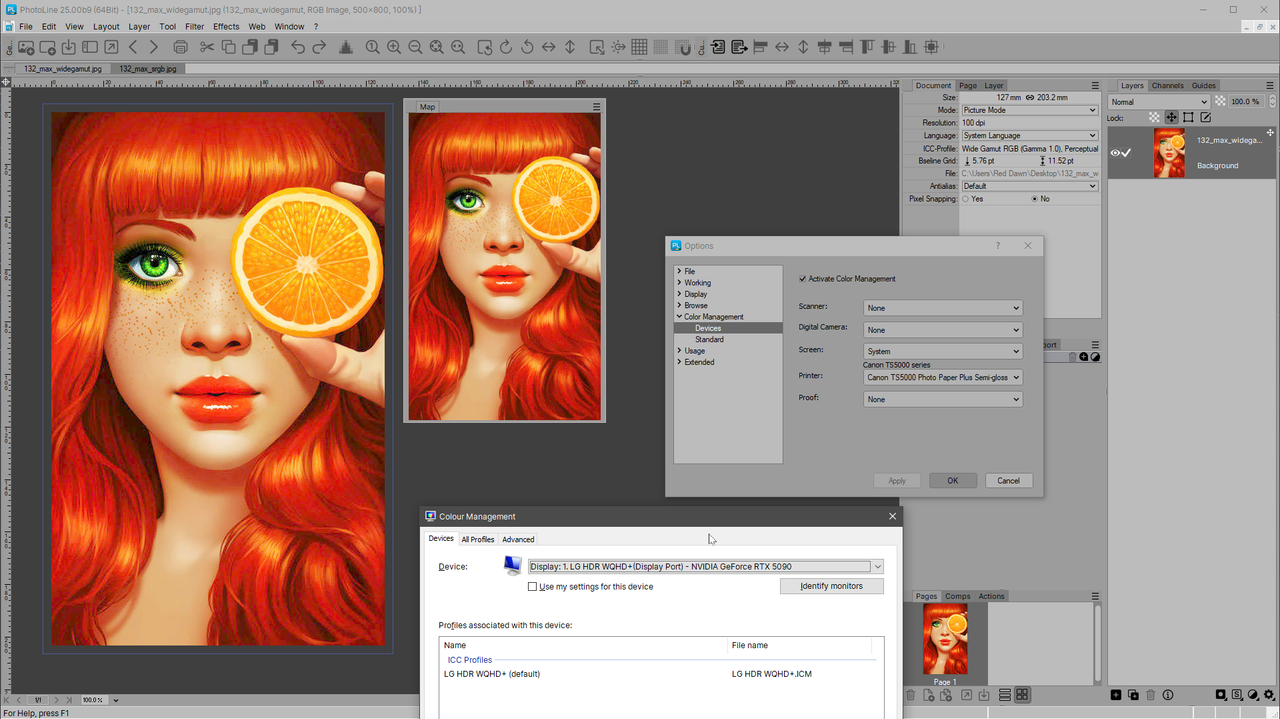
That doesn't match the version where I set the LG profile directly. It matches the sRGB profile: it is too saturated.
So... when "System" is used in PhotoLine's Screen profile, it relies on a standard sRGB profile.
What happens when we turn off colour management with this setup?
.
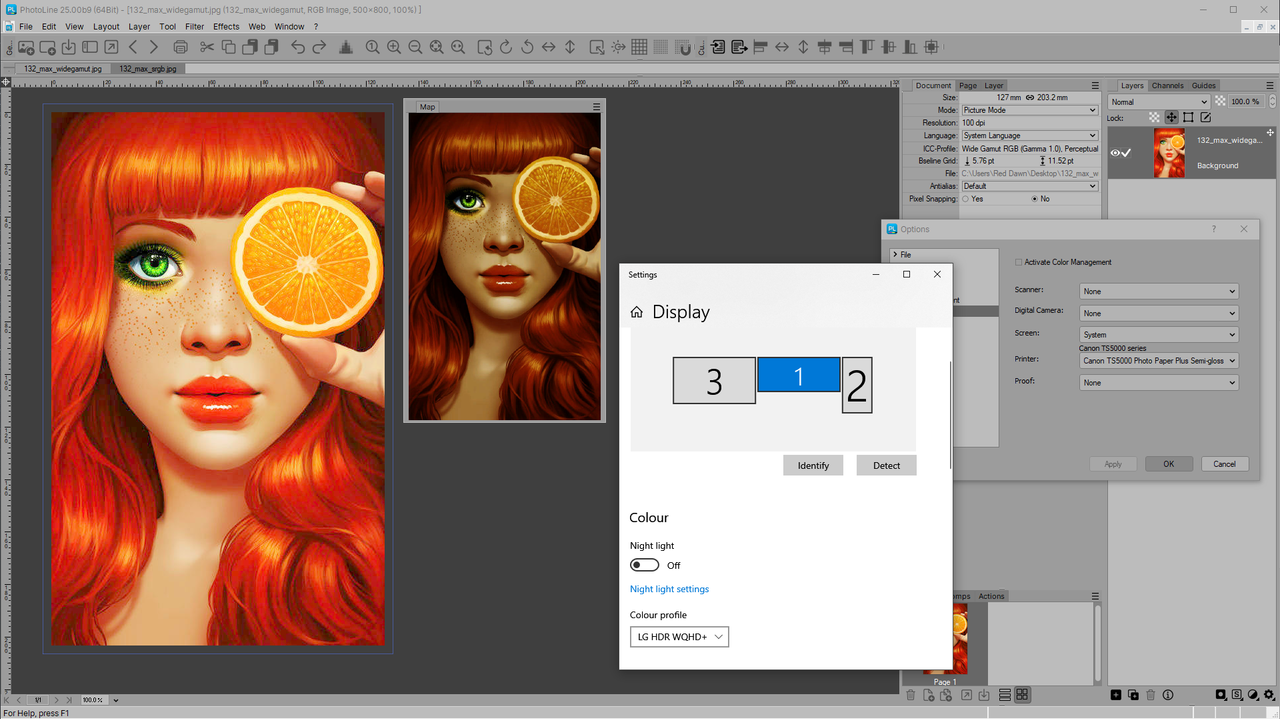
Same issue. It doesn't matter which profile is used in the System settings or PhotoLine's Screen profile settings: the image view seemingly defaults to sRGB no matter what. The Map window actually is not fooled, and shows the unmanaged colour version as expected.
In any case, as long as the screen profile in PhotoLine is set to your monitor profile it works just fine.
Krita doesn't even give the user an option to choose the default System one, and we have to pick the correct screen profile:
.
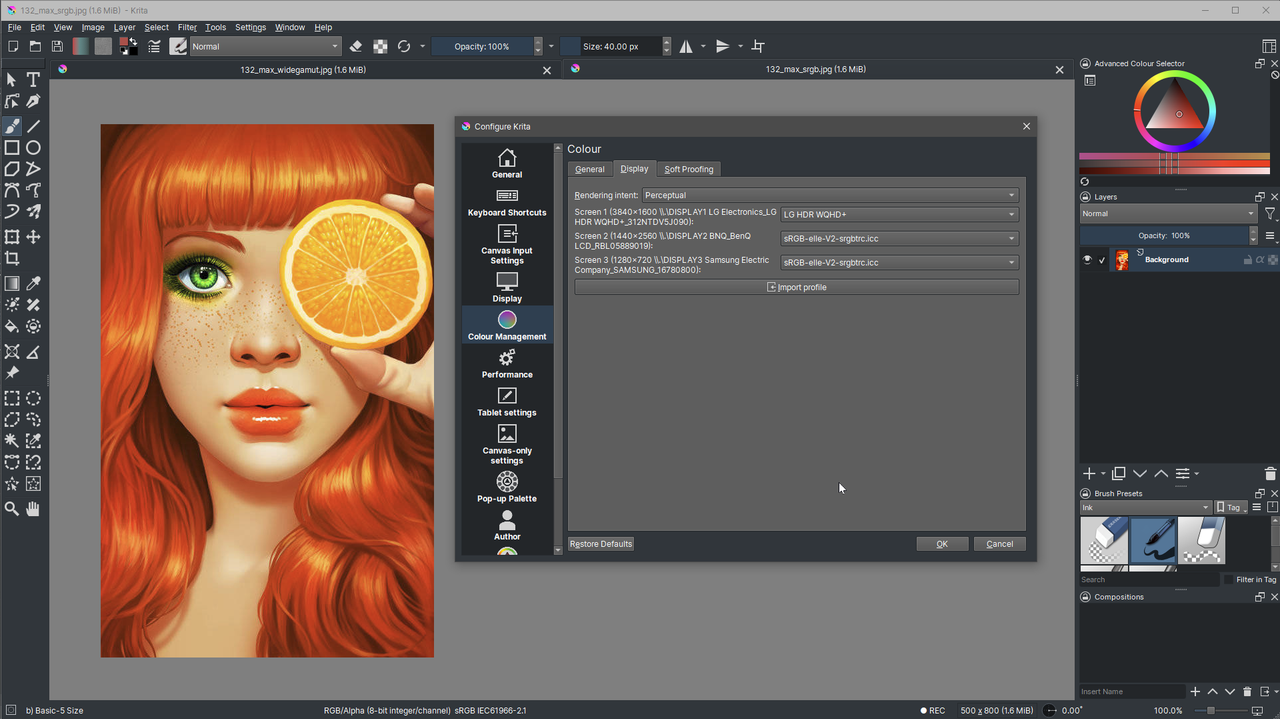
Irfanview relies in principle on the System profile by default, and it works as expected:
.
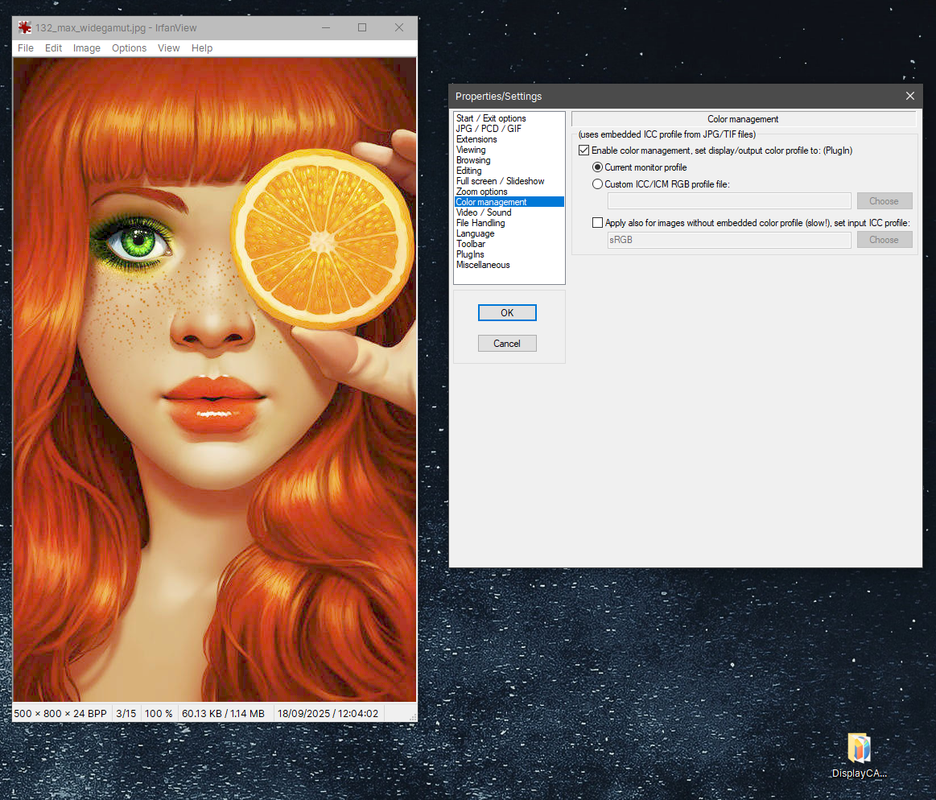
.
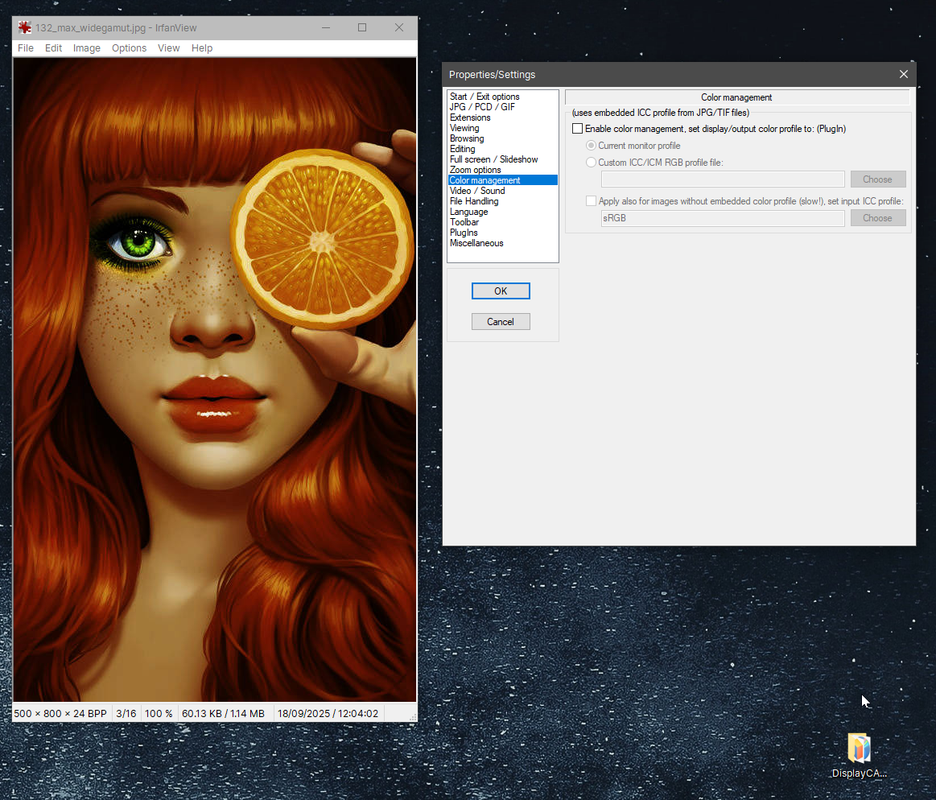
To end with:
Yes, it would be interesting to learn from Martin about PhotoLine's behaviour when the Screen profile is set to "System". If this is supposed to behave the same as (for example) Irfanview, it seems wrong to me.
Secondly: we should be SUPER happy that we can actually turn off colour management in PhotoLine with a simple checkbox. Photoshop and Affinity are borked in that respect, because it simply is not possible. In Photoshop we are forced to use a monitor profile and proof mode. Ridiculous. Not even talking about the behaviour of the colour settings in Photoshop...
Thirdly: if the screen profile is set to the monitor profile of the monitor in use, it works fine. This is also how Krita works, for example. Krita doesn't rely on the OS CMS screen set profile, as far as I can tell.
And turn off colour management in PhotoLine.
Low and behold, I run into the same behaviour as @pixel8tor:
.
That behaviour seems to be odd. Why is the map not colour managed, and the image view seems to be sRGB profile managed even when colour management is turned off?
The sRGB embedded version seems to display 'correctly' non-colour managed.
.
But on second thought it probably just means that the sRGB profile merely matches the seemingly in-use sRGB screen profile even when colour management is turned off in PhotoLine when the System profile is used.
When I force the screen profile in PhotoLine to use the standard srgb colour profile (like before) the result is as expected with deactivated CM and the wide gamut profile embedded image version:
.
So I decided to investigate further.
Because I still have not gotten around to properly profile this monitor, I decided to just install the manufacturer's monitor profile (which assumes that I am running the monitor in standard DCI-P3 mode). But I decide to continue to run the monitor in sRGB mode, because the result of this mismatch between sRGB and SCI-P3 should be a less saturated image even with colour management on. I do this to ensure I cannot confuse the system profile that is in use by PhotoLine with the actual monitor profile.
Now it works as it should:
.
Note that the saturation is slightly, but visibly, lowered when I use the LG profile. Which is to be expected since its DCI-P3 98% gamut is wider than sRGB.
With CM turned off and using this profile I get:
.
Next I change the system settings for my screen's colour profile to allow all apps system-wide to use the LG profile, and tell PhotoLine to use the System colour profile:
.
That doesn't match the version where I set the LG profile directly. It matches the sRGB profile: it is too saturated.
So... when "System" is used in PhotoLine's Screen profile, it relies on a standard sRGB profile.
What happens when we turn off colour management with this setup?
.
Same issue. It doesn't matter which profile is used in the System settings or PhotoLine's Screen profile settings: the image view seemingly defaults to sRGB no matter what. The Map window actually is not fooled, and shows the unmanaged colour version as expected.
In any case, as long as the screen profile in PhotoLine is set to your monitor profile it works just fine.
Krita doesn't even give the user an option to choose the default System one, and we have to pick the correct screen profile:
.
Irfanview relies in principle on the System profile by default, and it works as expected:
.
.
To end with:
Yes, it would be interesting to learn from Martin about PhotoLine's behaviour when the Screen profile is set to "System". If this is supposed to behave the same as (for example) Irfanview, it seems wrong to me.
Secondly: we should be SUPER happy that we can actually turn off colour management in PhotoLine with a simple checkbox. Photoshop and Affinity are borked in that respect, because it simply is not possible. In Photoshop we are forced to use a monitor profile and proof mode. Ridiculous. Not even talking about the behaviour of the colour settings in Photoshop...
Thirdly: if the screen profile is set to the monitor profile of the monitor in use, it works fine. This is also how Krita works, for example. Krita doesn't rely on the OS CMS screen set profile, as far as I can tell.
/*---------------------------------------------*/
System: Win10 64bit - i7 [email protected], p6t Deluxe v1, 48gb (6x8gb RipjawsX), Nvidia GTX1080 8GB, Revodrive X2 240gb, e-mu 1820, 2XSamsung SA850 (2560*1440) and 1XHP2408H 1920*1200 portrait
System: Win10 64bit - i7 [email protected], p6t Deluxe v1, 48gb (6x8gb RipjawsX), Nvidia GTX1080 8GB, Revodrive X2 240gb, e-mu 1820, 2XSamsung SA850 (2560*1440) and 1XHP2408H 1920*1200 portrait
-
shijan
- Mitglied
- Beiträge: 2095
- Registriert: Mo 23 Dez 2019 15:21
- Wohnort: Ukraine
Re: Is Color Management always on in Photoline?
Can you confirm that your system default profile in Windows set like this?

PhotoLine UI Icons Customization Project: https://www.pl32.com/forum3/viewtopic.php?f=3&t=6302
-
Herbert123
- Mitglied
- Beiträge: 2459
- Registriert: Sa 12 Mai 2012 21:38
Re: Is Color Management always on in Photoline?
Here are my settings.
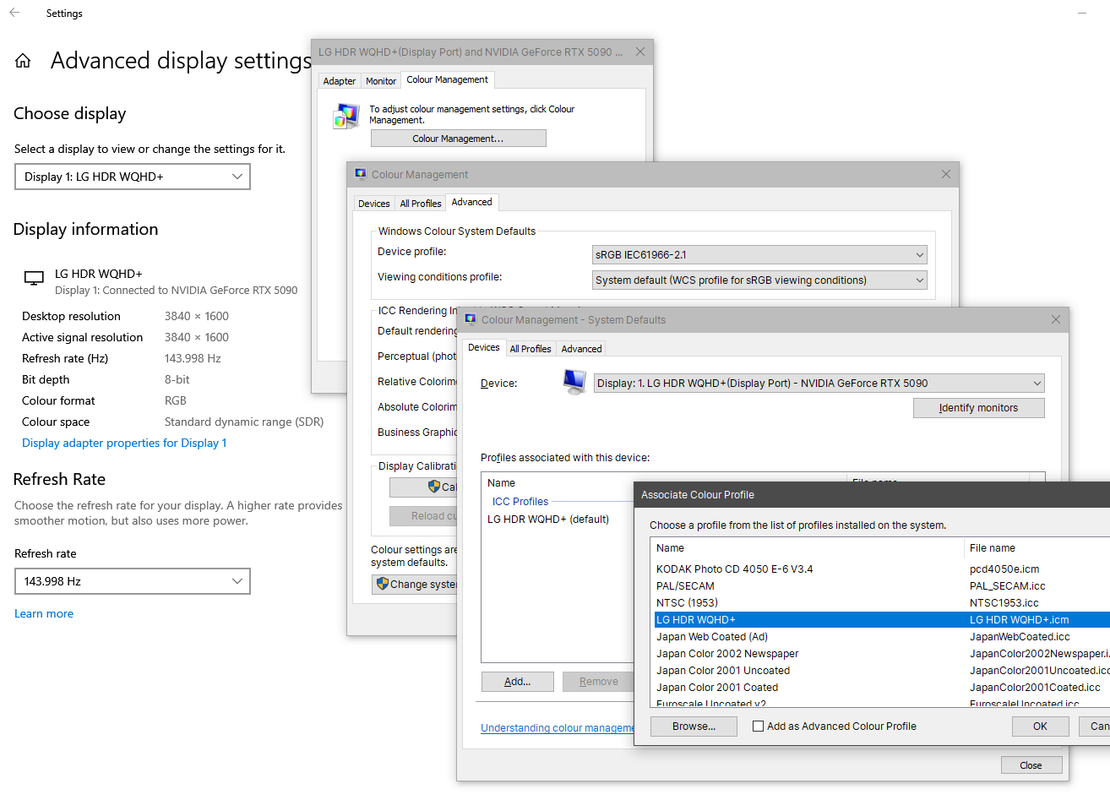
I do not have the generic display listed here, because my LG monitor is identified as the LG HDR WQHD+ (installed the drivers).
I do not have the generic display listed here, because my LG monitor is identified as the LG HDR WQHD+ (installed the drivers).
/*---------------------------------------------*/
System: Win10 64bit - i7 [email protected], p6t Deluxe v1, 48gb (6x8gb RipjawsX), Nvidia GTX1080 8GB, Revodrive X2 240gb, e-mu 1820, 2XSamsung SA850 (2560*1440) and 1XHP2408H 1920*1200 portrait
System: Win10 64bit - i7 [email protected], p6t Deluxe v1, 48gb (6x8gb RipjawsX), Nvidia GTX1080 8GB, Revodrive X2 240gb, e-mu 1820, 2XSamsung SA850 (2560*1440) and 1XHP2408H 1920*1200 portrait