Neue Testversion 25.00b11

Hier diskutieren die Betatester von PhotoLine untereinander und mit den Entwicklern
Benutzeravatar
Gerhard Huber
Entwickler
Entwickler
Beiträge: 4278
Registriert: Mo 18 Nov 2002 15:30
Wohnort: Bad Gögging

Neue Testversion 25.00b11

Beitrag von Gerhard Huber »

Hallo,

es gibt wieder eine neue Testversion 25.00b11.

Windows:
https://www.pl32.com/beta/pl2500b11.zip

macOS:
https://www.pl32.com/beta/plx2500b11.zip

Neues:
  • Ebenenliste, Suchen: "&linecolor" und "&fillcolor" suchen nun auch in Textebenen
  • Ebenenliste, Suchen: "&color" sucht Linien- und Füllfarbe
  • Ebenenliste: Es wird nun angezeigt, ob es ein aktives "Markierte Vektorebenen morphen" gibt
  • Diverse Fehlerbehebungen und kleinere Verbesserungen
Benutzeravatar
shijan
Mitglied
Beiträge: 2033
Registriert: Mo 23 Dez 2019 15:21
Wohnort: Ukraine

Re: Neue Testversion 25.00b11

Beitrag von shijan »

AVIF export don't works on macOS.
Screen Shot 2025-11-04 at 10.11.55 PM.jpg
Du hast keine ausreichende Berechtigung, um die Dateianhänge dieses Beitrags anzusehen.
PhotoLine UI Icons Customization Project: https://www.pl32.com/forum3/viewtopic.php?f=3&t=6302
Vivi_Ram
Mitglied
Beiträge: 421
Registriert: Sa 28 Sep 2024 17:04

Re: Neue Testversion 25.00b11

Beitrag von Vivi_Ram »

Morphing tool bug is fixed!
Vivi_Ram
Mitglied
Beiträge: 421
Registriert: Sa 28 Sep 2024 17:04

Rendering bug - Layer Styles are getting distorted

Beitrag von Vivi_Ram »

Chrome Effect - rendering bug.jpg
So, I was trying to recreate a layer style based element. It worked properly - but then it does not. I don't know what's happening.

How to reproduce the bug:

1. Save the file.
2. Open the file. Make some changes in the Layer Styles panel after selecting one of the elements. Undo the changes. Save and close.
3. Open the file again through File >> Recent files. You'll see the layer styles are getting distorted.

This can be corrected by changing how the layer applies in the properties panel. By cycling through Layer Styles to Layer, Group and Page, it is reset. But close and open again, it's there.

:) https://drive.google.com/file/d/1TKGw_2 ... drive_link - File is here.

This is what it should look like.
Chrome Effect.jpg
Du hast keine ausreichende Berechtigung, um die Dateianhänge dieses Beitrags anzusehen.
Vivi_Ram
Mitglied
Beiträge: 421
Registriert: Sa 28 Sep 2024 17:04

Re: Neue Testversion 25.00b11

Beitrag von Vivi_Ram »

I have a number of suggestions for improving flood fill:

1. The ability to flood fill vector objects based on the edges is essential: This is a big time-saving capability. This is a logical extension of the fact that PL can already create vector layer through flood fill.

At the moment, as far as I can see, flood fill only works on raster layers.

2. The vector layers created at the moment through flood fill produce enormous number of nodes. I understand this is because of screen anti-aliasing of the edges. But without anti-aliasing, it gets even worse. This is true for even simple shapes like a circle. See image below:
layer_3.jpg
If vector layers allow flood fill, at least a part of this problem can be solved I believe.

Please could we see some improvements in this? Thank you!
Du hast keine ausreichende Berechtigung, um die Dateianhänge dieses Beitrags anzusehen.
Benutzeravatar
shijan
Mitglied
Beiträge: 2033
Registriert: Mo 23 Dez 2019 15:21
Wohnort: Ukraine

Re: Neue Testversion 25.00b11

Beitrag von shijan »

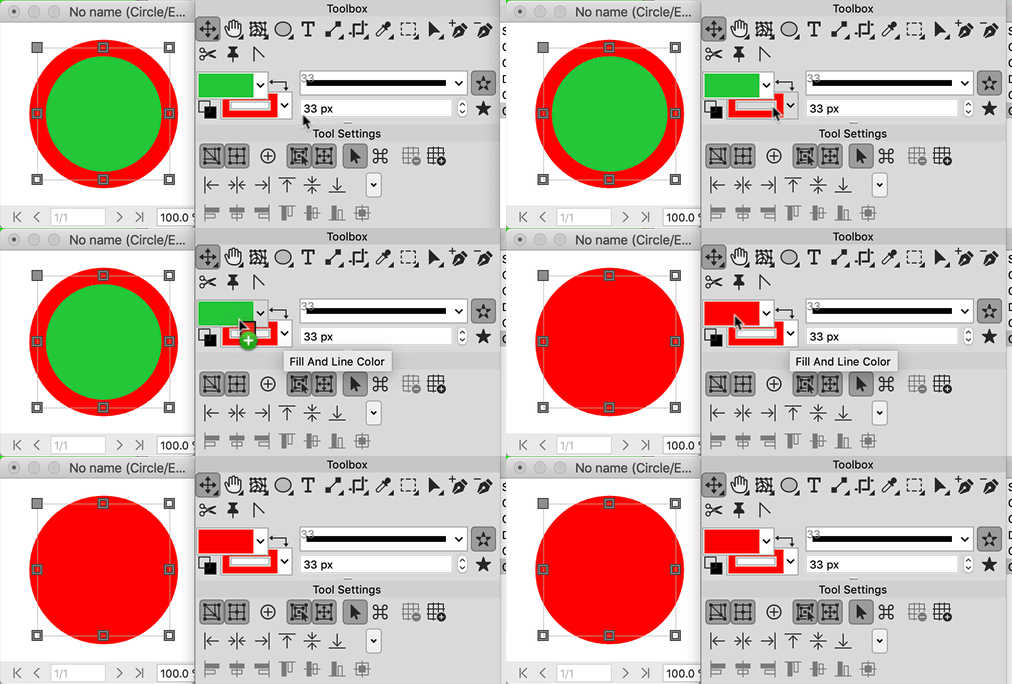
Just pick colors in Toolbox or drag and drop colors.
Bild

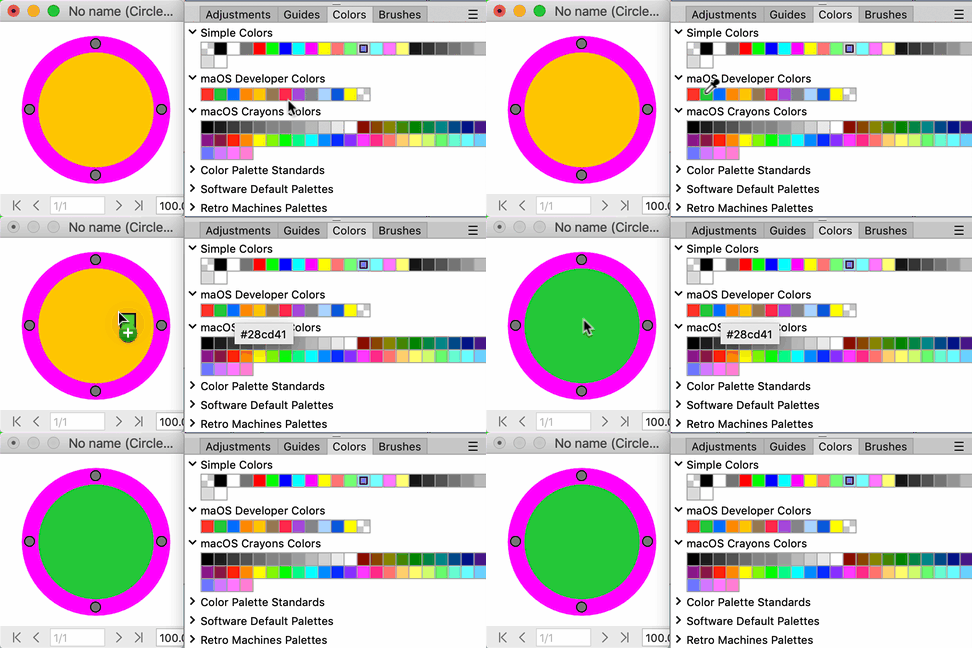
You can also drag and drop directly from Colors panel:
Bild
Zuletzt geändert von shijan am Mi 12 Nov 2025 11:18, insgesamt 1-mal geändert.
PhotoLine UI Icons Customization Project: https://www.pl32.com/forum3/viewtopic.php?f=3&t=6302
Vivi_Ram
Mitglied
Beiträge: 421
Registriert: Sa 28 Sep 2024 17:04

Re: Neue Testversion 25.00b11

Beitrag von Vivi_Ram »

This is not what I want @Shijan. Say I have drawn three separate vector lines with a profile. I want to be able to fill the gap between them automatically. This happens by detecting edges. This is how it works in pretty much every other software. Illustrator, Affinity... etcetera. PL already has the function. It just needs to be extended to included vector layers too.
layer.jpg


Those are three separate lines. Vector layers. Flood fill needs to be able to detect the edges and fill the gap. And it should not produce tens of nodes. Hope that helps.

Like this:
Flood Fill.gif
Du hast keine ausreichende Berechtigung, um die Dateianhänge dieses Beitrags anzusehen.
Zuletzt geändert von Vivi_Ram am Mi 12 Nov 2025 11:28, insgesamt 1-mal geändert.
Benutzeravatar
shijan
Mitglied
Beiträge: 2033
Registriert: Mo 23 Dez 2019 15:21
Wohnort: Ukraine

Re: Neue Testversion 25.00b11

Beitrag von shijan »

Did you mean fill like this, but keep it in vector?:
layer.jpg
Du hast keine ausreichende Berechtigung, um die Dateianhänge dieses Beitrags anzusehen.
PhotoLine UI Icons Customization Project: https://www.pl32.com/forum3/viewtopic.php?f=3&t=6302
Vivi_Ram
Mitglied
Beiträge: 421
Registriert: Sa 28 Sep 2024 17:04

Re: Neue Testversion 25.00b11

Beitrag von Vivi_Ram »

Yes, but in PL, it only works if the lines are raster layers. You cannot do a flood fill directly on a vector layer. In the GIF I have added to my previous response, the lines are vector. That's what I mean. And the resulting curve is sharp because there's no anti-aliasing. There are three nodes. One for each corner.

See below:
layer.jpg
Du hast keine ausreichende Berechtigung, um die Dateianhänge dieses Beitrags anzusehen.
Benutzeravatar
shijan
Mitglied
Beiträge: 2033
Registriert: Mo 23 Dez 2019 15:21
Wohnort: Ukraine

Re: Neue Testversion 25.00b11

Beitrag von shijan »

It is sort of possible in PhotoLine but not too fast and easy:
- Select all lines
- Layout->Vector->Union
- Click on Path Group layer in layers tree and in Layer Attributes change Type from "Path Group" to "Vector"
- Switch to "Edit Vector Points" tool and manually select all vector points inside. Hold Shift to add more points to selection
- Copy/Paste.
- Fill new vector layer with any color.
PhotoLine UI Icons Customization Project: https://www.pl32.com/forum3/viewtopic.php?f=3&t=6302
Vivi_Ram
Mitglied
Beiträge: 421
Registriert: Sa 28 Sep 2024 17:04

Re: Neue Testversion 25.00b11

Beitrag von Vivi_Ram »

Yes, this is an enormous number of steps for a simple and straightforward operation. It would be most welcome to do it directly. Select flood fill and click. As long as the active and below layers are set, it should work automatically. :)
Benutzeravatar
shijan
Mitglied
Beiträge: 2033
Registriert: Mo 23 Dez 2019 15:21
Wohnort: Ukraine

Re: Neue Testversion 25.00b11

Beitrag von shijan »

I guess globally all this could be requested as Vector Painting Tools for PhotoLine. Currently there are no any vector painting tools in Photoline at all.
There is Layout->Image->Path Painting, but it is not vector painting, it just draws raster brush stroke across vector shape.
PhotoLine UI Icons Customization Project: https://www.pl32.com/forum3/viewtopic.php?f=3&t=6302
Vivi_Ram
Mitglied
Beiträge: 421
Registriert: Sa 28 Sep 2024 17:04

Re: Neue Testversion 25.00b11

Beitrag von Vivi_Ram »

shijan hat geschrieben: Mi 12 Nov 2025 11:50 I guess globally all this could be requested as Vector Painting Tools for PhotoLine. Currently there are no any vector painting tools in Photoline at all.
There is Layout->Image->Path Painting, but it is not vector painting, it just draws raster brush stroke across vector shape.
Agreed: PhotoLine has a very powerful vector engine. I am particularly impressed by how it handles morphing. However, PL needs a number of features to fully flesh this out:

1. Vector brushes - Art and Scatter Brushes. Art brushes stretch a vector object across a path/curve. Scatter brushes scatter vector objects along a path. These can then be "expanded" or "split" into separate vector layers. This is a very quick and efficient way to produce complex vector-based shapes, textures, and so on.

See below:
Art and Scatter Brushes.jpg
These brushes can be edited in an enormous number of ways:

Scatter Brush Settings:
layer.jpg
Art Brush Settings:
layer.jpg

2. Morph Along Path: This is fairly self-explanatory. It is simply a matter of attaching a blend to a path. It has been around for pretty much since FreeHand. :) It would be a welcome addition.

3. Vector Pattern: PL already has a great vector pattern feature. It can be improved vastly if the following shapes are supported. Rhomboid, Triangle and Hexagon. As simple as it sounds, there is mathematically on 17 ways in which a pattern can be created. 17 and only 17. And every single 2D pattern in the universe can be fit in to these 4 shapes: Square, Rhomboid, Triangle and Hexagon. There's a mathematical proof for this from the world of crystallography that I am too simple to understand.
layer.jpg
4. Vector Contour/Chamfer: This is variously called as Offset, Chamfer or Contour. The idea is to create contours of a shape inside or outside the vector shape. It helps create perfectly aligned shapes very quickly. The resulting vectors can be split into individual layers, too. It is somewhat like morph tool in that the steps are always perfectly aligned to the centre of the shape. This is also very useful for adding contours to text.
Chamfer.jpg
5. Blob Brush: This is exactly like a raster brush, except it is a vector. And unlike a scatter brush/art brush, it does not create paths. Rather it creates filled shapes. And you can paint with your tablet.

These 5 features alone will make PL a vector powerhouse.
PS:
6. How can I forget? Vector Feathering: This is a complete game changer. There's simply no way of going back to anything else once you get to used to Vector Feathering.
Du hast keine ausreichende Berechtigung, um die Dateianhänge dieses Beitrags anzusehen.
Vivi_Ram
Mitglied
Beiträge: 421
Registriert: Sa 28 Sep 2024 17:04

[Bug]: Mesh Gradient

Beitrag von Vivi_Ram »

layer.jpg
When I apply Mesh gradient to complex shapes, it produces an enormous number of nodes. It also completely distorts the shape itself.

Please see above. The shape on the left is what it should look like. The shape in the middle is the distorted shape.

https://drive.google.com/file/d/1cGjC-9 ... sp=sharing
Du hast keine ausreichende Berechtigung, um die Dateianhänge dieses Beitrags anzusehen.
Benutzeravatar
shijan
Mitglied
Beiträge: 2033
Registriert: Mo 23 Dez 2019 15:21
Wohnort: Ukraine

Re: Neue Testversion 25.00b11

Beitrag von shijan »

I guess you expect too much from Mesh Gradient on so complex vector shapes. It is more logical to draw simple shape specially for mesh gradient and use main vector image as clipping mask for it.
Screen Shot 2025-11-12 at 2.41.58 PM.jpg
Du hast keine ausreichende Berechtigung, um die Dateianhänge dieses Beitrags anzusehen.
PhotoLine UI Icons Customization Project: https://www.pl32.com/forum3/viewtopic.php?f=3&t=6302