Okay, I know what's happening.
So, if I apply adjustments the traditional way of applying adjustments from the icon at the bottom of the layers panel, Undo does not work. Whereas if applied from within the adjustment layer panel, it works. @Gerhard & @Martin: Is this a deliberate choice? If not can it work consistently across both ways. It can be confusing when one works and the other does not.
Neue Testversion 25.00b12
-
Vivi_Ram
- Mitglied
- Beiträge: 421
- Registriert: Sa 28 Sep 2024 17:04
-
shijan

- Mitglied
- Beiträge: 2033
- Registriert: Mo 23 Dez 2019 15:21
- Wohnort: Ukraine
Re: Neue Testversion 25.00b12
Also there is a small problem - in Curves Adjustment Undo works strange when use bottom triangle handles:
If Curves panel inactive, Undo works well.
If Curves panel active, Undo creates multiple additional steps.
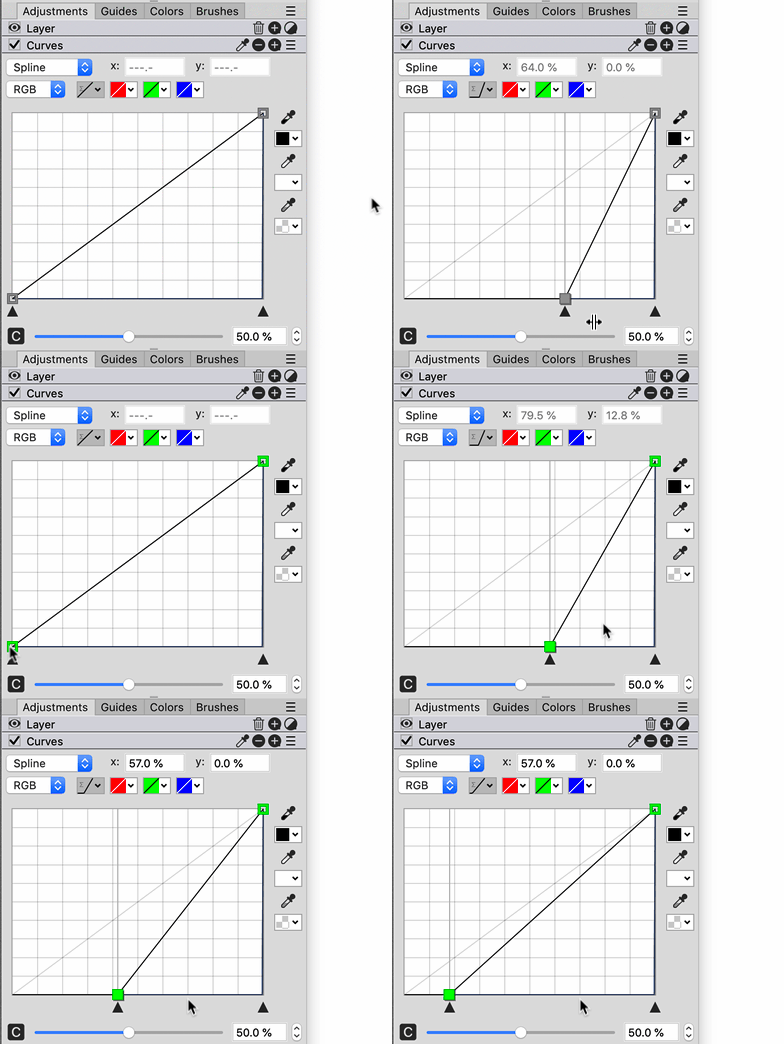
If Curves panel inactive, Undo works well.
If Curves panel active, Undo creates multiple additional steps.
PhotoLine UI Icons Customization Project: https://www.pl32.com/forum3/viewtopic.php?f=3&t=6302
-
Vivi_Ram
- Mitglied
- Beiträge: 421
- Registriert: Sa 28 Sep 2024 17:04
Re: Neue Testversion 25.00b12
Great catch. 
-
Vivi_Ram
- Mitglied
- Beiträge: 421
- Registriert: Sa 28 Sep 2024 17:04
Re: Neue Testversion 25.00b12
Scrubbing not working with pen tablet: Just a quick question. When I hold down Ctrl + Space bar, PL correctly invokes the Zoom function. However, PL does not seem to allow Scrub Zooming. Scrub zooming is exceptionally useful when working with pen tablet. I drag the pen right holding down Ctrl + Spacebar, Zoom in. Drag left, zoom out. https://ibb.co/9HCvNb9v - Like so. How do I do this in PL. If it's not available, please could I suggest this? It's virtually the standard in every other program and designers would really appreciate it.
-
Herbert123

- Mitglied
- Beiträge: 2455
- Registriert: Sa 12 Mai 2012 21:38
Re: Neue Testversion 25.00b12
Something changed when I use the middle mouse button to pan the view: when I let go after panning the view, a menu appears with "scale layer", Rotate Layer, and Convert layer type.
I checked the mouse preferences, but I did not change any settings.
This is really causing me a LOT of frustration. Is this new behaviour, or a new setting that needs to be turned off?
Thank you.
I checked the mouse preferences, but I did not change any settings.
This is really causing me a LOT of frustration. Is this new behaviour, or a new setting that needs to be turned off?
Thank you.
/*---------------------------------------------*/
System: Win10 64bit - i7 [email protected], p6t Deluxe v1, 48gb (6x8gb RipjawsX), Nvidia GTX1080 8GB, Revodrive X2 240gb, e-mu 1820, 2XSamsung SA850 (2560*1440) and 1XHP2408H 1920*1200 portrait
System: Win10 64bit - i7 [email protected], p6t Deluxe v1, 48gb (6x8gb RipjawsX), Nvidia GTX1080 8GB, Revodrive X2 240gb, e-mu 1820, 2XSamsung SA850 (2560*1440) and 1XHP2408H 1920*1200 portrait
-
Gerhard Huber

- Entwickler

- Beiträge: 4278
- Registriert: Mo 18 Nov 2002 15:30
- Wohnort: Bad Gögging
Re: Neue Testversion 25.00b12
You see the user context menu, if you click with the middle mouse button.
If you drag, the context menu doesn't occur.
If it occurs on your computer every time, there is a problem with your mouse.
If you drag, the context menu doesn't occur.
If it occurs on your computer every time, there is a problem with your mouse.
-
Vivi_Ram
- Mitglied
- Beiträge: 421
- Registriert: Sa 28 Sep 2024 17:04
Re: Neue Testversion 25.00b12
I cannot replicate this @Herbert123. As long as I hold down the scroll wheel and pan, it works perfectly. I do have a separate middle click button, which opens the context menu. Gerhard is right.
-
shijan
- Mitglied
- Beiträge: 2033
- Registriert: Mo 23 Dez 2019 15:21
- Wohnort: Ukraine
Re: Neue Testversion 25.00b12
Middle click (without drag) always was used for Context Menu. It is very useful menu. You can customize it here.

PhotoLine UI Icons Customization Project: https://www.pl32.com/forum3/viewtopic.php?f=3&t=6302
-
shijan
- Mitglied
- Beiträge: 2033
- Registriert: Mo 23 Dez 2019 15:21
- Wohnort: Ukraine
Re: Neue Testversion 25.00b12
It is probably your mouse button membrane mechanically creates double click instead of single click. It is a common problem with mouses. There is a solution. Press button very strong and hold 20-30 seconds. Knock mouse by the table to make internal parts vibrate. Repeat this 5-10 times.
PhotoLine UI Icons Customization Project: https://www.pl32.com/forum3/viewtopic.php?f=3&t=6302
-
Herbert123
- Mitglied
- Beiträge: 2455
- Registriert: Sa 12 Mai 2012 21:38
Re: Neue Testversion 25.00b12
Hmmm... you all are right: it seems the middle mouse button isn't responding as it should!
Thanks for pointing out that potential issue - I intend to clean it and check if the button isn't broken.
Thanks!
Thanks for pointing out that potential issue - I intend to clean it and check if the button isn't broken.
Thanks!
/*---------------------------------------------*/
System: Win10 64bit - i7 [email protected], p6t Deluxe v1, 48gb (6x8gb RipjawsX), Nvidia GTX1080 8GB, Revodrive X2 240gb, e-mu 1820, 2XSamsung SA850 (2560*1440) and 1XHP2408H 1920*1200 portrait
System: Win10 64bit - i7 [email protected], p6t Deluxe v1, 48gb (6x8gb RipjawsX), Nvidia GTX1080 8GB, Revodrive X2 240gb, e-mu 1820, 2XSamsung SA850 (2560*1440) and 1XHP2408H 1920*1200 portrait
-
Herbert123
- Mitglied
- Beiträge: 2455
- Registriert: Sa 12 Mai 2012 21:38
Re: Neue Testversion 25.00b12
THANK YOU! Used that method, and a lot of grit fell out after a few times repeating...shijan hat geschrieben: Mi 10 Dez 2025 12:28 It is probably your mouse button membrane mechanically creates double click instead of single click. It is a common problem with mouses. There is a solution. Press button very strong and hold 20-30 seconds. Knock mouse by the table to make internal parts vibrate. Repeat this 5-10 times.
Works again!

This is my favourite mouse ever (Sensei Ten), and I wouldn't want to replace it.
/*---------------------------------------------*/
System: Win10 64bit - i7 [email protected], p6t Deluxe v1, 48gb (6x8gb RipjawsX), Nvidia GTX1080 8GB, Revodrive X2 240gb, e-mu 1820, 2XSamsung SA850 (2560*1440) and 1XHP2408H 1920*1200 portrait
System: Win10 64bit - i7 [email protected], p6t Deluxe v1, 48gb (6x8gb RipjawsX), Nvidia GTX1080 8GB, Revodrive X2 240gb, e-mu 1820, 2XSamsung SA850 (2560*1440) and 1XHP2408H 1920*1200 portrait
-
Vivi_Ram
- Mitglied
- Beiträge: 421
- Registriert: Sa 28 Sep 2024 17:04
Re: Neue Testversion 25.00b12
@Gerhard: Quick question. How do I get Open Type features in PL on Windows? Thank you! I want to use contextual alternates for character combinations of Th, ff, fi, and so on. The font I am trying to use is the the famous free Junicode font for medievalist scholars.
-
Vivi_Ram
- Mitglied
- Beiträge: 421
- Registriert: Sa 28 Sep 2024 17:04
Re: Neue Testversion 25.00b12
[Potential Bug]: I am experiencing a very funny bug. As in it's actually making me laugh.
I set up my PL to have the exact keyboard layout as Xara to help work faster. I set up Shift + H and Shift + V as shortcuts for flip horizontally and vertically respectively. But every time I flip one object using the object, copy of the object flips too! It only happens with the shortcut, not with the dropdown. I checked. It's not a virtual copy. Just a simple duplicate. Check it out @Gerhard:
https://ibb.co/GvzJ3jG2
It's like a little dance!
I set up my PL to have the exact keyboard layout as Xara to help work faster. I set up Shift + H and Shift + V as shortcuts for flip horizontally and vertically respectively. But every time I flip one object using the object, copy of the object flips too!
It only happens with the shortcut, not with the dropdown. I checked. It's not a virtual copy. Just a simple duplicate. Check it out @Gerhard: https://ibb.co/GvzJ3jG2
It's like a little dance!
-
shijan
- Mitglied
- Beiträge: 2033
- Registriert: Mo 23 Dez 2019 15:21
- Wohnort: Ukraine
Re: Neue Testversion 25.00b12
Maybe you flip horizontally and vertically all document instead of layer?
PhotoLine UI Icons Customization Project: https://www.pl32.com/forum3/viewtopic.php?f=3&t=6302
-
Gerhard Huber
- Entwickler
- Beiträge: 4278
- Registriert: Mo 18 Nov 2002 15:30
- Wohnort: Bad Gögging
Re: Neue Testversion 25.00b12
yes, "Shift" makes PhotoLine to flip the whole document.