How to create "Long Shadows" efficiently on vector objects?

Answers to frequently asked questions about PhotoLine
csanchez
Mitglied
Beiträge: 36
Registriert: Di 19 Jul 2022 06:00

How to create "Long Shadows" efficiently on vector objects?

Beitrag von csanchez »

Hello everyone,

For a while now, I've wanted to learn how to generate "Long Shadows" on vector objects in an easy, automatic, and above all, precise way.

I know this style is a standard in visual guides like Material Design, and although I think it would be an excellent addition to have a dedicated Layer Style for this in PhotoLine, I'd like to know how you currently solve this.

What tricks or techniques do you recommend to achieve this effect without having to do it manually step by step? I'm especially interested if you know of any way to keep it editable or automate it through actions.

Thank you very much in advance for your suggestions!

Bild
Benutzeravatar
Hoogo
Beta Tester
Beiträge: 4169
Registriert: So 03 Jul 2005 13:35
Wohnort: Deutschland

Re: How to create "Long Shadows" efficiently on vector objects?

Beitrag von Hoogo »

I used "vector morph" for similar purposes, so this method is what I try first. The resulting shape is not really vector, it can be jaggy if your shapes have sharp spiky edges.
Du hast keine ausreichende Berechtigung, um die Dateianhänge dieses Beitrags anzusehen.
----------------
Herr Doktor, ich bin mir ganz sicher, ich habe Atom! /Doctor, doctor, I'm sure, I've got atoms!
Benutzeravatar
der_fotograf
Mitglied
Beiträge: 672
Registriert: Mo 05 Dez 2016 08:33
Wohnort: North Germany

Re: How to create "Long Shadows" efficiently on vector objects?

Beitrag von der_fotograf »

So etwas in der Richtung mit »3D Body«?
Wie man den 3D Body ohne Schatten füllen kann, habe ich jetzt nicht ausprobiert.

Screenshot 2026-01-22 at 07.37.41.jpg
Du hast keine ausreichende Berechtigung, um die Dateianhänge dieses Beitrags anzusehen.
Nur wenige wissen, wie viel man wissen muss, um zu wissen, wie wenig man weiss.
Only few know how much you have to know to know how little you know.
— Werner Heisenberg [German theoretical physicist]
Benutzeravatar
der_fotograf
Mitglied
Beiträge: 672
Registriert: Mo 05 Dez 2016 08:33
Wohnort: North Germany

Re: How to create "Long Shadows" efficiently on vector objects?

Beitrag von der_fotograf »

Uihh, jetzt habe ich Hoogos Morph mal geöffnet, das ist ja viel besser als die Lösung mit dem 3D Body.

Funktioniert einwandfrei, man muss nur die Anzahl der Stufen entsprechend hoch einsetzen.

long_shadow_02.pld
Du hast keine ausreichende Berechtigung, um die Dateianhänge dieses Beitrags anzusehen.
Nur wenige wissen, wie viel man wissen muss, um zu wissen, wie wenig man weiss.
Only few know how much you have to know to know how little you know.
— Werner Heisenberg [German theoretical physicist]
Benutzeravatar
shijan
Mitglied
Beiträge: 2012
Registriert: Mo 23 Dez 2019 15:21
Wohnort: Ukraine

Re: How to create "Long Shadows" efficiently on vector objects?

Beitrag von shijan »

It could be useful to request simple layer style for this common effect in future version(s) of PhotoLine.
PhotoLine UI Icons Customization Project: https://www.pl32.com/forum3/viewtopic.php?f=3&t=6302
Benutzeravatar
Hoogo
Beta Tester
Beiträge: 4169
Registriert: So 03 Jul 2005 13:35
Wohnort: Deutschland

Re: How to create "Long Shadows" efficiently on vector objects?

Beitrag von Hoogo »

shijan hat geschrieben: Do 22 Jan 2026 12:43 It could be useful to request simple layer style for this common effect in future version(s) of PhotoLine.
Idk... That trend and the style might get outdated some day, and what other use case is there for such layer style? Morphing gives more options.
long_shadow_02.png
Du hast keine ausreichende Berechtigung, um die Dateianhänge dieses Beitrags anzusehen.
----------------
Herr Doktor, ich bin mir ganz sicher, ich habe Atom! /Doctor, doctor, I'm sure, I've got atoms!
csanchez
Mitglied
Beiträge: 36
Registriert: Di 19 Jul 2022 06:00

Re: How to create "Long Shadows" efficiently on vector objects?

Beitrag von csanchez »

Alright guys, here's how I'm doing it to get a long vector shadow.

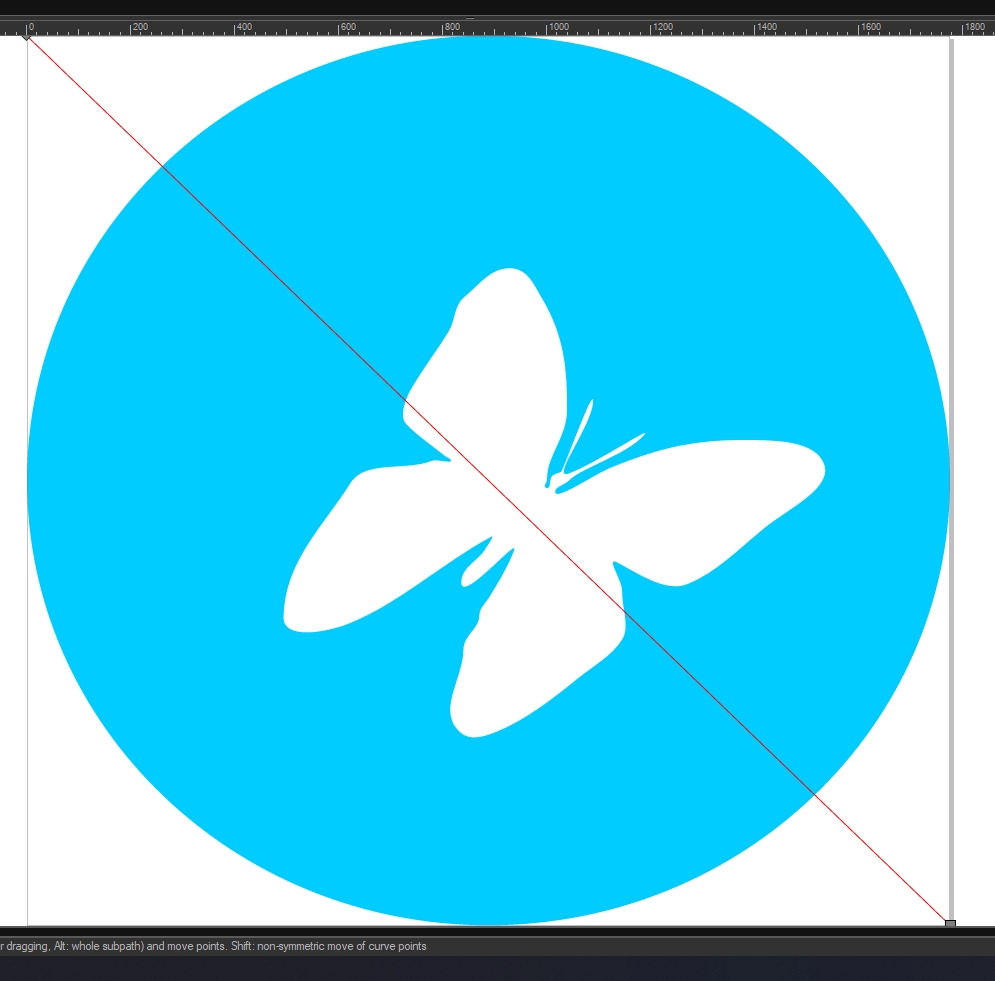
1. We create a long line from corner to corner; we'll use it as a guide line.
Bild

2. We create some copies and start moving the entire line/layer to the "extreme points" of the object, from where "the shadow would come out," using PhotoLine's "snapping" function (holding down Alt) is relatively easy.
Bild

3. We create a vector object by connecting the points of these lines that match the object.
Bild

4. We create a copy of the background circle, place it over the shadow layer, and convert the layer to "Layer Mask for Previous". (Ctrl + Shift + M)
4.1 Edit, another more appropriate way: leave the shadow layer on top, select the background and the shadow, and create an intersection of these.

Bild

In this way, it's relatively simple to get a long vector shadow, in my opinion.
But for that same reason, something like a layer style for this would be better, as it would allow you to configure things like the shadow's direction.
Bild
csanchez
Mitglied
Beiträge: 36
Registriert: Di 19 Jul 2022 06:00

Re: How to create "Long Shadows" efficiently on vector objects?

Beitrag von csanchez »

Hoogo hat geschrieben: Mi 21 Jan 2026 10:33 I used "vector morph" for similar purposes, so this method is what I try first. The resulting shape is not really vector, it can be jaggy if your shapes have sharp spiky edges.
Oh, I hadn't looked at this properly, it's really good and solves the thing about being able to modify the shadow's orientation :lol:
excellent! :D

On the other hand, it's true that the shadow isn't really a vector form; you can tell by zooming in a bit and it becomes a bit slow during editing.

Perhaps there's some way or trick to combine this idea with another method that makes the shadow vector?
csanchez
Mitglied
Beiträge: 36
Registriert: Di 19 Jul 2022 06:00

Re: How to create "Long Shadows" efficiently on vector objects?

Beitrag von csanchez »

shijan hat geschrieben: Do 22 Jan 2026 12:43 It could be useful to request simple layer style for this common effect in future version(s) of PhotoLine.
Yeah, in fact I think it would be enough to add some extra option to the "Outside Shadow" Layer Style.

Photopea solves this simply with a "Continuous" option in its Layer Style.
Bild
Benutzeravatar
shijan
Mitglied
Beiträge: 2012
Registriert: Mo 23 Dez 2019 15:21
Wohnort: Ukraine

Re: How to create "Long Shadows" efficiently on vector objects?

Beitrag von shijan »

Yes, that looks like the most logical way to go. In addition, maximum size of layer style should be unlocked everywhere. In many other apps it just possible to enter any larger value manually like this. Why don't allow extended range for Layer Styles in PhotoLine?
Bild
PhotoLine UI Icons Customization Project: https://www.pl32.com/forum3/viewtopic.php?f=3&t=6302
lutzwolfgang
Mitglied
Beiträge: 7
Registriert: Mi 12 Dez 2012 18:32

Re: How to create "Long Shadows" efficiently on vector objects?

Beitrag von lutzwolfgang »

The layer styles in Photoline have been preventing me from buying the program for years.
It's a shame :(
Benutzeravatar
Herbert123
Mitglied
Beiträge: 2452
Registriert: Sa 12 Mai 2012 21:38

Re: How to create "Long Shadows" efficiently on vector objects?

Beitrag von Herbert123 »

lutzwolfgang hat geschrieben: Mi 28 Jan 2026 14:02 The layer styles in Photoline have been preventing me from buying the program for years.
It's a shame :(
That's interesting to me, because certain parts about the layer styles in PhotoLine are actually quite good compared to other software.

But other parts (such as the limited maximum size of the layer style effect) are a bit problematic.

What are your issues with the layer styles?
/*---------------------------------------------*/
System: Win10 64bit - i7 920@3.6Ghz, p6t Deluxe v1, 48gb (6x8gb RipjawsX), Nvidia GTX1080 8GB, Revodrive X2 240gb, e-mu 1820, 2XSamsung SA850 (2560*1440) and 1XHP2408H 1920*1200 portrait
Benutzeravatar
shijan
Mitglied
Beiträge: 2012
Registriert: Mo 23 Dez 2019 15:21
Wohnort: Ukraine

Re: How to create "Long Shadows" efficiently on vector objects?

Beitrag von shijan »

Some time ago Layer styles UI was improved a lot, so currently there is no problem with UI usability. Also some requested new options where added during this time, so seems like Layer Styles development is not abandoned.
I guess it is all about that missing basic functionality compare to other apps:
- Layer style size limit.
- Some styles still use only 8 bit depth.
- Impossible to add multiple copies of same style and move it up down.

Also some confusion related problems:
- There is also strange behave of Drop Shadow. It creates blur effect in both directions, so it is not too easy to control it. Also due this behave shadow effect is lost around sharp corners.
- "Hide Original" behave very unusual with Inside/Outside Shadow.
- There is no layer "Intensity" slider which changes opacity of the layer but keep layer style untouched.
- Layer Style intensity and layer Opacity behave very different with vector and raster layers. This adds some confusion into workflow.

Most of the problems where described with examples here viewtopic.php?p=52101#p52101
PhotoLine UI Icons Customization Project: https://www.pl32.com/forum3/viewtopic.php?f=3&t=6302
lutzwolfgang
Mitglied
Beiträge: 7
Registriert: Mi 12 Dez 2012 18:32

Re: How to create "Long Shadows" efficiently on vector objects?

Beitrag von lutzwolfgang »

The main reason for not switching to Photoline is that I cannot import my text effects from Photopea into Photoline.
Photoline lacks the layer style features to make this possible.
Over the years, I have created many text effects, mainly glass, plastic, and metal.
I have tried several times to recreate texts with the demo version, but the results are not nearly as good.
For example, Google “glass text effects” on YouTube and recreate them in Photoline. You will never achieve such cool results and it will take much more time.
However, since I enjoy creating text effects and Photoline lacks too many options, I will stick with Photopea, even though I don't like the browser version.
I don't think any more options will be added, as Mr. Huber has said something similar.
But if you don't need that, you get a very good 2D program at a fair price.

*Photopea has 5 types of bevel and emboss, Photoline only has two, inner and outer bevel
*Photopea drop shadow includes the options / shadow gap and continuous, Photoline has neither
*Photopea has the satin function, Photoline does not
*The Photoline sliders are limited to a value of 200, in Photopea the value is 2000
*and the many other things that the user “shijan” has already mentioned several times
Bild
Benutzeravatar
shijan
Mitglied
Beiträge: 2012
Registriert: Mo 23 Dez 2019 15:21
Wohnort: Ukraine

Re: How to create "Long Shadows" efficiently on vector objects?

Beitrag von shijan »

Long shadows Layer Style was added in 25.60b2, however it is slightly off-centered yet and so needs a bugfix.
PhotoLine UI Icons Customization Project: https://www.pl32.com/forum3/viewtopic.php?f=3&t=6302