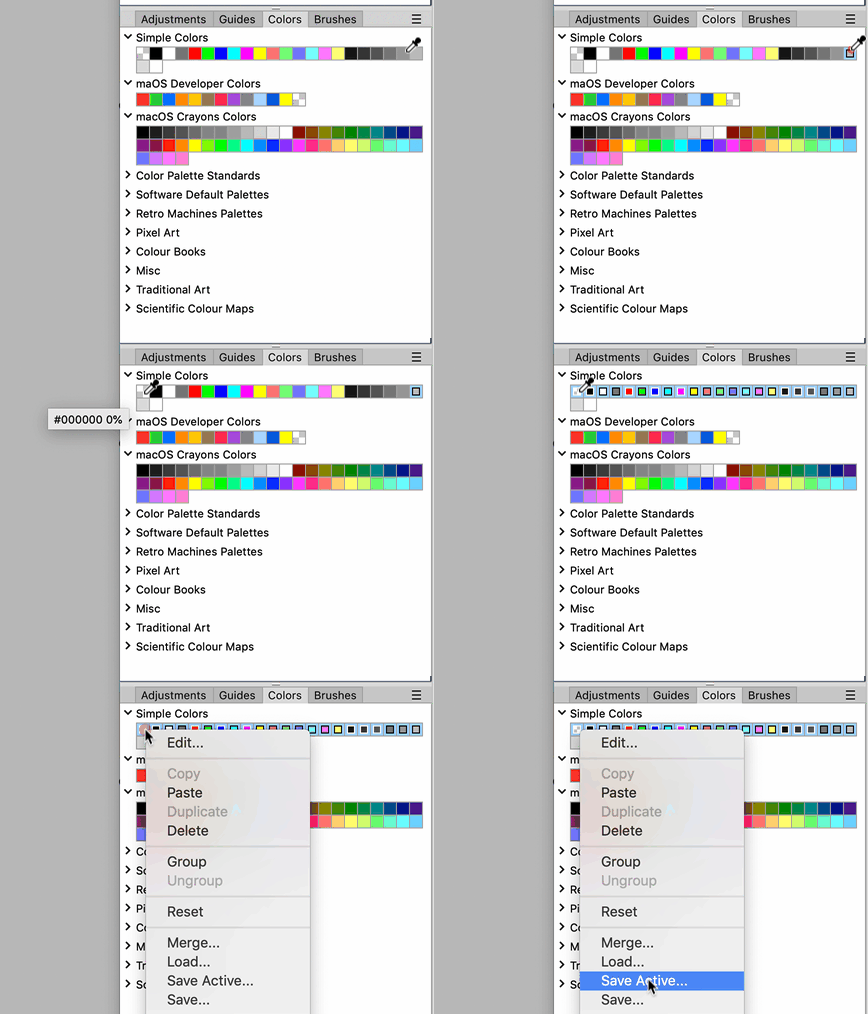
so wie du das machst, wird eine Gruppe gespeichert, das geht so nicht.
Du musst die einzelnen Farben anwählen.
Neue Testversion 25.00b13
-
Gerhard Huber

- Entwickler

- Beiträge: 4278
- Registriert: Mo 18 Nov 2002 15:30
- Wohnort: Bad Gögging
-
Hoogo

- Beta Tester
- Beiträge: 4169
- Registriert: So 03 Jul 2005 13:35
- Wohnort: Deutschland
Re: Neue Testversion 25.00b13
Du meinst so: 16 Einzelne Farbe speichern, und im Reduzieren 16 mal Farben markieren und einzeln laden?Gerhard Huber hat geschrieben: Di 17 Feb 2026 11:37 so wie du das machst, wird eine Gruppe gespeichert, das geht so nicht.
Du musst die einzelnen Farben anwählen.
Du hast keine ausreichende Berechtigung, um die Dateianhänge dieses Beitrags anzusehen.
----------------
Herr Doktor, ich bin mir ganz sicher, ich habe Atom! /Doctor, doctor, I'm sure, I've got atoms!
Herr Doktor, ich bin mir ganz sicher, ich habe Atom! /Doctor, doctor, I'm sure, I've got atoms!
-
shijan

- Mitglied
- Beiträge: 2033
- Registriert: Mo 23 Dez 2019 15:21
- Wohnort: Ukraine
Re: Neue Testversion 25.00b13
Just hold Shift key to select multiple colors
PhotoLine UI Icons Customization Project: https://www.pl32.com/forum3/viewtopic.php?f=3&t=6302
-
Hoogo
- Beta Tester
- Beiträge: 4169
- Registriert: So 03 Jul 2005 13:35
- Wohnort: Deutschland
Re: Neue Testversion 25.00b13
Ja, das war der Trick

----------------
Herr Doktor, ich bin mir ganz sicher, ich habe Atom! /Doctor, doctor, I'm sure, I've got atoms!
Herr Doktor, ich bin mir ganz sicher, ich habe Atom! /Doctor, doctor, I'm sure, I've got atoms!
-
Vivi_Ram
- Mitglied
- Beiträge: 421
- Registriert: Sa 28 Sep 2024 17:04
Re: Neue Testversion 25.00b13
[Idea]: Could we turn measurement into an object. This would help when we're trying to set up layouts, as well dielines. 
-
shijan
- Mitglied
- Beiträge: 2033
- Registriert: Mo 23 Dez 2019 15:21
- Wohnort: Ukraine
Re: Neue Testversion 25.00b13
Just use vector rectangle as a ruler and enter its size in layer attributes. Quick and easy.Vivi_Ram hat geschrieben: Di 17 Feb 2026 16:57 [Idea]: Could we turn measurement into an object. This would help when we're trying to set up layouts, as well dielines.
But i agree, it could nice to have some sort of instant interactive overlay measurements marks for lines and vector objects, similar to CAD applications:
Du hast keine ausreichende Berechtigung, um die Dateianhänge dieses Beitrags anzusehen.
PhotoLine UI Icons Customization Project: https://www.pl32.com/forum3/viewtopic.php?f=3&t=6302
-
Vivi_Ram
- Mitglied
- Beiträge: 421
- Registriert: Sa 28 Sep 2024 17:04
Re: Neue Testversion 25.00b13
Yes, I can do that. I have been trying to create measurement tags, but when you have a large number of measurements, manually keeping them on track becomes really difficult. Here's Affinity's measurement. I really like it. It works with snapping. But again, not printable. I like that it at least remains on screen after you let the mouse button go unlike in PL. I also like the little magenta circle show which point to which point the measurement is taken from.
Du hast keine ausreichende Berechtigung, um die Dateianhänge dieses Beitrags anzusehen.
-
Vivi_Ram
- Mitglied
- Beiträge: 421
- Registriert: Sa 28 Sep 2024 17:04
Re: Neue Testversion 25.00b13
Speaking of snapping, I think  PL needs an option to exclude selected objects from snapping. Don't get me wrong: PL's snapping is excellent, but it is too good in certain situations. The only way to avoid it is to either switch it off completely or call it through ALT. But you should be able to select objects and exclude those objects from snapping.
 PL needs an option to exclude selected objects from snapping. Don't get me wrong: PL's snapping is excellent, but it is too good in certain situations. The only way to avoid it is to either switch it off completely or call it through ALT. But you should be able to select objects and exclude those objects from snapping.
 Du hast keine ausreichende Berechtigung, um die Dateianhänge dieses Beitrags anzusehen.
-
Vivi_Ram
- Mitglied
- Beiträge: 421
- Registriert: Sa 28 Sep 2024 17:04
Re: Neue Testversion 25.00b13
Adding to this conversation. If we make measurements printable, all measurements should be added to its own measurement layer. So it becomes a matter of a single click to turn it on and off.
See INKSCAPE for instance. It does this as a path effect. But it only measures between segments automatically, which is not particularly useful.
See INKSCAPE for instance. It does this as a path effect. But it only measures between segments automatically, which is not particularly useful.
Zuletzt geändert von Vivi_Ram am Sa 21 Feb 2026 14:54, insgesamt 1-mal geändert.
-
Herbert123

- Mitglied
- Beiträge: 2455
- Registriert: Sa 12 Mai 2012 21:38
Re: Neue Testversion 25.00b13
One thing I asked for a couple of times in the past decade are layer-based guides. That is extremely helpful when controlling snapping "sets". I often use multiple sets of guides for different purposes in a layout.Vivi_Ram hat geschrieben: Mi 18 Feb 2026 16:07 Speaking of snapping, I think
Which is not really possible in PhotoLine. It is not even possible to create groups of guides in the guide manager and hide / show these quickly and independently.
I wish this would be improved.
/*---------------------------------------------*/
System: Win10 64bit - i7 [email protected], p6t Deluxe v1, 48gb (6x8gb RipjawsX), Nvidia GTX1080 8GB, Revodrive X2 240gb, e-mu 1820, 2XSamsung SA850 (2560*1440) and 1XHP2408H 1920*1200 portrait
System: Win10 64bit - i7 [email protected], p6t Deluxe v1, 48gb (6x8gb RipjawsX), Nvidia GTX1080 8GB, Revodrive X2 240gb, e-mu 1820, 2XSamsung SA850 (2560*1440) and 1XHP2408H 1920*1200 portrait
-
Vivi_Ram
- Mitglied
- Beiträge: 421
- Registriert: Sa 28 Sep 2024 17:04
Re: Neue Testversion 25.00b13
YES! YES! Layer based guides would be amazing. FreeHand nailed it ages ago. Xara also allows you to turn literally any object into guide. One of my favourite techniques for creating layouts rapidly is by creating tables. Merging cells, spacing between cells. Turn to guide. DONE! It remains a table. You can use the table tool to go and unmerge and edit cells. Incredibly useful and easy. And yes, you can have multiple groups of guides within the guide layer and toggle their visibility on and off.
-
Vivi_Ram
- Mitglied
- Beiträge: 421
- Registriert: Sa 28 Sep 2024 17:04
Re: Neue Testversion 25.00b13
Here's yet another snapping scenario that I really want. Snapping when two handles are of the same lengths across two different nodes. Image 1. Snapping when two handles are of the same length on the same curve. Image 2. See the little equal sides on handles to indicate they are equal. And finally ability to move and rotate angles at any 5-degree increments. At the moment, rotating handles only snaps at 45-degrees. Actually, rotation in general snaps at 45 degrees - unless I am missing something. You should be able to define this in the settings. See image 3. This is extremely useful. And this rotation constraint should work with handles too. Not just objects.
Du hast keine ausreichende Berechtigung, um die Dateianhänge dieses Beitrags anzusehen.
-
Vivi_Ram
- Mitglied
- Beiträge: 421
- Registriert: Sa 28 Sep 2024 17:04
Re: Neue Testversion 25.00b13
The angle constraint can be defined by any increment. By increments of 2, 3, 4, 5, 10. Those presets are just the common angles. Which makes me wonder, does PL allow you to define nudge distance?
-
Vivi_Ram
- Mitglied
- Beiträge: 421
- Registriert: Sa 28 Sep 2024 17:04
Re: Neue Testversion 25.00b13
Ability to save current view would be a great addition to PL within the navigator. It saves me a tonne of time when I have multiple layers, objects, and want to switch back and forth between various zoom levels at precise points and even exact pages. The way it works is somewhat similar to Layer Composition, but they're not the same at all. Layer Comps works with layer visibility, but Saving Current View works by zoom levels and cursor position at any given moment.
So for instance say you have a large image, and virtual copy of that image but much smaller on another page in the same document, the way to get there without all the extra clicks and scrolls is by saving two current views. The large image. And the small image on another page. You make your edits on the source copy, and select the view from the navigator to go to the next page. Voila! Done! No clicking and scrolling and zooming.
It is useful in many other scenarios. For instance, if you were planning edits for a photo and you want to write yourself instructions for each of the points in the image that you want to correct, you save the view and rename the view. I use it all the time when I am working on glyphs. I create a much smaller copy of the glyph, probably at 5 pts high, and save a view. Then I work on the source copy. And switch to the 5pt view to see how it looks.
It's also useful when you are working on many different iterations of your design within the same document, and you have not exported the right one. You simply zoom into the right design and name the view "This is the right design. Work from here." And you close the document. Next time, you can open the document and click on the saved view. This is what I have done. I've written instructions for myself in Tamil, my mother tongue, saying, this is the final iteration of the glyph from that session. Start from there.
So for instance say you have a large image, and virtual copy of that image but much smaller on another page in the same document, the way to get there without all the extra clicks and scrolls is by saving two current views. The large image. And the small image on another page. You make your edits on the source copy, and select the view from the navigator to go to the next page. Voila! Done! No clicking and scrolling and zooming.
It is useful in many other scenarios. For instance, if you were planning edits for a photo and you want to write yourself instructions for each of the points in the image that you want to correct, you save the view and rename the view. I use it all the time when I am working on glyphs. I create a much smaller copy of the glyph, probably at 5 pts high, and save a view. Then I work on the source copy. And switch to the 5pt view to see how it looks.
It's also useful when you are working on many different iterations of your design within the same document, and you have not exported the right one. You simply zoom into the right design
 and name the view "This is the right design. Work from here." And you close the document. Next time, you can open the document and click on the saved view. This is what I have done. I've written instructions for myself in Tamil, my mother tongue, saying, this is the final iteration of the glyph from that session. Start from there.
Du hast keine ausreichende Berechtigung, um die Dateianhänge dieses Beitrags anzusehen.
-
Vivi_Ram
- Mitglied
- Beiträge: 421
- Registriert: Sa 28 Sep 2024 17:04
Re: Neue Testversion 25.00b13
https://ibb.co/5x9VCdSm - Here's the gif of it.