We thought a bit more about this. There is actually a far more elegant solution to this problem of tangent nodes than introducing a separate node type. It is simple. All you need is a tool setting option that says: "Snap" or "Lock Handle to Chords" - that's it! Now you have a tangent node.
With the node tool active, you click on a node, and then toggle on "Lock Handles to Chords" - the handle of that node is now locked to the chord of adjacent nodes. Chord being the straight line between two nodes.
And this means, that you have a single code base. That's actually quite elegant. I am going to do it!
Some wonderful news! - We cracked the code for Bezigon in C++
-
Vivi_Ram
- Mitglied
- Beiträge: 488
- Registriert: Sa 28 Sep 2024 15:04
-
Vivi_Ram
- Mitglied
- Beiträge: 488
- Registriert: Sa 28 Sep 2024 15:04
Re: Some wonderful news! - We cracked the code for Bezigon in C++
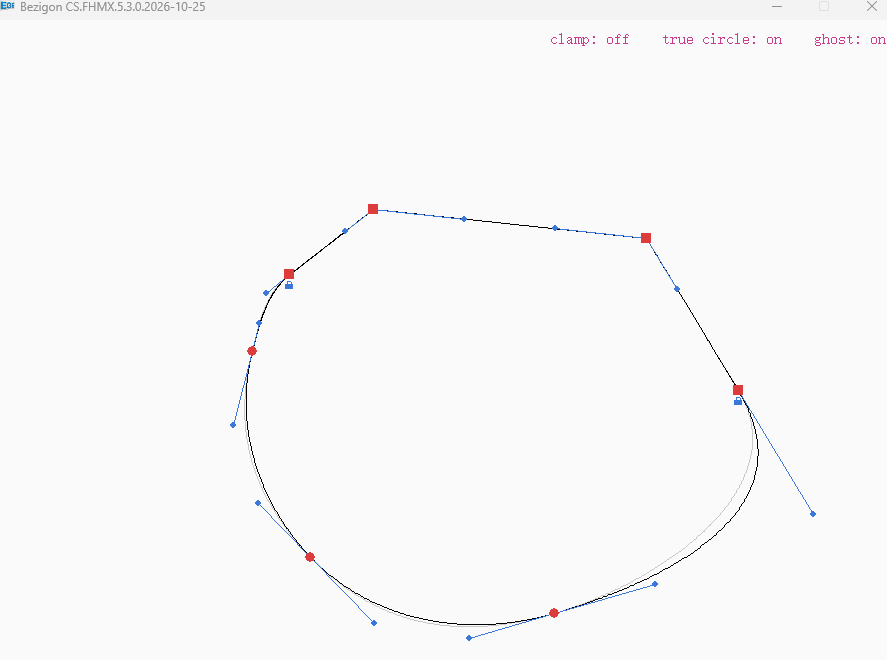
Just an update; Over the weekend, we managed to figure out how to set per node flag and lock the nodes: It works beautifully and reproduces the tangent node behaviour of FreeHand within the two node scheme we have in PhotoLine. You'll see the little blue lock under the node. That's the node locked to chord!
You'll also notice the clamping function, true-circle approximation as well as ghost lines for comparison. These are features we've derived from observing Blender and TikZ algorithms. We managed to simplify the APIs, cut down the entire library by about 30% in length.
We did use AI to run tests (as before) and tests produce FreeHand's results across millions of random paths.

I'll document everything thoroughly and do a handover. After this, it's entirely up to you how you wish to implement it. But I've handed you all the pieces you need.
-
Vivi_Ram
- Mitglied
- Beiträge: 488
- Registriert: Sa 28 Sep 2024 15:04
Re: Some wonderful news! - We cracked the code for Bezigon in C++
Since I released that code, the library has gone through a huge churn cycle. We had to strip and rebuild. Not because the logic is wrong. It is perfectly usable. But because we had a new idea. Tangent node is really not a separate node, but a cusp node with handle locked to chord. The idea is as simple as it is obvious. The implementation however is a whole new monster. Because, now you have to figure out how is this lock going to work.
We use De Casteljau algorithm to preserve shape when inserting new node on existing shapes. But then locking is a unique case. So we had work out every single on of these cases manually. By hand. FreeHand is of no use here. Because FreeHand does not preserve shape. It brutally applies a tangent node with both handles instantly available. That is not intuitive or even purposeful. So after 10 further iterations of back and forth, we discovered the solution. The version is now 14! The rule is simple too:
Locked node ALWAYS gives precedence to a sharp node's chord when a smooth neighbour is present. Where both neighbours are either square or locked or combination of the two, the locked node in between them has no handle automatically. If a manual handle is draw out, this gets preserved in subsequent operations.
This is our labour of love and addition to 40 year old Bezigon algorithm.
However, there's something even more interesting we've done.
We built a drag gesture layer which allows you to drag nodes, handles and segments using modifiers. Alt to break, Ctrl to unite. You know those three buttons in the node tool settings? This will become obvious when people actually try it. These gestures are actually native to PL. We built it for the benefit of the devs who we hope will integrate it into the program. So we wanted to show them how Bezigon can sit perfectly alongside their existing gestures model.
But then, we realised that in the process of doing this, we had created a dependancy! FUCK!
Now anyone who wanted to implement in must also implement these gestures. So another round: We created two layers. Geometry layer. Drag gesture layer. Completely separate as headers and algorithms. You can strip out gestures without losing a thing.
https://drive.google.com/file/d/1BDM-Jt ... sp=sharing - Here's the new demo file. You can download, play and enjoy. You will get a warning on Windows. No digital signature. Ignore it. It's safe.
PRESS D to see the handles. Forgot to add. Shift click for Smooth node. Ctrl Click for Locked node. These are not algorithm level shortcuts. None of it is. K for clamp. C/S/L for toggling between Cusp, Smooth and Locked. G for Ghost Lines. O for True Circle. R for reset to Bezigon Handles. Ctrl + Z/Y for Undo/Redo. Esc to Clear Canvas. Enter or Alt Click to finish drawing curve.
We've also included Clamp, True Circle and Ghost Lines as options. Clamping exists for extremely close nodes which have enormous handles. Clamp makes sure that the length of the handle is not greater than either 2 or 5 times greater than distance between the nodes. True circles is basically a subset of Bezigon. It overrides Bezigon and approximates true circles like Spiro Path does. Ghost Lines, I believe, are just a demo thing. It exists to show the difference between clamped and unclamped, circle/bezigon, lines. You'll see what I mean when you play with it.
So you have enormous flexibility built directly into the algorithm, which I hope Martin and Gerhard implements as options for bezigon.
Final note: EGE, the Open Source engine that we used before was not sufficient. So we rewrote the demo in Raylib. Well, my colleague did.
It works wonderfully. And we also took AI's help (GLM this time) to write an exhaustive test suite. Covering millions of paths. And we compared this with FreeHand.
The deviation is 0.0008%. Because FH uses 0.3899994 as the approximating constant.
At this point, my autistic, perfectionistic streak is completely satisfied. Please give me a kiss of appreciation. I am tired now. I've gotten this monkey off my back. Thank you!
I'll share the full code base after documentation is done. There's a lot to rewrite.
-
PhilM
- Mitglied
- Beiträge: 193
- Registriert: Do 28 Mai 2015 16:00
- Wohnort: Belgium
Re: Some wonderful news! - We cracked the code for Bezigon in C++
Hello,
Interesting
I do not like the pen tool.
But I think I would love the Bezigon. It looks efficient.
-
Vivi_Ram
- Mitglied
- Beiträge: 488
- Registriert: Sa 28 Sep 2024 15:04
Re: Some wonderful news! - We cracked the code for Bezigon in C++
Who likes the pen tool!
Yes, I think the bezigon is great. Can you believe it is 40 years old. First shipped in Altsys' Fontographer!