Neue Testversion 25.60b2

Hier diskutieren die Betatester von PhotoLine untereinander und mit den Entwicklern
Benutzeravatar
Gerhard Huber
Entwickler
Entwickler
Beiträge: 4276
Registriert: Mo 18 Nov 2002 15:30
Wohnort: Bad Gögging

Neue Testversion 25.60b2

Beitrag von Gerhard Huber »

Hallo,

es gibt wieder eine neue Testversion 25.60b2.

Windows:
https://www.pl32.com/beta/pl2560b2.zip

macOS:
https://www.pl32.com/beta/plx2560b2.zip

Neues:
  • Neuer Ebeneneffekt: Schatten lang
  • Ebeneneffekte, Schatten: Größerer Abstand möglich
  • Attribute-Dialoge: Der ICC-Profil-Eintrag hat nun ein Kontextmenü mit Zuweisen, Konvertieren und Exportieren
  • Diverse Fehlerbehebungen und kleinere Verbesserungen
Benutzeravatar
shijan
Mitglied
Beiträge: 2012
Registriert: Mo 23 Dez 2019 15:21
Wohnort: Ukraine

Re: Neue Testversion 25.60b2

Beitrag von shijan »

Some other problems fixed in 25.60b2 added to Large List of Bugfixes 2019-2026:
  • Request/Idea: Undo support for deleted Color Position samples.
  • Request/Idea: Long Shadow Layer Style (requested by multiple users)
  • Request/Idea: Set, Convert, Export ICC Profile right-click menu in Document and Layer Attributes.
  • Program crash when scroll Font list and Phosphate.ttc font appears.
  • Program crash when use Free Lasso and Automatic Lasso, click once and press Esc.
  • Cycle selected point from last to first when use numpad + - keys works in Hue Editor but still don't works in Curves.
  • When navigate Curves or Hue Editor points using numpad + - keys, their x:/y: values don't updated automatically. It could be more useful and logical always show x:/y: values of active point.
  • On macOS Mojave color dropboxes and tabs are still broken In "White Point", "Clouds", "Custom" and "Replace Colors" adjustments.
  • Ctrl+Tab on Windows, Command+F1 on macOS works not too logical. In Curves it switches between RGB/Lab/HIS/HSV. In Hue Editor it switches between Hue/Brightness/Saturation. In Levels it switches between R/G/B/All. It is better to use it to switch between R/G/B/All in Curves, Levels, Channel Mixer.
Zuletzt geändert von shijan am Mi 27 Mai 2026 08:14, insgesamt 4-mal geändert.
PhotoLine UI Icons Customization Project: https://www.pl32.com/forum3/viewtopic.php?f=3&t=6302
Benutzeravatar
shijan
Mitglied
Beiträge: 2012
Registriert: Mo 23 Dez 2019 15:21
Wohnort: Ukraine

Re: Neue Testversion 25.60b2

Beitrag von shijan »

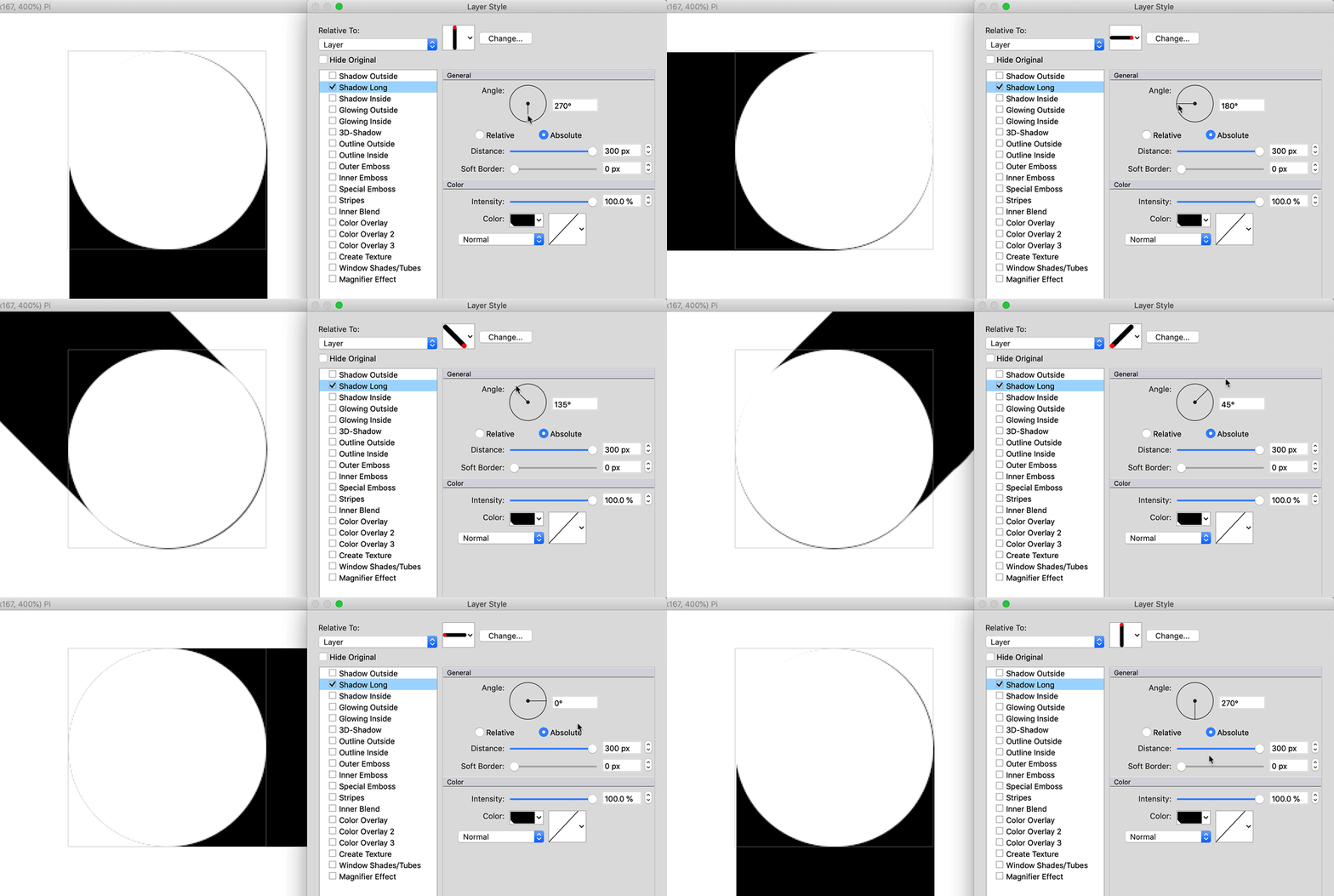
Shadow Long is somehow off-centered from layer center and produce unwanted pixel edge at different angles.
Unfortunately still impossible to create larger sized Shadow Soft Border and Glowing Width :(
Bild
PhotoLine UI Icons Customization Project: https://www.pl32.com/forum3/viewtopic.php?f=3&t=6302
Benutzeravatar
Herbert123
Mitglied
Beiträge: 2452
Registriert: Sa 12 Mai 2012 21:38

Re: Neue Testversion 25.60b2

Beitrag von Herbert123 »

shijan hat geschrieben: Mi 27 Mai 2026 04:46 Shadow Long is somehow off-centered from layer center and produce unwanted pixel edge at different angles.
A temporary workaround is to assign a thin outside outline:
work-around.jpg
A secondary issue is that the long shadow isn't exactly straight at certain angles and shows slight bumps. This is easier to observe when anti-aliasing is turned off.
Du hast keine ausreichende Berechtigung, um die Dateianhänge dieses Beitrags anzusehen.
/*---------------------------------------------*/
System: Win10 64bit - i7 920@3.6Ghz, p6t Deluxe v1, 48gb (6x8gb RipjawsX), Nvidia GTX1080 8GB, Revodrive X2 240gb, e-mu 1820, 2XSamsung SA850 (2560*1440) and 1XHP2408H 1920*1200 portrait
Benutzeravatar
shijan
Mitglied
Beiträge: 2012
Registriert: Mo 23 Dez 2019 15:21
Wohnort: Ukraine

Re: Neue Testversion 25.60b2

Beitrag von shijan »

Herbert123 hat geschrieben: So 31 Mai 2026 18:00 A secondary issue is that the long shadow isn't exactly straight at certain angles and shows slight bumps. This is easier to observe when anti-aliasing is turned off.
Do you mean these bumps? It probably happens due off-centered placement as well.
Screen Shot 2026-05-31 at 8.20.23 PM.jpg
Du hast keine ausreichende Berechtigung, um die Dateianhänge dieses Beitrags anzusehen.
PhotoLine UI Icons Customization Project: https://www.pl32.com/forum3/viewtopic.php?f=3&t=6302
Benutzeravatar
Herbert123
Mitglied
Beiträge: 2452
Registriert: Sa 12 Mai 2012 21:38

Re: Neue Testversion 25.60b2

Beitrag von Herbert123 »

shijan hat geschrieben: So 31 Mai 2026 19:23 Do you mean these bumps? It probably happens due off-centered placement as well.
Yes, those. Even anti-aliased the edge doesn't seem quite straight and looks a bit bumpy.
/*---------------------------------------------*/
System: Win10 64bit - i7 920@3.6Ghz, p6t Deluxe v1, 48gb (6x8gb RipjawsX), Nvidia GTX1080 8GB, Revodrive X2 240gb, e-mu 1820, 2XSamsung SA850 (2560*1440) and 1XHP2408H 1920*1200 portrait
Benutzeravatar
shijan
Mitglied
Beiträge: 2012
Registriert: Mo 23 Dez 2019 15:21
Wohnort: Ukraine

Re: Neue Testversion 25.60b2

Beitrag von shijan »

I just find a new "Typography" Panel which provides same Open Type settings as tab in Text Tool Settings.
Screen Shot 2026-06-03 at 1.10.36 AM.jpg
Du hast keine ausreichende Berechtigung, um die Dateianhänge dieses Beitrags anzusehen.
PhotoLine UI Icons Customization Project: https://www.pl32.com/forum3/viewtopic.php?f=3&t=6302
Benutzeravatar
Herbert123
Mitglied
Beiträge: 2452
Registriert: Sa 12 Mai 2012 21:38

Re: Neue Testversion 25.60b2

Beitrag von Herbert123 »

@shijan Very cool. The new panel I prefer over the text tool settings.
/*---------------------------------------------*/
System: Win10 64bit - i7 920@3.6Ghz, p6t Deluxe v1, 48gb (6x8gb RipjawsX), Nvidia GTX1080 8GB, Revodrive X2 240gb, e-mu 1820, 2XSamsung SA850 (2560*1440) and 1XHP2408H 1920*1200 portrait
Benutzeravatar
der_fotograf
Mitglied
Beiträge: 672
Registriert: Mo 05 Dez 2016 08:33
Wohnort: North Germany

Re: Neue Testversion 25.60b2

Beitrag von der_fotograf »

On macOS I can't replicate the above problems at all.

However, there is a glitch with text: If I type a line, i.e. at a size of 12pt, change the text size to 20pt, and then apply the long shadow, the shadow will be generated based on the original text size (12pt).

On the other hand: who is so insane to use long shadows with text… in good design, text is always without gimmicks for better readability. So maybe it doesn't make any sense to analyse this behaviour any further.
Nur wenige wissen, wie viel man wissen muss, um zu wissen, wie wenig man weiss.
Only few know how much you have to know to know how little you know.
— Werner Heisenberg [German theoretical physicist]
Benutzeravatar
der_fotograf
Mitglied
Beiträge: 672
Registriert: Mo 05 Dez 2016 08:33
Wohnort: North Germany

Re: Neue Testversion 25.60b2

Beitrag von der_fotograf »

If I change the view to full screen and want to hide the panels with F11 or fn+F11 (which is the key combination to invoke the function key on a Mac keyboard), the panels will not be hidden, they remain visible. Maybe you can fix this.
Nur wenige wissen, wie viel man wissen muss, um zu wissen, wie wenig man weiss.
Only few know how much you have to know to know how little you know.
— Werner Heisenberg [German theoretical physicist]
Benutzeravatar
shijan
Mitglied
Beiträge: 2012
Registriert: Mo 23 Dez 2019 15:21
Wohnort: Ukraine

Re: Neue Testversion 25.60b2

Beitrag von shijan »

Few ideas for Shadow Long effect:
Linear gradient direction could follow shadow angle. Something similar to Show Planar checkbox, but for Shadow Long.
long-shadow-effect-illustrator-tutorial-final.jpg
User setting to start effect from each character (or maybe also from each layer in the group?) individually.
shadowlong.jpg
Option to load colors palette that will apply palette color to each character. It also could be button "Random" that will apply palette colors in random order.
RetroLongShadow0.jpg
By the way, same palette effect and Random button could be added to the Text Tool to produce texts with randomly colored letters.
colorful-alphabet-letters-illustration-2AT4DJ6.jpg
Du hast keine ausreichende Berechtigung, um die Dateianhänge dieses Beitrags anzusehen.
Zuletzt geändert von shijan am So 14 Jun 2026 17:07, insgesamt 1-mal geändert.
PhotoLine UI Icons Customization Project: https://www.pl32.com/forum3/viewtopic.php?f=3&t=6302
Benutzeravatar
shijan
Mitglied
Beiträge: 2012
Registriert: Mo 23 Dez 2019 15:21
Wohnort: Ukraine

Re: Neue Testversion 25.60b2

Beitrag von shijan »

It also could be an option to apply Palette colors to Long Shadow in direction like this.
d-effect-color-version-funky-vibes-retro-vintage-display-bold-font-alphabet-d-effect-color-version-funky-vibes-retro-vintage-347058654.jpg
With Long Shadow improved gradient direction this could be done if create hard transitions between gradient points:
Screen Shot 2026-06-14 at 1.15.08 PM.jpg
Du hast keine ausreichende Berechtigung, um die Dateianhänge dieses Beitrags anzusehen.
PhotoLine UI Icons Customization Project: https://www.pl32.com/forum3/viewtopic.php?f=3&t=6302
Benutzeravatar
Herbert123
Mitglied
Beiträge: 2452
Registriert: Sa 12 Mai 2012 21:38

Re: Neue Testversion 25.60b2

Beitrag von Herbert123 »

In my opinion more advanced (long) text shadow effects such as your uploaded examples are rather specific context use cases - ones where it becomes the illustrator/artist's responsibility to execute these.

Long shadows are already quite specific. In all my design career I might have had to create a long shadow effect perhaps a handful of times.

I see no benefits in adding every possible option for a wide range of contexts.

That said, a gradient option sounds useful.
/*---------------------------------------------*/
System: Win10 64bit - i7 920@3.6Ghz, p6t Deluxe v1, 48gb (6x8gb RipjawsX), Nvidia GTX1080 8GB, Revodrive X2 240gb, e-mu 1820, 2XSamsung SA850 (2560*1440) and 1XHP2408H 1920*1200 portrait
Benutzeravatar
Hoogo
Beta Tester
Beiträge: 4169
Registriert: So 03 Jul 2005 13:35
Wohnort: Deutschland

Re: Neue Testversion 25.60b2

Beitrag von Hoogo »

Herbert123 hat geschrieben: Mo 15 Jun 2026 07:13...are rather specific context use cases - ones where it becomes the illustrator/artist's responsibility to execute these...
I agree very much.

I think a function "convert effect to layers" or "show effect as child layers" could be helpful. Both enable manual changes in some way, both with some disadvantages.

A real layer has no connection to its parent layer anymore and won't reflect changes made to it.

A child layer keeps the connection, but if manual changes were even possible, they would get lost when the effect or parent layer are changed. But these childs could be moved to other layers, could have masks, other child layers or adjustments attached, so I think they enable some intersting possibilities.

I assume that effects are internally already close to layers, so maybe it would not be that difficult to implement?
----------------
Herr Doktor, ich bin mir ganz sicher, ich habe Atom! /Doctor, doctor, I'm sure, I've got atoms!
Benutzeravatar
shijan
Mitglied
Beiträge: 2012
Registriert: Mo 23 Dez 2019 15:21
Wohnort: Ukraine

Re: Neue Testversion 25.60b2

Beitrag von shijan »

Herbert123 hat geschrieben: Mo 15 Jun 2026 07:13 In my opinion more advanced (long) text shadow effects such as your uploaded examples are rather specific context use cases - ones where it becomes the illustrator/artist's responsibility to execute these.
Well, i don't say it is something urgent, but random colors and striped/faded gradients is literally the only possible custom options for Long Shadow. It is just time saving option. Sure it already could be done by creating layer for each letter and add effect to each letter manually, but it just consume large amount of time and will be problematic if you need to change text. Same goes to Colored letters. It is possible manually select each letter and set custom color, but for large amount of text it will be endless task.

By the way, another possible idea for Long Shadow - option to follow custom curved vector path instead of simple straight line (as i remember, similar option already was requested some time ago for Vector Morph effect).
PhotoLine UI Icons Customization Project: https://www.pl32.com/forum3/viewtopic.php?f=3&t=6302