Recorded this pretty long video exploring various ways to use masking.

Hier diskutieren die Betatester von PhotoLine untereinander und mit den Entwicklern
Vivi_Ram
Mitglied
Beiträge: 488
Registriert: Sa 28 Sep 2024 15:04

Recorded this pretty long video exploring various ways to use masking.

Beitrag von Vivi_Ram »

https://youtu.be/b0G0wtlya5U - Recorded this video on vector masking in PL. :) It has a couple of suggestions too.

1. Negative values should be possible when it comes clipping width
2. When clips are inverted, the thumbnail should change to reflect it as it is otherwise difficult to know what is happening.
3. Luminance value of the vector outline should also be included in the vector clip. At the moment, it is ignore. Whereas Transparency option includes the outline.
Benutzeravatar
shijan
Mitglied
Beiträge: 2107
Registriert: Mo 23 Dez 2019 13:21
Wohnort: Ukraine

Re: Recorded this pretty long video exploring various ways to use masking.

Beitrag von shijan »

Ok, that's a long video, will look into it today i guess :D
Vivi_Ram hat geschrieben: Fr 02 Okt 2026 12:52 2. When clips are inverted, the thumbnail should change to reflect it as it is otherwise difficult to know what is happening.
Yes, that could be useful. Maybe also add Invert badge?
inv.jpg
Vivi_Ram hat geschrieben: Fr 02 Okt 2026 12:52 3. Luminance value of the vector outline should also be included in the vector clip. At the moment, it is ignore. Whereas Transparency option includes the outline.
If set Vector to Clip mode, Vector Outline already visible in Luminance mode. In your example You used black outline so it is logical that in Luminance mode it became invisible
norm.jpg
cliplum.jpg
Du hast keine ausreichende Berechtigung, um die Dateianhänge dieses Beitrags anzusehen.
Zuletzt geändert von shijan am Fr 02 Okt 2026 19:13, insgesamt 5-mal geändert.
PhotoLine UI Icons Customization Project: https://www.pl32.com/forum3/viewtopic.php?f=3&t=6302
Vivi_Ram
Mitglied
Beiträge: 488
Registriert: Sa 28 Sep 2024 15:04

Re: Recorded this pretty long video exploring various ways to use masking.

Beitrag von Vivi_Ram »

If set Vector to Clip mode, Vector Outline already visible in Luminance mode. Or did you mean something different?
Actually, you're right. Scratch that. I was working on an object without outline, and in my notes, mistakenly wrote down that luminance clipping does not account for outline. :)

Also, I agree - there should be an invert clip icon in the layers panel, and when the clip is inverted, the mask thumbnail should change to reflect it. :) Both are useful indicators that an invert has been applied.
Vivi_Ram
Mitglied
Beiträge: 488
Registriert: Sa 28 Sep 2024 15:04

Re: Recorded this pretty long video exploring various ways to use masking.

Beitrag von Vivi_Ram »

A further note to the developers: Please add a label to the drop down for "clipping style" which allows you to select path, shape, luminance and transparency. It has no label.
Benutzeravatar
shijan
Mitglied
Beiträge: 2107
Registriert: Mo 23 Dez 2019 13:21
Wohnort: Ukraine

Re: Recorded this pretty long video exploring various ways to use masking.

Beitrag von shijan »

Watched your video and have some notes:
1. You didn't show that Clip and other options located in right click menu and used key modifiers instead. For beginners who will watch this video this could be important to see right click menu. Overall for simple tutorials it is more informative to use right click mens instead of hotkeys.
2. I agree that Layer thumbnail itself cold be inverted when Invert mode checkbox is enabled.
3. Explanation about Layer Type by mistake could be removed.
4. You say that Vector Layer mask mode in Layer Attributes have no label name, but actually it is a part of Clipping area. Areas divided by separator lines.
5. Also you may add that Clipping Soft Edge use Soften filter instead of Blur and may produce unwanted cross artifacts if set it to large size, as described here viewtopic.php?p=50629#p50629 So sometimes it is simpler to add Blur adjustment layer instead of using Soft Edge checkbox.
6. Also you may add that in some situations Clipping Soft Edge could be 8-bit instead of 16-bit as described here viewtopic.php?p=52401#p52401
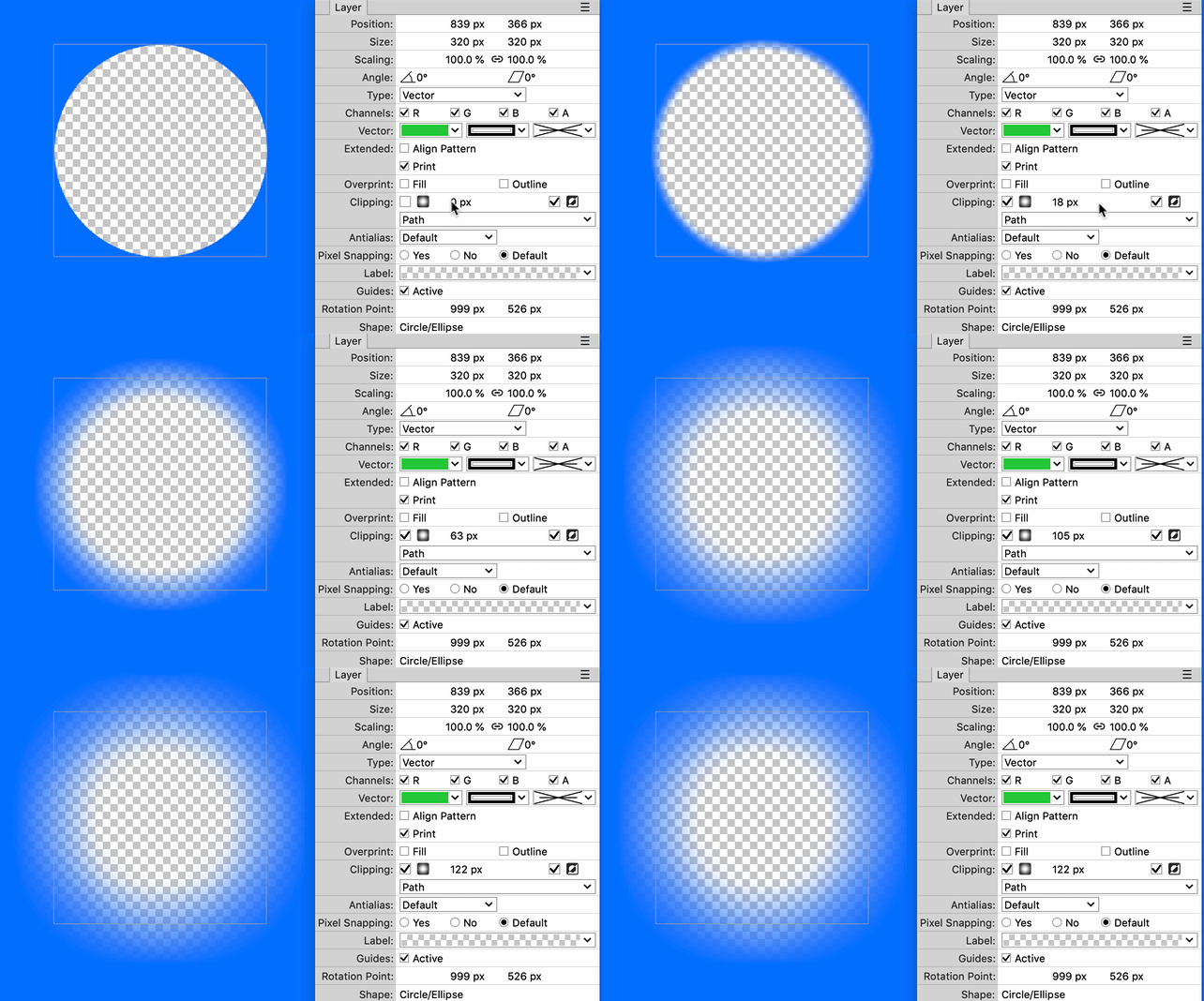
7. Negative values for Soft Edge makes no sense, because currently it applied symmetrically at both sides. To make it work as you requested it is required to add Inside/Center/Outside modes for Soft Edge.
7. Vector Outline is visible in Clip Luminance mode. In your example You used black outline so it is logical that in Luminance mode it became invisible
PhotoLine UI Icons Customization Project: https://www.pl32.com/forum3/viewtopic.php?f=3&t=6302
Vivi_Ram
Mitglied
Beiträge: 488
Registriert: Sa 28 Sep 2024 15:04

Re: Recorded this pretty long video exploring various ways to use masking.

Beitrag von Vivi_Ram »

:D :D Actually, what happened was this:

I set up OBS to record the window instead of display, and it simply does not show drop downs, dialog boxes, etc. :mrgreen: :mrgreen: :mrgreen: I just realised that I was clicking into air when I was showing the drop downs. I actually was not using short cuts at all. So stupid of me!

And I agree with the rest. I might re-record this a bit more thoughtfully and in a more organized way and reupload it.

Here's another thing I made a mistake of.

In my previous takes of this video, OBS accidentally remembered my previous timer setting and kept stopping at 10 minute mark. While I continued to talk. So I actually lost a better take than this. And this was my lazy last effort. :)

Thanks for the suggestions. I will add them to the next draft.

What do you mean by inside outside? That does not make sense. When you applied feathered edge, it eats "inward into the mask" - negative values are simply going to clip outward.

One other I missed: You cannot select how you want to clip (the dropdown is disabled) when you clip using a virtual layer. Which is a major limitation.

I've now added a comment on the video.
Benutzeravatar
shijan
Mitglied
Beiträge: 2107
Registriert: Mo 23 Dez 2019 13:21
Wohnort: Ukraine

Re: Recorded this pretty long video exploring various ways to use masking.

Beitrag von shijan »

It softens to both sides.
Bild
PhotoLine UI Icons Customization Project: https://www.pl32.com/forum3/viewtopic.php?f=3&t=6302
Vivi_Ram
Mitglied
Beiträge: 488
Registriert: Sa 28 Sep 2024 15:04

Re: Recorded this pretty long video exploring various ways to use masking.

Beitrag von Vivi_Ram »

shijan hat geschrieben: Fr 02 Okt 2026 19:37 It softens to both sides.
Bild
AH!! Okay, I see it now.
Benutzeravatar
shijan
Mitglied
Beiträge: 2107
Registriert: Mo 23 Dez 2019 13:21
Wohnort: Ukraine

Re: Recorded this pretty long video exploring various ways to use masking.

Beitrag von shijan »

So summary of requests from this conversation:
1.When Clipping Inverted is enabled, layer thumbnail should be inverted as well. Also additional Invert badge could be added in the right side of the layer.
2. Request for Inside/Center/Outside modes for Clipping Soft Edge.
3. Path, Shape, Luminance, Transparensy Clipping modes for Virtual Copy of Vector Layer.
PhotoLine UI Icons Customization Project: https://www.pl32.com/forum3/viewtopic.php?f=3&t=6302
Vivi_Ram
Mitglied
Beiträge: 488
Registriert: Sa 28 Sep 2024 15:04

Re: Recorded this pretty long video exploring various ways to use masking.

Beitrag von Vivi_Ram »

Yes, I think that sums it up correctly.
Benutzeravatar
shijan
Mitglied
Beiträge: 2107
Registriert: Mo 23 Dez 2019 13:21
Wohnort: Ukraine

Re: Recorded this pretty long video exploring various ways to use masking.

Beitrag von shijan »

Inside/Center/Outside modes for Clipping Soft Edge something like this:
Screen Shot 2026-10-02 at 10.49.01 PMv3.jpg
Du hast keine ausreichende Berechtigung, um die Dateianhänge dieses Beitrags anzusehen.
PhotoLine UI Icons Customization Project: https://www.pl32.com/forum3/viewtopic.php?f=3&t=6302