Here are a few suggestions on ways to improve selections in PL:
1. Ability to go back to the previous point in mid-selection by pressing Ctrl+Z or redo the step by Ctrl + Y. At the moment, undo and redo don't apply to lasso selections. Alternatively, if Ctrl+Z/Y or already assigned globally, there's a simpler way to achieve this like in Xara. Alt (or Shift) + drag to peel back the lasso to the previous point. It is super intuitive. I'll record a short video to illustrate what I mean. In Xara, you can reverse practically anything by using Alt. For instance, Shift + Erasing turns the eraser to brush. Shift + Brushing turns brush into eraser. This is extremely useful and allows you to work from a single tool.
2. The ability to switch to a different lasso tool mid selection. For instance, you should be able to switch to Vector Lasso for on particular portion of the selection and then switch back to freehand for the rest, since, selection is simply a selection. And the logic already exists in the PL. For instance, you can make a freehand selection and upon finishing, switch to Vector lasso to see anchor points. This would be far more useful if it was mid selection.
3. The ability to use the bounds of a selection as the bounds of quick selection tool. At the moment, if you want to make a quick selection, the only way to do that is by drawing a rectangle and letting the algorithm do its work. You then have to paint and mark out background, foreground. But if you're able to use the lasso selection area AS the quick selection boundary, it would be far faster, since the total area that the algorithm needs to work on would be far smaller. Equally, this can work between Mask Brush and Quick Selection too. I can paint off the regions that I want the quick selection to ignore and then switch to quick selection. Then the algorithm can refine it.
4. It would be great to have a selection brush that automatically snaps to edges. Just like in PS/Affinity.
5. At the moment, border matting is a bit of guess work as we cannot know what's going to happen until after "Extract" is pressed. Turning this into real-time refinement would vastly improve usability. Affinity does this very well for comparison, with the ability for live overlays in various colours as well as b/w. This already exists in PL, except you can't do it until you have clicked "extract".
A few ways to improve selection tools
-
Vivi_Ram
- Mitglied
- Beiträge: 488
- Registriert: Sa 28 Sep 2024 15:04
-
Vivi_Ram
- Mitglied
- Beiträge: 488
- Registriert: Sa 28 Sep 2024 15:04
Re: A few ways to improve selection tools
https://ibb.co/psNH0hT - The short video is here. It's not linking for some reason.
-
shijan

- Mitglied
- Beiträge: 2107
- Registriert: Mo 23 Dez 2019 13:21
- Wohnort: Ukraine
Re: A few ways to improve selection tools
Backspace or Delete keyVivi_Ram hat geschrieben: Do 08 Okt 2026 09:51 Here are a few suggestions on ways to improve selections in PL:
1. Ability to go back to the previous point in mid-selection by pressing Ctrl+Z or redo the step by Ctrl + Y. At the moment, undo and redo don't apply to lasso selections. Alternatively, if Ctrl+Z/Y or already assigned globally, there's a simpler way to achieve this like in Xara. Alt (or Shift) + drag to peel back the lasso to the previous point. It is super intuitive. I'll record a short video to illustrate what I mean. In Xara, you can reverse practically anything by using Alt. For instance, Shift + Erasing turns the eraser to brush. Shift + Brushing turns brush into eraser. This is extremely useful and allows you to work from a single tool.
PhotoLine UI Icons Customization Project: https://www.pl32.com/forum3/viewtopic.php?f=3&t=6302
-
shijan
- Mitglied
- Beiträge: 2107
- Registriert: Mo 23 Dez 2019 13:21
- Wohnort: Ukraine
Re: A few ways to improve selection tools
Not sure how this could work. There is a difference between Vector lasso (which is vector object) and raster selections which is raster image-based mask.Vivi_Ram hat geschrieben: Do 08 Okt 2026 09:51 2. The ability to switch to a different lasso tool mid selection. For instance, you should be able to switch to Vector Lasso for on particular portion of the selection and then switch back to freehand for the rest, since, selection is simply a selection. And the logic already exists in the PL. For instance, you can make a freehand selection and upon finishing, switch to Vector lasso to see anchor points. This would be far more useful if it was mid selection.
PhotoLine UI Icons Customization Project: https://www.pl32.com/forum3/viewtopic.php?f=3&t=6302
-
shijan
- Mitglied
- Beiträge: 2107
- Registriert: Mo 23 Dez 2019 13:21
- Wohnort: Ukraine
Re: A few ways to improve selection tools
Automatic Lasso snaps to edges. Or did you mean some different tool?Vivi_Ram hat geschrieben: Do 08 Okt 2026 09:51 4. It would be great to have a selection brush that automatically snaps to edges. Just like in PS/Affinity.
PhotoLine UI Icons Customization Project: https://www.pl32.com/forum3/viewtopic.php?f=3&t=6302
-
Vivi_Ram
- Mitglied
- Beiträge: 488
- Registriert: Sa 28 Sep 2024 15:04
Re: A few ways to improve selection tools
It is and it is not. I think PL sees them interchangeably. Which is the real strength I am point out. Try drawing a freehand lasso and then click out. Then switch to vector lasso. You'll see you can edit it as a vector lasso - although it will have a million anchor points. So for instance, let's say I am selecting an object which is geometric on one side and organic and on the other side. I can quickly use the vector lasso to select the geometric portion and then switch back freehand for the organic portions of the image. But as I am talking this through, I am also seeing how this can be technically achieved with the freehand itself. Since you can hold Ctrl down and continue to get very precise selections. So maybe this isn't such a great idea.shijan hat geschrieben: Do 08 Okt 2026 10:27Not sure how this could work. There is a difference between Vector lasso (which is vector object) and raster selections which is raster image-based mask.Vivi_Ram hat geschrieben: Do 08 Okt 2026 09:51 2. The ability to switch to a different lasso tool mid selection. For instance, you should be able to switch to Vector Lasso for on particular portion of the selection and then switch back to freehand for the rest, since, selection is simply a selection. And the logic already exists in the PL. For instance, you can make a freehand selection and upon finishing, switch to Vector lasso to see anchor points. This would be far more useful if it was mid selection.

Zuletzt geändert von Vivi_Ram am Do 08 Okt 2026 10:44, insgesamt 1-mal geändert.
-
Vivi_Ram
- Mitglied
- Beiträge: 488
- Registriert: Sa 28 Sep 2024 15:04
Re: A few ways to improve selection tools
Automatic lasso is a lasso tool. The selection brush is something else. It allows you to paint across regions and snaps automatically to edges. It is mightily convenient. My go-to selection tool in Affinity.
-
shijan
- Mitglied
- Beiträge: 2107
- Registriert: Mo 23 Dez 2019 13:21
- Wohnort: Ukraine
Re: A few ways to improve selection tools
Yep, that's interesting. I didn't try to switch between lassos like this. Even if switch using hotkey from vector to free lasso or opposite, it automatically closes lasso.Vivi_Ram hat geschrieben: Do 08 Okt 2026 10:40It is and it is not. I think PL sees them interchangeably. Which is the real strength I am point out. Try drawing a freehand lasso and then click out. Then switch to vector lasso. You'll see you can edit it as a vector lasso - although it will have a million anchor points.shijan hat geschrieben: Do 08 Okt 2026 10:27Not sure how this could work. There is a difference between Vector lasso (which is vector object) and raster selections which is raster image-based mask.Vivi_Ram hat geschrieben: Do 08 Okt 2026 09:51 2. The ability to switch to a different lasso tool mid selection. For instance, you should be able to switch to Vector Lasso for on particular portion of the selection and then switch back to freehand for the rest, since, selection is simply a selection. And the logic already exists in the PL. For instance, you can make a freehand selection and upon finishing, switch to Vector lasso to see anchor points. This would be far more useful if it was mid selection.
Zuletzt geändert von shijan am Do 08 Okt 2026 10:48, insgesamt 1-mal geändert.
PhotoLine UI Icons Customization Project: https://www.pl32.com/forum3/viewtopic.php?f=3&t=6302
-
Vivi_Ram
- Mitglied
- Beiträge: 488
- Registriert: Sa 28 Sep 2024 15:04
Re: A few ways to improve selection tools
Didn't know this was possible. You learn something everyday!shijan hat geschrieben: Do 08 Okt 2026 10:24Backspace or Delete keyVivi_Ram hat geschrieben: Do 08 Okt 2026 09:51 Here are a few suggestions on ways to improve selections in PL:
1. Ability to go back to the previous point in mid-selection by pressing Ctrl+Z or redo the step by Ctrl + Y. At the moment, undo and redo don't apply to lasso selections. Alternatively, if Ctrl+Z/Y or already assigned globally, there's a simpler way to achieve this like in Xara. Alt (or Shift) + drag to peel back the lasso to the previous point. It is super intuitive. I'll record a short video to illustrate what I mean. In Xara, you can reverse practically anything by using Alt. For instance, Shift + Erasing turns the eraser to brush. Shift + Brushing turns brush into eraser. This is extremely useful and allows you to work from a single tool.
-
Vivi_Ram
- Mitglied
- Beiträge: 488
- Registriert: Sa 28 Sep 2024 15:04
Re: A few ways to improve selection tools
The basic idea is to keep the tools completely interchangeable. Allowing you to switch back and forth.shijan hat geschrieben: Do 08 Okt 2026 10:45Yep, that's interesting. I didn't try to switch between lassos like this.Vivi_Ram hat geschrieben: Do 08 Okt 2026 10:40It is and it is not. I think PL sees them interchangeably. Which is the real strength I am point out. Try drawing a freehand lasso and then click out. Then switch to vector lasso. You'll see you can edit it as a vector lasso - although it will have a million anchor points.shijan hat geschrieben: Do 08 Okt 2026 10:27
Not sure how this could work. There is a difference between Vector lasso (which is vector object) and raster selections which is raster image-based mask.
-
shijan
- Mitglied
- Beiträge: 2107
- Registriert: Mo 23 Dez 2019 13:21
- Wohnort: Ukraine
Re: A few ways to improve selection tools
It is in the manual:Vivi_Ram hat geschrieben: Do 08 Okt 2026 10:45Didn't know this was possible. You learn something everyday!shijan hat geschrieben: Do 08 Okt 2026 10:24Backspace or Delete keyVivi_Ram hat geschrieben: Do 08 Okt 2026 09:51 Here are a few suggestions on ways to improve selections in PL:
1. Ability to go back to the previous point in mid-selection by pressing Ctrl+Z or redo the step by Ctrl + Y. At the moment, undo and redo don't apply to lasso selections. Alternatively, if Ctrl+Z/Y or already assigned globally, there's a simpler way to achieve this like in Xara. Alt (or Shift) + drag to peel back the lasso to the previous point. It is super intuitive. I'll record a short video to illustrate what I mean. In Xara, you can reverse practically anything by using Alt. For instance, Shift + Erasing turns the eraser to brush. Shift + Brushing turns brush into eraser. This is extremely useful and allows you to work from a single tool.
6.2.22 The Automatic Lasso
The automatic lasso is similar to the free lasso. By clicking and dragging you can create freehand curves, by clicking without dragging you can create connections between two points. The main difference is, that the automatic lasso doesn’t create straight lines but a path following the strongest contrast in the mouse area. If you want to select an object, simply click on its edge. From now on a line is following the mouse. If you agree with the suggested path, you only have to click with the mouse.
Sometimes the suggested path may not be appropriate. In this situation you can press and hold the Ctrl-key (Windows) or Command-Key (macOS) in order to switch to the "free lasso"-mode. Now you can draw straight connection lines.
Wrong lines can be removed by pressing the Backspace-key.
By double-clicking you end input.
Due to its similarity to the free lasso it has the same settings (see chapter 6.2.21). Additionally a Tolerance is available. Tolerance is the width of the area, in which the best contour is searched for. The Tolerance can be adjusted by using the keys Arrow Up and Arrow Down, too.
Zuletzt geändert von shijan am Do 08 Okt 2026 10:50, insgesamt 1-mal geändert.
PhotoLine UI Icons Customization Project: https://www.pl32.com/forum3/viewtopic.php?f=3&t=6302
-
Vivi_Ram
- Mitglied
- Beiträge: 488
- Registriert: Sa 28 Sep 2024 15:04
Re: A few ways to improve selection tools
https://www.youtube.com/watch?v=P9tEcUC0-C0 - That's the selection brush.
But of all my suggestions, I think 3 would be the most useful. The ability to use lasso selection as the bounds for quick selection.
-
shijan
- Mitglied
- Beiträge: 2107
- Registriert: Mo 23 Dez 2019 13:21
- Wohnort: Ukraine
Re: A few ways to improve selection tools
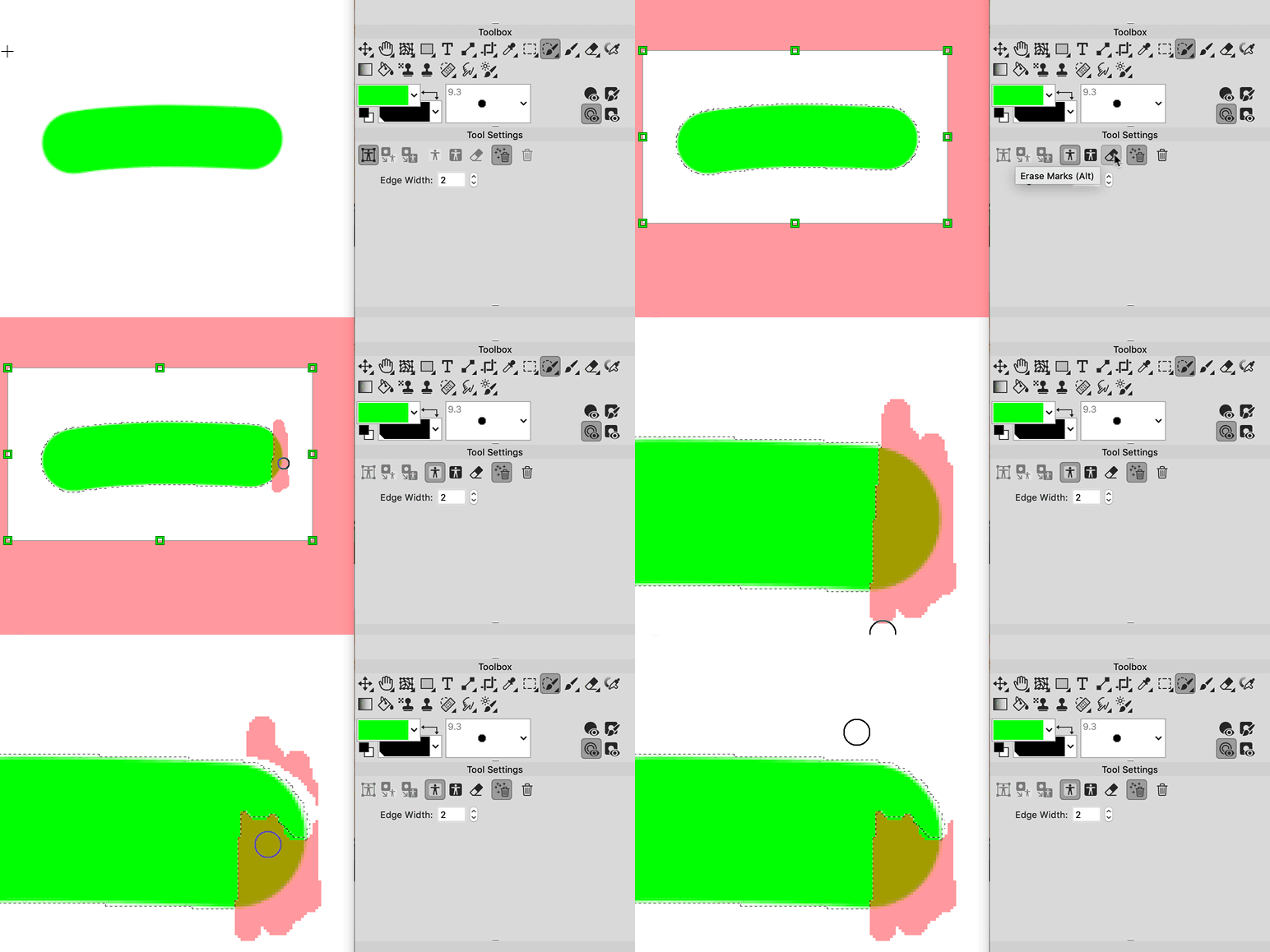
There is no exactly same brush, but Quick Selection Brush can do something similar with some hotkeys. It adds or removes selections and detects (snaps) edges. You just draw slightly refined object and background areas and it generates accurate mask based on this.
PhotoLine UI Icons Customization Project: https://www.pl32.com/forum3/viewtopic.php?f=3&t=6302
-
shijan
- Mitglied
- Beiträge: 2107
- Registriert: Mo 23 Dez 2019 13:21
- Wohnort: Ukraine
Re: A few ways to improve selection tools
Well, Quick Selection too don't needs too precise selection. It just needs to understand in general which area use as object and which use as background to create automatic lasso.Vivi_Ram hat geschrieben: Do 08 Okt 2026 10:50 https://www.youtube.com/watch?v=P9tEcUC0-C0 - That's the selection brush.
But of all my suggestions, I think 3 would be the most useful. The ability to use lasso selection as the bounds for quick selection.
Zuletzt geändert von shijan am Do 08 Okt 2026 11:23, insgesamt 2-mal geändert.
PhotoLine UI Icons Customization Project: https://www.pl32.com/forum3/viewtopic.php?f=3&t=6302
-
Vivi_Ram
- Mitglied
- Beiträge: 488
- Registriert: Sa 28 Sep 2024 15:04
Re: A few ways to improve selection tools
Quick selection brush works negatively. That is, you start by drawing an area around the object you want to select. And then, the algorithm basically infers the object by leaving out everything that is not the object. As you show, you have to mark out the objects (Yellow regions) and background (Red regions). This is quite slow. On the other hand, a selection brush starts with the positive area. For instance, if you want to select a horse in a field. You directly paint on the horse instead of selecting the area in which the horse is. https://youtu.be/2j83XIYPqZk - Like so.