A couple of interesting things in Photoscape

Here everybody can post his problems with PhotoLine
Benutzeravatar
greenmorpher
Mitglied
Beiträge: 943
Registriert: Di 29 Mai 2007 14:42
Wohnort: Rabaul, Papua New Guinea

A couple of interesting things in Photoscape

Beitrag von greenmorpher »

Hello folks

A contributor to the DPReview Kodak Talk forum has just nominated Photoscape as his preferred photo editing software. it obviously doesn't have the power of PhotoLine but it looks as though it does have a couple of useful tools we could use. They might be present already and I've just failed to see them! Oh no, not again! :(

http://www.photoscape.org/ps/main/index.php

1) Selective b&w/grayscale filter. Switch from color to grayscale, you use the mouse to select an area which retains color. This is not shown on the site, by the way. It is illustrated here: http://forums.dpreview.com/forums/read. ... e=39202038
Actually, the more I think about this, the less I think it might be useful! Obviously, you can do a perfect job by creating a second layer, applying transparency, and erasing the selected area. or just make a selection of the area where you want to retain color with the lasso, invert selection, and then change the new selected area to grayscale.

Hmmm -- just tried selecting and then inverting the selection. Use the Lasso tool to select, then to invert the selection, you must go to Mask > Invert Mask. That command should be in Lasso > Invert Lasso, I think. Or Selection > Invert Selection. From where I sit, I used the lasso to make a selection. "Mask" didn't have anything to do with it. I had to look up the manual to find that.

2) You can put together a number of pix to make one pic.

3) There's a splitter tool to slice up a pic.

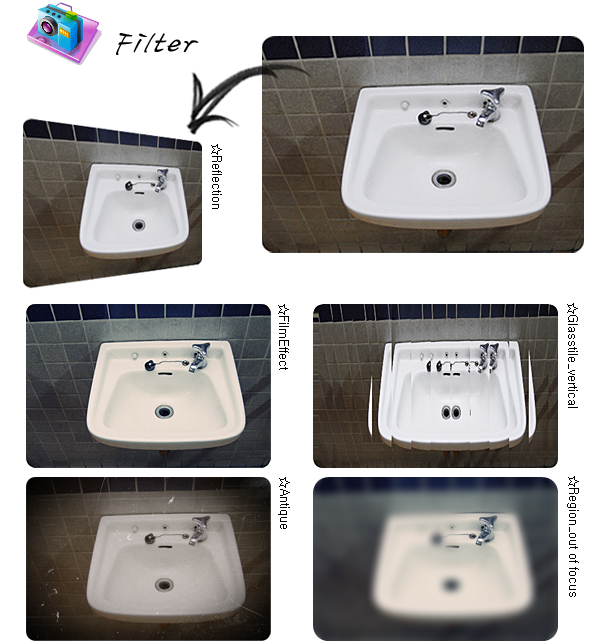
4) There's the Glasstile tool.

These latter three are illustrated on the site.

Cheers, geoff
Benutzeravatar
Hoogo
Beta Tester
Beiträge: 4169
Registriert: So 03 Jul 2005 13:35
Wohnort: Deutschland

Re: A couple of interesting things in Photoscape

Beitrag von Hoogo »

1) Yes, there are so many ways to create a partial b/w, and you've already mentioned a lot of them. An adjustment layer "hue/saturation" is quite useful, there you can turn into b/w depending on color, and you've got already a mask to paint in black and white.
2) Yes, it takes some more steps in PL.
3) I haven't seen an example on the webpage. Maybe "Web > tile image" will do?
4) Tricky, but possible:
-Create a black layer of the size of your picture. Your picture has to be 1 layer.
-Add layer effect "window shades/tubes" of white color. For your purpose "window shade" would be correct.
-Fix layer
-Ctrl+C to copy this layer to the clipboard
-Delete or hide the layer, activate your picture
-"Effects > Shape tools > distort image with image". Press the "insert"-button there and try different values for vertical and horizontal.
Benutzeravatar
greenmorpher
Mitglied
Beiträge: 943
Registriert: Di 29 Mai 2007 14:42
Wohnort: Rabaul, Papua New Guinea

Re: A couple of interesting things in Photoscape

Beitrag von greenmorpher »

Hoogo hat geschrieben:1) Yes, there are so many ways to create a partial b/w, and you've already mentioned a lot of them. An adjustment layer "hue/saturation" is quite useful, there you can turn into b/w depending on color, and you've got already a mask to paint in black and white.
Ah -- "hue/saturation" is the one when you do a selection -- not "change the new selected area to grayscale" as I suggested first because that doesn't change the selecton, it applies to the whole picture. Desaturating the selection works on the selection only, though. Thanks, Hoogo, I always forget desaturation.
2) Yes, it takes some more steps in PL.
Presumably this could be set up as a single command with an action using a document page. What could its starting point be? A number of pix in a folder? Then it would need to allow the user to set the page size and margins, then batch process the pixto the same size, shape and resolution to fit within those measurements.
3) I haven't seen an example on the webpage. Maybe "Web > tile image" will do?
I'll ask the troops about this. I haven't used that tool before -- just tried it. Certainly works very effectively!
4) Tricky, but possible:
-Create a black layer of the size of…
I've seen this kind of effect in other programs over the years and have actually used it a few times over the journey. Looking at the effect, and having just tried the Tile Image tool, it would seem to me that a tool like this could be built fairly easily using the Tile Image approach, but retaining the pieces within the picture (rather than saving them off separately) as layers with transparency, somewhat offset. The offset would have to be in two opposite directions from the center line. It would be really nice if you could set an angle for the slicing too! That wold be stunning. (Do I want much? Just everything!)

Cheers, geoff
Zuletzt geändert von greenmorpher am Di 30 Aug 2011 00:09, insgesamt 1-mal geändert.
bkh
Beta Tester
Beiträge: 3687
Registriert: Do 26 Nov 2009 22:59

Re: A couple of interesting things in Photoscape

Beitrag von bkh »

greenmorpher hat geschrieben:1) Selective b&w/grayscale filter.
I'm with Hoogo here – just use an adjustment layer. Grey mixer or channel mixer might do as well – gives you more options for controlling the b/w conversion.

greenmorpher hat geschrieben:Hmmm -- just tried selecting and then inverting the selection. Use the Lasso tool to select, then to invert the selection, you must go to Mask > Invert Mask. That command should be in Lasso > Invert Lasso, I think. Or Selection > Invert Selection. From where I sit, I used the lasso to make a selection. "Mask" didn't have anything to do with it. I had to look up the manual to find that.
Lasso and Mask are two sides of the same medal – the mask is the area outside the lasso, the lasso is just the line so you can't invert it. I think I have already suggested to use "Selection" (the part of the picture inside the lasso) everywhere, instead of lasso/mask/selection with very closely related meanings :roll:
greenmorpher hat geschrieben:2) You can put together a number of pix to make one pic.
"Create Picture Catalog" should be able to do this – you could easily create a preset for just putting photos togehter horizontally or vertically.
greenmorpher hat geschrieben:4) There's the Glasstile tool.
These latter three are illustrated on the site.
I haven't found an actual example of the Glass tile tool on their page. There are videos in the Help section, but none regarding this effect. Could it be similar to PL's Mosaic effect? Hoogo's suggestion sounds more like "Waves".

Cheers

Burkhard.
Benutzeravatar
Hoogo
Beta Tester
Beiträge: 4169
Registriert: So 03 Jul 2005 13:35
Wohnort: Deutschland

Re: A couple of interesting things in Photoscape

Beitrag von Hoogo »

bkh hat geschrieben:I haven't found an actual example of the Glass tile tool on their page.
The washbowl in the right middle.
bkh
Beta Tester
Beiträge: 3687
Registriert: Do 26 Nov 2009 22:59

Re: A couple of interesting things in Photoscape

Beitrag von bkh »

Hoogo hat geschrieben:
bkh hat geschrieben:I haven't found an actual example of the Glass tile tool on their page.
The washbowl in the right middle.
Thanks, Hoogo – of course, your solution does just that.
greenmorpher hat geschrieben:2) You can put together a number of pix to make one pic.
Actually, using "Tile image" without saving the tiles, followed by "Create Print Document" also seems to work. (You'll have to fix the document size to fit the right number of tiles horizontally and vertically).

If you want different angles, you could rotate or distort the image, tile the result, and undo the distortion in the recombined pic. :mrgreen:

Cheers

Burkhard.
Benutzeravatar
greenmorpher
Mitglied
Beiträge: 943
Registriert: Di 29 Mai 2007 14:42
Wohnort: Rabaul, Papua New Guinea

Re: A couple of interesting things in Photoscape

Beitrag von greenmorpher »

Okay, so it's established that we can do these things in PhotoLine -- albeit with various levels of difficulty ranging up from the pretty darned simple of 1) to a great deal of difficulty in the case of 4).

The value of these tools in Photoscape is that they remove that difficulty by providing ready-made tools. The selective retention of color in an otherwise gray scale picture is a very Q&D way of doing it, but since it just involves running the mouse around, it would be significantly faster than the ways available in PL (and other programs); the glasstile workarounds involve lots of work.

It would be nice to have such tools in PL for those (like me) who would use them occasionally and don't have the expertise to do this stuff from first principles.

Cheers, geoff
mwenz
Mitglied
Beiträge: 122
Registriert: Fr 13 Mai 2011 23:50

Re: A couple of interesting things in Photoscape

Beitrag von mwenz »

Regarding number 1...

Perhaps I missed it in this thread. I do the occasional illustration where all but the subject is in B/W.

I duplicate the color layer. I add the Gray Mixer adjustment layer. Then, with only the adjustment layer and its color layer viewable, I merge the two layers into a single B/W layer. Then using the Layer Properties dialog, check the "Use Transparency" check box. With the B/W layer active, erase where one desires the color layer below to show through.

No masks involved.

Take care, Mike
Du hast keine ausreichende Berechtigung, um die Dateianhänge dieses Beitrags anzusehen.
Benutzeravatar
Hoogo
Beta Tester
Beiträge: 4169
Registriert: So 03 Jul 2005 13:35
Wohnort: Deutschland

Re: A couple of interesting things in Photoscape

Beitrag von Hoogo »

mwenz hat geschrieben:Regarding number 1...

Perhaps I missed it in this thread. I do the occasional illustration where all but the subject is in B/W.

I duplicate the color layer. I add the Gray Mixer adjustment layer. Then, with only the adjustment layer and its color layer viewable, I merge the two layers into a single B/W layer. Then using the Layer Properties dialog, check the "Use Transparency" check box. With the B/W layer active, erase where one desires the color layer below to show through.

No masks involved.

Take care, Mike
Depending on the purpose, you could drop some of the steps.
-Drop "Duplicate the color-layer"
-Take "Add gray mixer adjustment layer"
-Drop the rest.
The usual adjustment layer comes already with a mask. Paint with black to let the colored background shine through.

Sometimes it might even be handy to create the mask as first step, by using "select color", "magic wand" or some of the other tools, and then add the grayscale adjustment.
Benutzeravatar
greenmorpher
Mitglied
Beiträge: 943
Registriert: Di 29 Mai 2007 14:42
Wohnort: Rabaul, Papua New Guinea

Re: A couple of interesting things in Photoscape

Beitrag von greenmorpher »

As I already said -- agreed, you can do this stuff in PL. What Photoscape (and some other programs) are offering is tools so you can do them faster -- one step. The Photoscape Q&D color in a sea of grayscale is simply rubbing over the area with a brush, as I understand it.

That one is easy-peasy, though, in PL (or any another program with layers) -- basically just two steps. But the other three are more interesting, I would have thought.

Cheers, geoff
Benutzeravatar
OldRadioGuy
Mitglied
Beiträge: 418
Registriert: Fr 24 Apr 2009 19:09
Wohnort: Austin, Texas, USA

Re: A couple of interesting things in Photoscape

Beitrag von OldRadioGuy »

I have been reading Geoff's comments and the various responses in this thread with interest.

While a lot of these programs may have special automated effects that can't be done in one step in PhotoLine, they are usually limited in number, and the program itself falls far short of the power of PL.

Often effects can be achieved with multiple steps in PL, recorded in a macro (action) and then reused on other images. What we really need in this forum is a category for posting and sharing actions with discussion and translation for English- and German-speaking users.

I say the following for potential newbies of PL, looking in on this forum to help them decide whether or not to try the program:

As a serious amateur photographer and occasional desktop and web publisher, I tend to use several software programs to achieve my objectives. But most of the work is done in PhotoLine. It's powerful and fast, particularly if you have a 64-bit operating system. If I could afford only one application, it would be PhotoLine.

Just open an image, create a Virtual Copy of that image, select from more than 30 Adjustment Layers and apply one or more to your Virtual Copy. Reduce the opacity of the Adjustment Layer, change the Blend mode, brush with black on the Adjustment Layer to apply it to only part of the image -- lots of options here. All of this is lossless editing. Many of your changes can be recorded in an Action for use with other images.

Save your edited image in PL's native pld format to be able to return and edit the various layers. Then save the file to whatever format you need for the final product. Save options include Photoshops psd format, and the folks at PhotoLine are doing a good job keeping up with Adobe changes to enable psd files with layers to be edited in PL -- a better job than any competitors I have looked at.

PL has more than adequate tools for making selections (masks) and spot corrections, and we can expect improvements in that area.

Where else can you get all this for under $100 U.S.?


I just don't want potential users considering the software to get the wrong impression. But, yes, Goeff, it would be nice if some more of those one-step options were available in PhotoLine.

Bob
PhotoLine 24.xx |DxO PureRAW 4 |Various Third-Party Plugins | macOS 14.11 | Apple M2 Max | 64 GB Memory | E-M1markIII.
Benutzeravatar
greenmorpher
Mitglied
Beiträge: 943
Registriert: Di 29 Mai 2007 14:42
Wohnort: Rabaul, Papua New Guinea

Re: A couple of interesting things in Photoscape

Beitrag von greenmorpher »

Good corrective, Bob. I wouldn't want anyone to doubt the power of PL and the relative simplicity of doing many things in it. What I'm talking about here, I suppose, is simply matching what might be called "beginner" or "convenience" tools with those of other programs that might appeal to people in the lower end (price-wise) of the market. The composite picture tool and the glass tile tool go beyond that since replicating those effects is relatively complex. Click of a button solutions would be great. :)

Cheers, geoff
bkh
Beta Tester
Beiträge: 3687
Registriert: Do 26 Nov 2009 22:59

Re: A couple of interesting things in Photoscape

Beitrag von bkh »

Here's a collection of presets for "distort image with image …" for the glass tile effect, using Hoogo's idea. Merge them into the presets for "Distort image with image …", then choose the right setting from the presets menu. You'll even get a preview.

For me, that would be sufficient, but of course, one has to remember to look in "distort image with image …" – not a very obvious place.

For me, the real question is whether you'd use "glass tiles", "tile image" and "compose images" often enough to merit individual commands. They seem the sort of effects you try a couple of times, say "wow, looks interesting" but then you don't use them (at least that's true for me).

Cheers

Burkhard.
Du hast keine ausreichende Berechtigung, um die Dateianhänge dieses Beitrags anzusehen.
Zuletzt geändert von bkh am Fr 02 Sep 2011 08:37, insgesamt 2-mal geändert.
Benutzeravatar
greenmorpher
Mitglied
Beiträge: 943
Registriert: Di 29 Mai 2007 14:42
Wohnort: Rabaul, Papua New Guinea

Re: A couple of interesting things in Photoscape

Beitrag von greenmorpher »

That's very thoughtful of you, Burkhard. How do I open the file, though?

I agree with you -- it's not the sort of thing you would use all the time. in fact, you would use it fairly rarely. BUT that's what makes a little tool to do it so valuable. If uyou had to work through a complicated procedure each time, you would be reinventing the wheel each time you did it because you wouldn’t' use it that much.

In addition, though, there is stuff like this that is magic for newcomers to computer photo editing. They might never use a tool, but if they see it illustrated, they'll be entranced! Sells the program!

There's a tool that was available in a Mac program that disappeared about a bazillion years ago -- Superpaint,I think it was called. It had a brush that you dragged and it left a trail of stars of various shapes and colors in a variable width trail, across your picture. The width varied with the speed of movement of the brush. I think you could set a basic parameter or two for the trail. Maybe maximum and minimum star size, maybe the average width of the trail. Could we set up something like that in PhotoLine? Probably. But it would be much nicer if we could just select a tool -- and tell newcomers that it was there. I could use it professionally but it would also be marvelous for family stuff -- birthday cards and whatnot. Or is one already there that I'm not recognizing? There are the star-shaped brushes and stuff, but this was different from that.

Cheers, geoff
bkh
Beta Tester
Beiträge: 3687
Registriert: Do 26 Nov 2009 22:59

Re: A couple of interesting things in Photoscape

Beitrag von bkh »

greenmorpher hat geschrieben:That's very thoughtful of you, Burkhard. How do I open the file, though?
Basically, just like any other presets. Choose the "Distort image with image …" filter, then click on the Edit icon (pen and paper) next to the "Presets" combo box. You'll get another dialog, 'Presets". Click on the disk icon, and you'll get another menu to save, load, merge your presets. (You'll only have to do this once - PL remembers the new presets until you load a new set.) There's also a longer explanation of this in Section 3.8.2 ("The Preferences") in the PL manual.

Cheers

Burkhard.