Tool request - auto correction based on grayscale chart patches

Hier diskutieren die Betatester von PhotoLine untereinander und mit den Entwicklern
Benutzeravatar
shijan
Mitglied
Beiträge: 2033
Registriert: Mo 23 Dez 2019 15:21
Wohnort: Ukraine

Tool request - auto correction based on grayscale chart patches

Beitrag von shijan »

There is a known technique to correct shifted (or faded) colors in sources that includes grayscale chart of some faded source. In most cases it is used for film restoration. There is an article that explains how to calculate adjustment curve based on some math formula https://www.sciencedirect.com/science/a ... 7417305150

Seems in PhotoLine it could be done only with Curves manually. Pick point for each grayscale sample and adjust each channel to make them near same value.
Adjustment based on Gray chart is very common task. Some other special apps can do it automatically.

So i really would like to request for new tool in PhotoLine. Tool where you simply pick each patch in grayscale chart one by one, and it auto corrects each patch to neutral gray.

Or it just could be a new option for Curves. Sort of new special picker in Curves UI.

Here is my example correction made from jpeg shared in that article:

Bild

Bild
PhotoLine UI Icons Customization Project: https://www.pl32.com/forum3/viewtopic.php?f=3&t=6302
PhilM
Mitglied
Beiträge: 191
Registriert: Do 28 Mai 2015 18:00
Wohnort: Belgium

Re: Tool request - auto correction based on grayscale chart patches

Beitrag von PhilM »

Hi

Couldn't you use Hald CLUT ?

Phil
Benutzeravatar
shijan
Mitglied
Beiträge: 2033
Registriert: Mo 23 Dez 2019 15:21
Wohnort: Ukraine

Re: Tool request - auto correction based on grayscale chart patches

Beitrag von shijan »

Not sure if i understand what you mean. Hald CLUT can save color correction but it can't auto adjust image based on patches. To create Hald CLUT we need at first manually create Curves anyway.

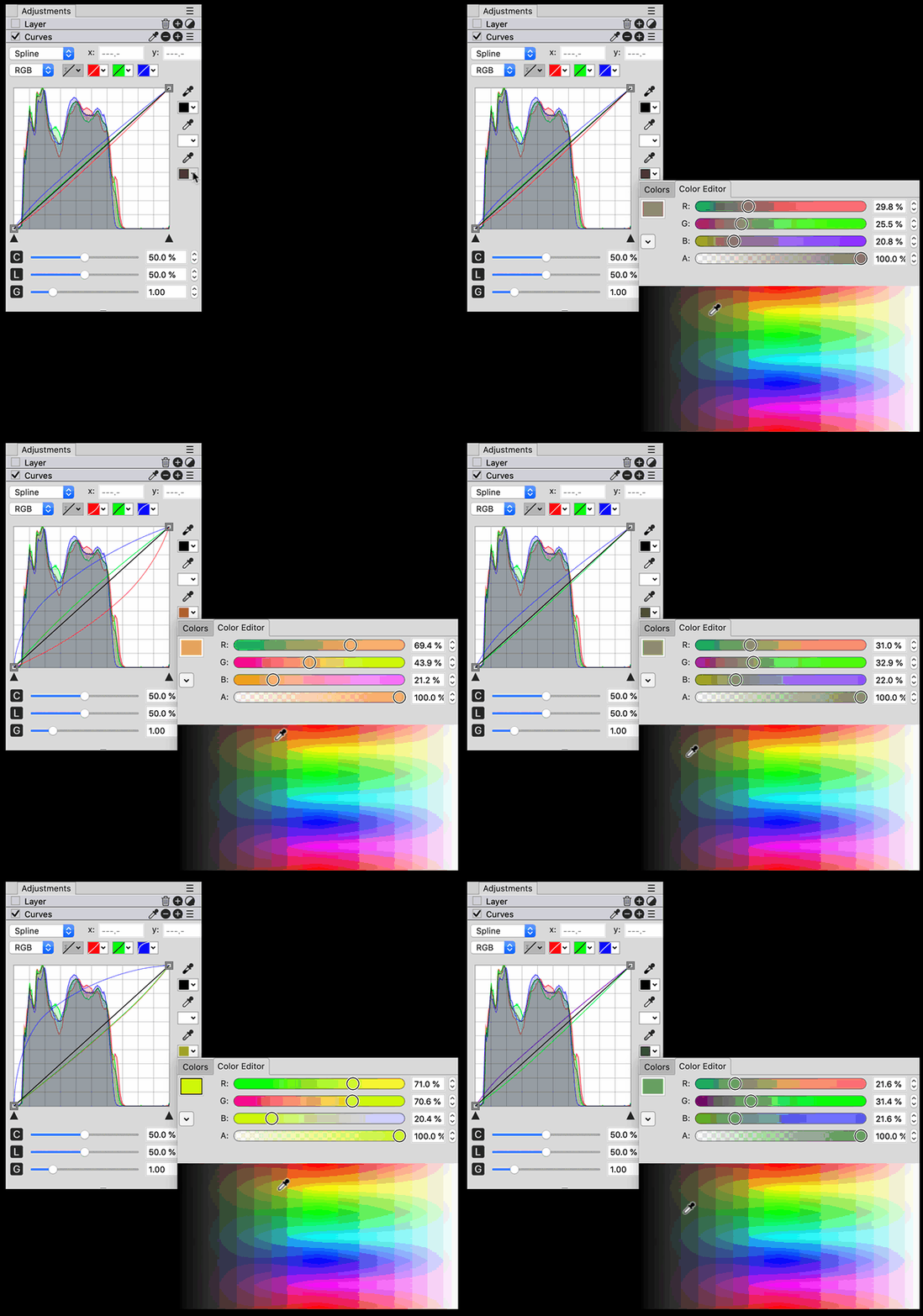
I purpose to automate somehow points creation in Curves, so just add special "Neutralizer Picker", click to patches 1,2,3,4,5 .... one by one, and so every patch automatically became adjusted.

Currently it could be done only in 100% manual and not to precise way:
Add color picker samples to each patch to monitor RGB values.
Add Curves and click to each patch to add points to the curve.
Repeat it for each R G B curve.
Move manually each point up/down until R G B color picker samples values in each point became more-less the same.
PhotoLine UI Icons Customization Project: https://www.pl32.com/forum3/viewtopic.php?f=3&t=6302
Benutzeravatar
shijan
Mitglied
Beiträge: 2033
Registriert: Mo 23 Dez 2019 15:21
Wohnort: Ukraine

Re: Tool request - auto correction based on grayscale chart patches

Beitrag von shijan »

Guess in simplest possible way without UI changes, it could be some key modifier for Grey Picker in Curves. So at each new click it could add and auto adjust new set of R G B points to already existing points.
UPD. Probably not too logical idea because 1 picker keeps 1 color. So we really need multiple Pickers.
Bild
Zuletzt geändert von shijan am So 10 Dez 2023 02:20, insgesamt 1-mal geändert.
PhotoLine UI Icons Customization Project: https://www.pl32.com/forum3/viewtopic.php?f=3&t=6302
Benutzeravatar
shijan
Mitglied
Beiträge: 2033
Registriert: Mo 23 Dez 2019 15:21
Wohnort: Ukraine

Re: Tool request - auto correction based on grayscale chart patches

Beitrag von shijan »

So currently in Curves Adjustment Alt+Click on image creates points in each of R G B channel curve. Not sure if it was old option that i missed earlier or new one. Anyway this is great, but vertical (y) values still should be entered (copy/pasted) manually for each point.

:arrow: So here is another logical request:
Is it possible to add additional key modifier to automatically align R G B points vertically to value of currently selected curve channel tab?
For example:
If switch to All channels curve and Alt+Shift+Click on image - R G B points align vertically to Lightness curve point.
If switch to Green channel curve and Alt+Shift+Click on image - R B curves points align vertically to G curve point.

I guess something similar was requested long time ago in 2015 by user Tida here viewtopic.php?p=45142#p45142 and explained here https://www.youtube.com/watch?v=-KroIm6P7Jc
PhotoLine UI Icons Customization Project: https://www.pl32.com/forum3/viewtopic.php?f=3&t=6302
pixel8tor
Mitglied
Beiträge: 72
Registriert: Di 24 Jul 2018 17:15

Re: Tool request - auto correction based on grayscale chart patches

Beitrag von pixel8tor »

Your new idea would also be a great tool for establishing a grey axis for a photo. Quite often shadows and highlights need to be balanced the differently. Currently I have to open the curves dialog twice. Once for the highlights and then again for the shadows. Being able to set multiple AutoGrey adjustment points on the curve would be fantastic. It's something I've often wondered why I've never seen it in any image editor. Seems it souldn't be too difficult to program - maybe Photoline can be the first. But I'm sure the Huber's ToDo list is already endless. Anyway this idea gets my thumbs up!
:D
Benutzeravatar
shijan
Mitglied
Beiträge: 2033
Registriert: Mo 23 Dez 2019 15:21
Wohnort: Ukraine

Re: Tool request - auto correction based on grayscale chart patches

Beitrag von shijan »

Ok, another idea. Maybe just add 2 additional pickers to Curves side bar? In most cases 3 points is enough. Something like this:
Bild
PhotoLine UI Icons Customization Project: https://www.pl32.com/forum3/viewtopic.php?f=3&t=6302
Benutzeravatar
shijan
Mitglied
Beiträge: 2033
Registriert: Mo 23 Dez 2019 15:21
Wohnort: Ukraine

Re: Tool request - auto correction based on grayscale chart patches

Beitrag von shijan »

Or what remove Black and White pickers from UI (use hotkeys instead)? I personally never used those Black and White pickers in Curves (I use Levels instead). This will allow to have 4 useful gray pickers without any changes in UI size.
P.S. It is also could be useful to unify somehow hotkeys in Levels and Curves, but this needs some research...
Bild
PhotoLine UI Icons Customization Project: https://www.pl32.com/forum3/viewtopic.php?f=3&t=6302
Benutzeravatar
shijan
Mitglied
Beiträge: 2033
Registriert: Mo 23 Dez 2019 15:21
Wohnort: Ukraine

Re: Tool request - auto correction based on grayscale chart patches

Beitrag von shijan »

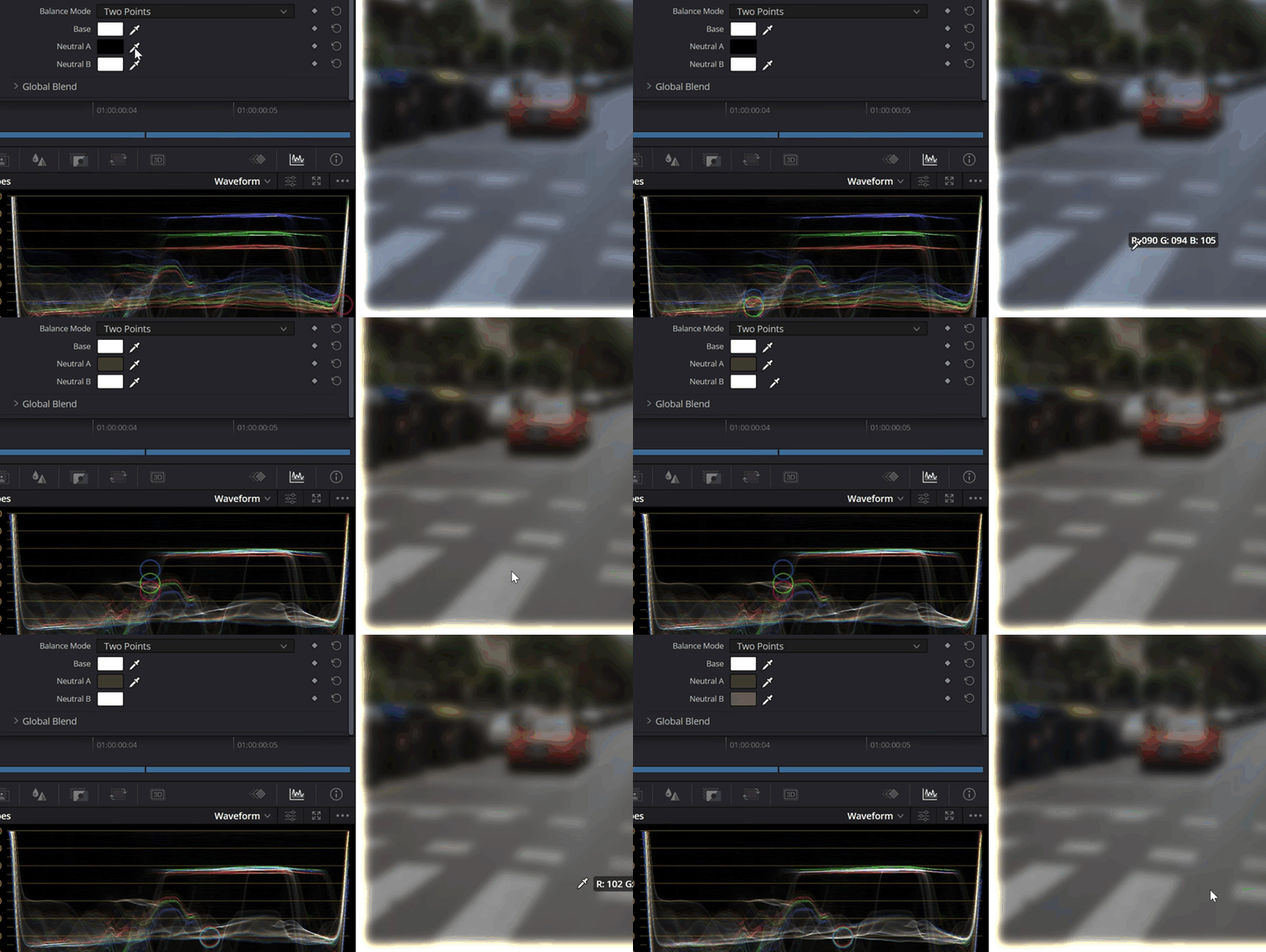
Any progress on this?
Some new free film negative processing plugins for Davinci Resolve have similar linearization option and even allow to select custom amount of eyedroppers https://github.com/helios1138/filmeon but same workflow in PhotoLine is still simpler and faster.
Bild
Zuletzt geändert von shijan am Mo 06 Apr 2026 23:44, insgesamt 1-mal geändert.
PhotoLine UI Icons Customization Project: https://www.pl32.com/forum3/viewtopic.php?f=3&t=6302
Benutzeravatar
shijan
Mitglied
Beiträge: 2033
Registriert: Mo 23 Dez 2019 15:21
Wohnort: Ukraine

Re: Tool request - auto correction based on grayscale chart patches

Beitrag von shijan »

Also to save more screen space for curves area, it is more logical to arrange eyedroppers like this:
v2.jpg
or like this:
v1.jpg
Du hast keine ausreichende Berechtigung, um die Dateianhänge dieses Beitrags anzusehen.
PhotoLine UI Icons Customization Project: https://www.pl32.com/forum3/viewtopic.php?f=3&t=6302
Benutzeravatar
shijan
Mitglied
Beiträge: 2033
Registriert: Mo 23 Dez 2019 15:21
Wohnort: Ukraine

Re: Tool request - auto correction based on grayscale chart patches

Beitrag von shijan »

Or if make a toggle that allow to hide Contrast/Luminance/Gamma sliders, it will be possible to fit up to 4 grey eyedroppers without changes in UI and also extend usable curves chart area.
The only problem here is 4 eyedroppers is not enough sometimes. I really prefer to have at least 5-7 eyedroppers.
curve eyedroppersv2.jpg
Du hast keine ausreichende Berechtigung, um die Dateianhänge dieses Beitrags anzusehen.
PhotoLine UI Icons Customization Project: https://www.pl32.com/forum3/viewtopic.php?f=3&t=6302
Benutzeravatar
shijan
Mitglied
Beiträge: 2033
Registriert: Mo 23 Dez 2019 15:21
Wohnort: Ukraine

Re: Tool request - auto correction based on grayscale chart patches

Beitrag von shijan »

From some point of view, it could be better to have dedicated separate neutralizer (or linearizer) adjustment with unlimited amount of manually added eyedroppers.
curve eyedroppers4.jpg
Du hast keine ausreichende Berechtigung, um die Dateianhänge dieses Beitrags anzusehen.
Zuletzt geändert von shijan am Do 23 Apr 2026 01:56, insgesamt 1-mal geändert.
PhotoLine UI Icons Customization Project: https://www.pl32.com/forum3/viewtopic.php?f=3&t=6302
Benutzeravatar
shijan
Mitglied
Beiträge: 2033
Registriert: Mo 23 Dez 2019 15:21
Wohnort: Ukraine

Re: Tool request - auto correction based on grayscale chart patches

Beitrag von shijan »

One more possible idea for this linearization adjustment: Instead of fixed curves-based correction points, it could instantly read color from each sample marker point and change correction interactively even when you move markers on the image. In this case it probably should use its own special color samples markers instead of Color position tool markers.
Or it could be another logic. It could read normal color position markers data and simply have an option to assign correction to selected color position markers from the list.
To improve performance, this interactive setting probably should have on/off toggle.
PhotoLine UI Icons Customization Project: https://www.pl32.com/forum3/viewtopic.php?f=3&t=6302
Benutzeravatar
shijan
Mitglied
Beiträge: 2033
Registriert: Mo 23 Dez 2019 15:21
Wohnort: Ukraine

Re: Tool request - auto correction based on grayscale chart patches

Beitrag von shijan »

Guess it is rather realistic idea because Curves eyedropper already can read and correct color in realtime. So it just needs few additional eyedroppers in Curves UI, or some setting to read multiple colors directly from selected Color Samples.
Bild
PhotoLine UI Icons Customization Project: https://www.pl32.com/forum3/viewtopic.php?f=3&t=6302
Vivi_Ram
Mitglied
Beiträge: 421
Registriert: Sa 28 Sep 2024 17:04

Re: Tool request - auto correction based on grayscale chart patches

Beitrag von Vivi_Ram »

This is super cool. Never knew it existed.