[Idea]: Boolean Mode for Vectors

Hier diskutieren die Betatester von PhotoLine untereinander und mit den Entwicklern
Vivi_Ram
Mitglied
Beiträge: 488
Registriert: Sa 28 Sep 2024 15:04

[Idea]: Boolean Mode for Vectors

Beitrag von Vivi_Ram »

Bild

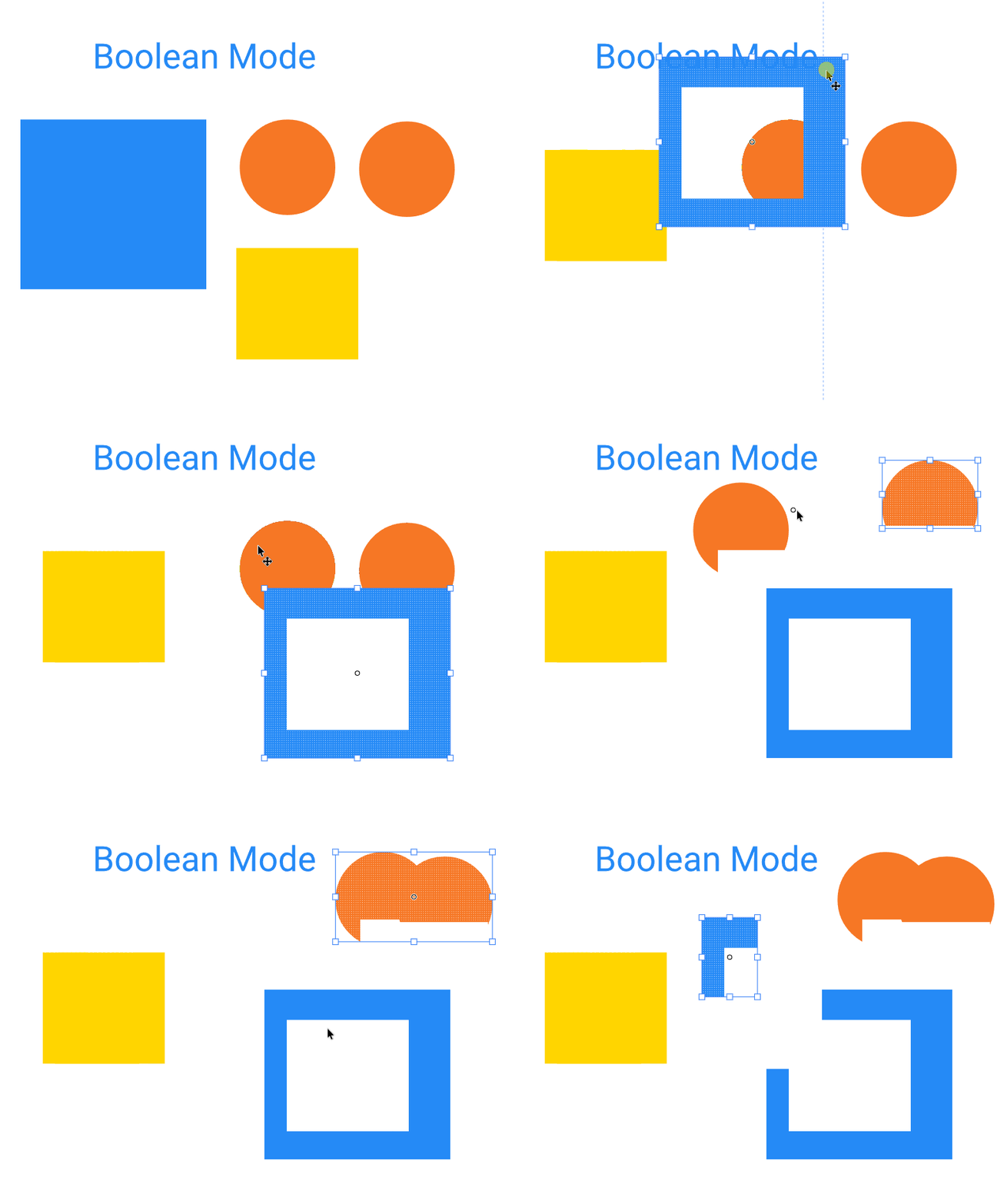
I recently saw a beta for an extraordinarily simple and intuitive way of using boolean logic. You toggle on Boolean mode and simply start sculpting with Vector shapes and marquee selections. It is so so effective! It would be great to have it. And it is simple to understand. Same colours merge, different colours cut, marquees cut. You can also use vector lassos to cut. That's it. This could be a very effective and simple alternative for the fact that PL does not have a shape builder tool.
Ashcraaft
Mitglied
Beiträge: 493
Registriert: Fr 26 Nov 2010 08:39
Wohnort: Kempen

Re: [Idea]: Boolean Mode for Vectors

Beitrag von Ashcraaft »

Plus 1+
Bitte besuche & teile PhotoLine auf folgenden Seiten:
PhotoLine bei Facebook | YouTube

Danke, Sascha Ballweg
(Photoline-Nutzung: Mac OS-X & Windows 10)
Benutzeravatar
shijan
Mitglied
Beiträge: 2107
Registriert: Mo 23 Dez 2019 13:21
Wohnort: Ukraine

Re: [Idea]: Boolean Mode for Vectors

Beitrag von shijan »

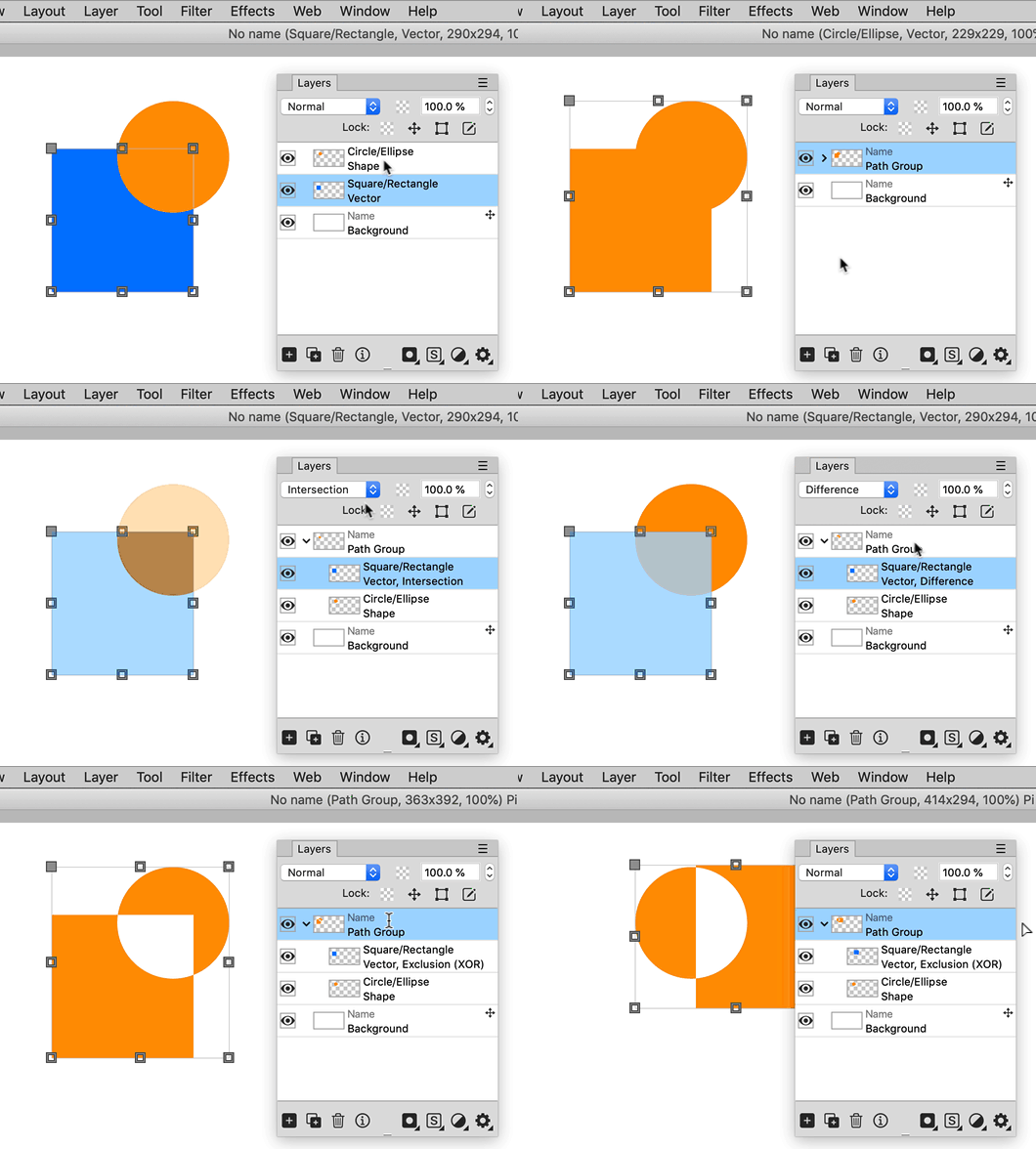
But PhotoLine already have some nice non destructive vector boolean tools:
Bild
Zuletzt geändert von shijan am Mo 19 Okt 2026 12:18, insgesamt 1-mal geändert.
PhotoLine UI Icons Customization Project: https://www.pl32.com/forum3/viewtopic.php?f=3&t=6302
Benutzeravatar
shijan
Mitglied
Beiträge: 2107
Registriert: Mo 23 Dez 2019 13:21
Wohnort: Ukraine

Re: [Idea]: Boolean Mode for Vectors

Beitrag von shijan »

I only could wish that Cut mode worked like this (keep all vector parts):
INoVXye.jpg
Du hast keine ausreichende Berechtigung, um die Dateianhänge dieses Beitrags anzusehen.
PhotoLine UI Icons Customization Project: https://www.pl32.com/forum3/viewtopic.php?f=3&t=6302
Vivi_Ram
Mitglied
Beiträge: 488
Registriert: Sa 28 Sep 2024 15:04

Re: [Idea]: Boolean Mode for Vectors

Beitrag von Vivi_Ram »

That's a traditional boolean operation. That's not it. This is a continuous way of operating without clicking anything. Like Sculpting. It is like Shape Builder in vector software, except that this is far more intuitive. By going into Boolean Mode, you can essentially do boolean operations without any menu or further clicks. Just overlay shapes and keep cutting it.
Zuletzt geändert von Vivi_Ram am Mo 19 Okt 2026 12:21, insgesamt 1-mal geändert.
Benutzeravatar
shijan
Mitglied
Beiträge: 2107
Registriert: Mo 23 Dez 2019 13:21
Wohnort: Ukraine

Re: [Idea]: Boolean Mode for Vectors

Beitrag von shijan »

Is it for vector or for raster objects? It looks like destructive one way sculpting. Looks interesting but may be not too practical.
PhotoLine UI Icons Customization Project: https://www.pl32.com/forum3/viewtopic.php?f=3&t=6302
Vivi_Ram
Mitglied
Beiträge: 488
Registriert: Sa 28 Sep 2024 15:04

Re: [Idea]: Boolean Mode for Vectors

Beitrag von Vivi_Ram »

shijan hat geschrieben: Mo 19 Okt 2026 12:21 Is it for vector or for raster objects? It looks like destructive one way sculpting. Looks interesting but may be not too practical.
This is purely for vectors. And yes, it is destructive in beta. We can turn it into a non destructive mode optionally as layers merge in the layers panel.
Benutzeravatar
shijan
Mitglied
Beiträge: 2107
Registriert: Mo 23 Dez 2019 13:21
Wohnort: Ukraine

Re: [Idea]: Boolean Mode for Vectors

Beitrag von shijan »

What could be simpler and prettier than put multiple vectors inside special boolean (path group) and non destructively mix their interception setting there?
Screen Shot 2026-10-19 at 3.23.00 PM.jpg
Du hast keine ausreichende Berechtigung, um die Dateianhänge dieses Beitrags anzusehen.
PhotoLine UI Icons Customization Project: https://www.pl32.com/forum3/viewtopic.php?f=3&t=6302
Vivi_Ram
Mitglied
Beiträge: 488
Registriert: Sa 28 Sep 2024 15:04

Re: [Idea]: Boolean Mode for Vectors

Beitrag von Vivi_Ram »

Again, that's a layer operation. The boolean mode is direct canvas operation. That's the difference. Also, deciding boolean operation based on colours is very intuitive.

Also, boolean operation has no place for marquees and lassos. boolean mode does.
Vivi_Ram
Mitglied
Beiträge: 488
Registriert: Sa 28 Sep 2024 15:04

Re: [Idea]: Boolean Mode for Vectors

Beitrag von Vivi_Ram »

If others want to try it, it is found here: https://vectoria.design/demo - You just draw shapes and play with it. Super fun! Notice also that it has a pin wrap which would quite great to have - even for raster images. That pin wrap is called bone [something] in Affinity, and allows you to move the limbs of subject without distorting the rest of the image.
Benutzeravatar
shijan
Mitglied
Beiträge: 2107
Registriert: Mo 23 Dez 2019 13:21
Wohnort: Ukraine

Re: [Idea]: Boolean Mode for Vectors

Beitrag von shijan »

I just can't imagine what is the practical real life sense of this.
Why use marquees and lassos which are temporary tools which can't be saved and disappear once you click outside them, when you simply could use any vector object shape which will remain visible as layer until you delete it manually?
But yes, it is super fun. Maybe more useful like for abstract vector painting...
Zuletzt geändert von shijan am Mo 19 Okt 2026 13:00, insgesamt 1-mal geändert.
PhotoLine UI Icons Customization Project: https://www.pl32.com/forum3/viewtopic.php?f=3&t=6302
Vivi_Ram
Mitglied
Beiträge: 488
Registriert: Sa 28 Sep 2024 15:04

Re: [Idea]: Boolean Mode for Vectors

Beitrag von Vivi_Ram »

shijan hat geschrieben: Mo 19 Okt 2026 12:55 I just can't imagine what is the practical real life sense of this.
Why use marquees and lassos which are temporary tools which can't be saved and disappear once you click outside them, when you simply could use any vector object shape which will remain visible as layer until you delete it manually?
It is useful when you want to work rapidly and just get your idea on paper. When you don't want to go back and forth between drop downs and layers panels. Almost all other Vector software has some version of this. In Irritator, Inkscape and Affinity, you have Shape Builder - which is non-destructive. Ideally, PL could implement this. But I reckon it might involve effort. Boolean mode is essentially a simplified, on-screen, direct manipulation version of Shape Builder. That's the usefulness of it. Marquees and lassos allow you to cut out portions of the vector without creating vector objects that you then have to clean up afterwards - like you would in Shape Builder. So it is actually far more efficient. Ideally, it would be possible to do with freehand lasso when you can simply use the pen and cut out shapes. In other programs, you have the vector eraser, which allows you to do this, too. So the boolean mode replaces two different types of tools - Shape Builder and Vector Eraser. And the reason I recommend it is because PL does not need to introduce any new tool. It already has the logic built in.

Finally, boolean operations are sequential. That is, you cannot perform a merge, a cut and fragment all at the same time. In boolean mode, you can. Simply drop the shape on top of each other, drag a lasso within those shapes or over those shapes, and done! Finally, you can use boolean mode on both outlines, filled shapes, or mix of two without the outlines getting filled in. You can use the lasso to cut out specific portions of an outline. Impossible in boolean logic alone.